Indicateur cassure moyennes mobiles

Viewing 8 posts - 1 through 8 (of 8 total)

  • Author
    Posts
  • #134063 quote
    GilInvest
    Participant
    Average

    Bonjour, suite aux videos de formation, je suis en train de créer mon premier indicateur, qui me paraissait simple. Objectif : Identifier quand une bougie casse à la fois la EMA7 et la EMA20 en cloture (Appelé “Break”) > afficher sous cette bougie une fleche verte pointant vers le haut pour un break haussier et au dessus de cette bougie, une fleche rouge pointant vers le bas pour un break baissier > En même temps, dans un encadré sous graphique, afficher un histogramme vert (valeur +1) quand il y a un break haussier et un histogramme rouge (valeur -1) quand il y a un break baissier.

    Mon code est indiqué ci-apres mais ca ne veut pas fonctionner. En particulier la dernière ligne. Qqn peut il m’aider à comprendre pourquoi

    atr10=averagetruerange[10]
    
    once histoup = 0
    once histodown = 0
    
    If close[0]>ExponentialAverage[7] and close[0]>ExponentialAverage[20]  then
    
    DRAWARROWUP(barindex[0],low-atr10/2)coloured(0,200,0)
    
    endif
    
    if close[0]<ExponentialAverage[7] and close[0]<ExponentialAverage[20] then
    
    DRAWARROWdown(barindex[0],high+atr10/2)coloured(200,0,0)
    
    endif
    
    if close[0]<ExponentialAverage[7] and close[0]<ExponentialAverage[20] then 
    
    return histoup coloured(120,210,120) style(histogram), histodown coloured(210,120,120) style(histogram)
    
    #134091 quote
    RicLg
    Participant
    Senior

    [attachment file=”134092″]

    Bonsoir,

    atr10=averagetruerange[10]
     
    once histoup = 0
    once histodown = 0
     
    If close[0]>ExponentialAverage[7] and close[0]>ExponentialAverage[20]  then
    DRAWARROWUP(barindex[0],low-atr10/2)coloured(0,200,0)
    histoup=1
    else
    histoup=0
    endif
     
    if close[0]<ExponentialAverage[7] and close[0]<ExponentialAverage[20] then
    DRAWARROWdown(barindex[0],high+atr10/2)coloured(200,0,0)
    histodown=1
    else
    histodown=0
    endif
     
    return histoup coloured(120,210,120) style(histogram), histodown coloured(210,120,120) style(histogram)
    GilInvest thanked this post
    Break-EMA7_20.itf 05_Prc_Insertion-Code.png 05_Prc_Insertion-Code.png
    #134110 quote
    GilInvest
    Participant
    Average

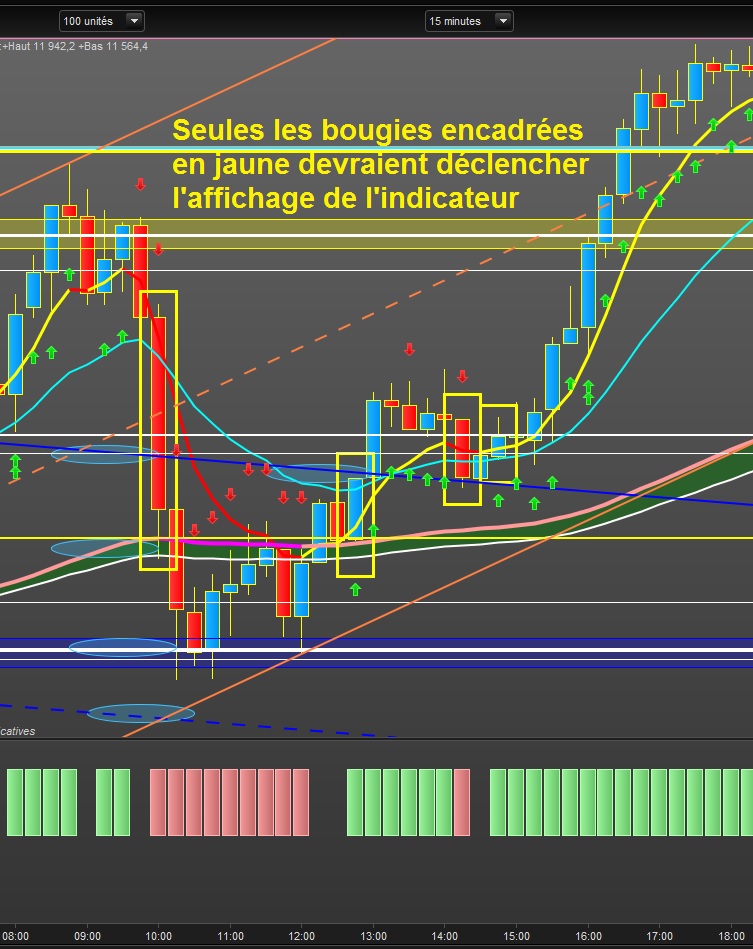
    Ouh la merci mais je réalise que le rendu de mon code est à côté de la plaque. J’ai aussi mal formulé le descriptif ci-dessus. En fait il faut que la bougie qui déclenche l’indicateur soit à cheval sur la EMA7 et la EMA20, qu’elle casse les deux EMA en fait pour constituer un break ou ou un break down. Bon je vais revoir mon code et le re-soumets aux experts. Merci encore

    #134113 quote
    GilInvest
    Participant
    Average

    Seules les bougies encadrées en jaune sur la copie d’ecran ci-jointe doivent déclencher l’affichage de l’indicateur. Je revois mon code et vous reviens. Bonne soirée

    Indic-break-ema7_20-200602.jpg Indic-break-ema7_20-200602.jpg
    #134139 quote
    Shark
    Participant
    Senior

    Je suis pas un expert en programmation donc à confirmer en regardant sur le graphe mais il me semble qu’il te suffit de rajouter en condition un low/high au-dessus ou en-dessous des MM.

    atr10=averagetruerange[10]
     
    once histoup = 0
    once histodown = 0
    
    c1= low[0]<ExponentialAverage[20] AND low[0]<ExponentialAverage[7] AND high[0]>ExponentialAverage[20]  AND high[0]>ExponentialAverage[7] AND open[0]<close[0]
    
    c2= low[0]<ExponentialAverage[20] AND low[0]<ExponentialAverage[7] AND high[0]>ExponentialAverage[20] AND high[0]>ExponentialAverage[7] AND open[0]>close[0] 
    
    If close[0]>ExponentialAverage[7] and close[0]>ExponentialAverage[20] and c1 then
    DRAWARROWUP(barindex[0],low-atr10/2)coloured(0,200,0)
    histoup=1
    else
    histoup=0
    endif
     
    if close[0]<ExponentialAverage[7] and close[0]<ExponentialAverage[20] and c2 then
    DRAWARROWdown(barindex[0],high+atr10/2)coloured(200,0,0)
    histodown=1
    else
    histodown=0
    endif
     
    return histoup coloured(120,210,120) style(histogram), histodown coloured(210,120,120) style(histogram)
    GilInvest thanked this post
    #134142 quote
    GilInvest
    Participant
    Average

    Oui merci. C’est ce que je me suis dit hier soir et donné comme exercice  pour aujourd’hui. Je vais tenter de faire le code seul et vérifier avec le tien. Bonne journée

    Shark thanked this post
    #134145 quote
    GilInvest
    Participant
    Average

    Ca marche !! et j’aboutis au même code. J’ai simplement donné une valeur de -1 à histodown de sorte à ce que sur l’indicateur sous graphique, j’ai des histogrammes verte au dessus d’une ligne “0” et des histogrammes rouges sous la ligne “0”. Deux questions : 1/ comment obtenez/définissez vous les valeurs des différentes couleurs que vous souhaitez donner à vos flèches, histogrammes, etc ? 2/Comment insérer le tarcé d’une ligne “0” directement dans le code ? Merci et bonne journée

    #134148 quote
    JC_Bywan
    Moderator
    Master

    Bonjour,

    1) RGB (red green blue), échantillons: https://www.prorealcode.com/documentation/coloured/

    ou autre liste donnée par Nicolas aussi: http://cloford.com/resources/colours/500col.htm

    2) return 0 as “0”

    GilInvest thanked this post
Viewing 8 posts - 1 through 8 (of 8 total)

  • You must be logged in to reply to this topic.

Indicateur cassure moyennes mobiles


ProBuilder : Indicateurs & Outils Personnalisés

New Reply
Author
author-avatar
GilInvest @gilinvest Participant
Summary

This topic contains 7 replies,
has 4 voices, and was last updated by JC_Bywan

5 years, 10 months ago.

Topic Details
Forum: ProBuilder : Indicateurs & Outils Personnalisés
Language: French
Started: 06/01/2020
Status: Active
Attachments: 3 files
Logo Logo
Loading...