Incorrect value function 'close'

Viewing 12 posts - 1 through 12 (of 12 total)
  • Author
    Posts
  • #64461 quote
    davide
    Participant
    New

    Hello,

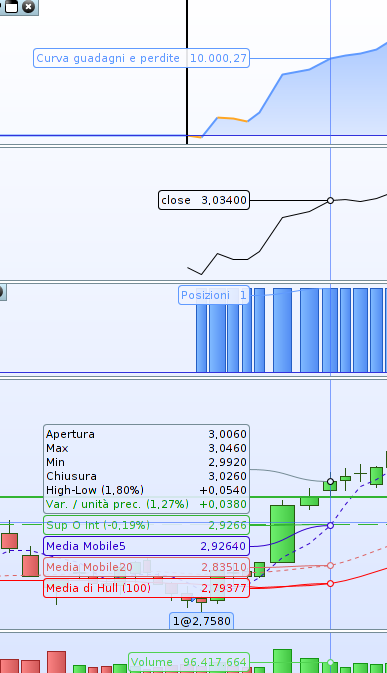
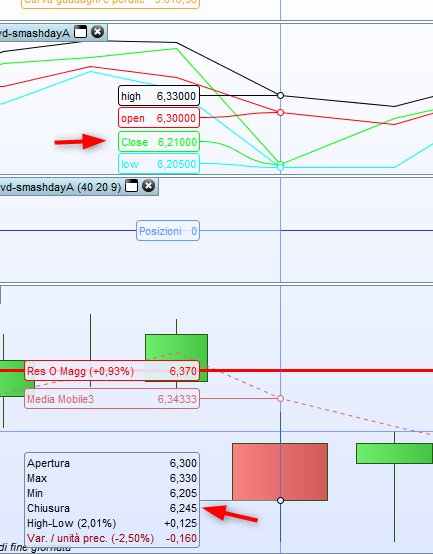
    i’ve noted a strange behaviour with the function ‘close’ in proorder. The version of prorealtime that i use is the free version with the values of the end of the day. In the image i’ve attached i have drawed with the function ‘graph’, the values of the high, low, open and close of the bar. All values, as anyone can view, are correct except the ‘close’. Why? (so sorry for my poor english).

    Thanks

    #64462 quote
    davide
    Participant
    New

    the image

    close.png close.png
    #64465 quote
    Nicolas
    Keymaster
    Master

    Topic moved in English ProOrder forum.

    Please share your code in order to replicate the problem.

    #64470 quote
    davide
    Participant
    New

    Hi, thanks for the reply.

    My code is pretty simple. As you can view in the image i simply wrote “graph close, graph open, graph high, graph low” at the end of my code, just for debug and what you see is that the value ‘close’ is not equal to the value close of the bar.

    #64472 quote
    davide
    Participant
    New
    defparam CUMULATEORDERS = FALSE
    
    setup = close > close[1]
    
    if setup then
    buy 1 shares at market
    endif
    set stop %loss 2
    
    graph close

    just for clarity, this is an example and in the image there is my problem.

    screenshot-area-2018-03-05-173922.png screenshot-area-2018-03-05-173922.png
    #64586 quote
    davide
    Participant
    New

    Sorry but there’s anyone who can put my simple code in his proorder and verify the difference between the ‘graph close’ and the close on the bar?
    thanks in advance

    #64591 quote
    robertogozzi
    Moderator
    Master

    I just tested your code and it reflects your pic, the two values don’t match!

    I can’t figure out why, though.

    You’d better ask PRT.

    davide thanked this post
    #64593 quote
    davide
    Participant
    New

    Thank you 🙂

    So you confirm that the use of function ‘close’ in the code may can lead to incorrect results? 🙁

    #64655 quote
    davide
    Participant
    New

    Sorry Roberto, what does it mean “You’d better ask PRT”?

    Don’t you think that all that you create with the proorder module, it is likely to be wrong if you use the ‘close’ function? At this point I do not know what to do anymore 🙁

    #64656 quote
    robertogozzi
    Moderator
    Master

    I don’t know why CLOSE returns those incorrect values. That’s why I suggest to address a note to PRT customer service, I can’t be of any help.

    Maybe the inner computatgions are done correctly and just the output is wrong, but I am still speculating!

    davide thanked this post
    #64689 quote
    Nicolas
    Keymaster
    Master

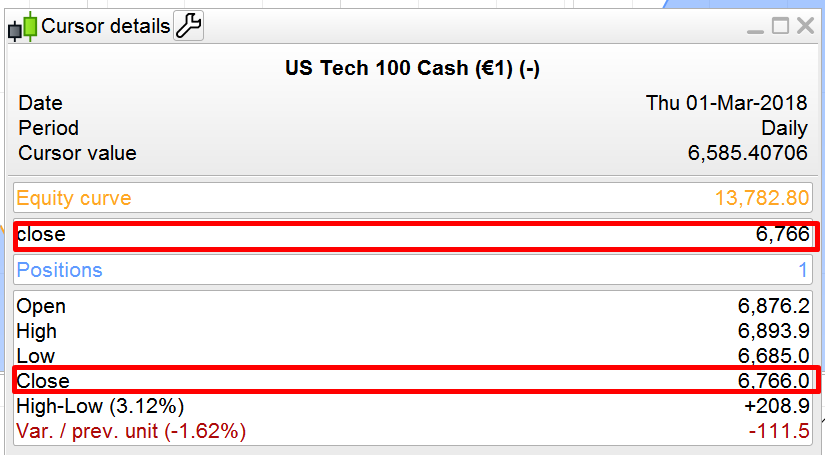
    What instrument and timeframe please? Because I can’t replicate, results match for me with your code example (picture attached).

    proorder-close-matching.png proorder-close-matching.png
    #64722 quote
    davide
    Participant
    New

    I use the free version at the moment so with the values at day’s end. The timeframe is the daily and i have tested with the italian shares. The ‘close’ only return incorrect values, not the ‘open’, ‘high’ or ‘low’.
    I’ve just tested the same code with one DAX’s share (adidas) and the values are instead correct.

Viewing 12 posts - 1 through 12 (of 12 total)

  • You must be logged in to reply to this topic.

Incorrect value function 'close'


ProOrder: Automated Strategies & Backtesting

New Reply
Author
author-avatar
davide @davide Participant
Summary

This topic contains 11 replies,
has 3 voices, and was last updated by davide

8 years ago.

Topic Details
Forum: ProOrder: Automated Strategies & Backtesting
Language: English
Started: 03/05/2018
Status: Active
Attachments: 3 files
Logo Logo
Loading...