I am using the EOD version to test my strategy from Amibroker.
Is it possible to create a specific import list of stocks – i did search the “Import” button in the List section but there is no documentation (that i could find) to describe the format of the txt file.
Unfortunately you can’t import data.
Hi Rob
Thanks for the reply – perhaps i didnt make it clear – i wanted to create a list with my own stock symbols (from a text file) rather than import stock prices
Have a merry xmas
You can’t access any kind of peripheral (mouse, keyboard, printer, disk, etc…).
Hi
Thanks for your response – not sure where you got the idea i wanted to access any peripheral devices. I’ll take a look at the documentation.
Similar query previously
creating a new list with import
There doesnt seem to be any documentation around this functionality
not sure where you got the idea i wanted to access any peripheral devices
Whatever data you need, be it texts, numbers, files, spreadsheets, etc… need to be stored somewhere in a peripheral device, either local or elsewhere (cloud, etc…).
The PRT platform doesn’t support accessing any kind of peripherals (other than a folder of your choice to import/export ITF files), thus you can’t get any data from any source other than that provided by ProRealTime itself.
WimParticipant
Junior
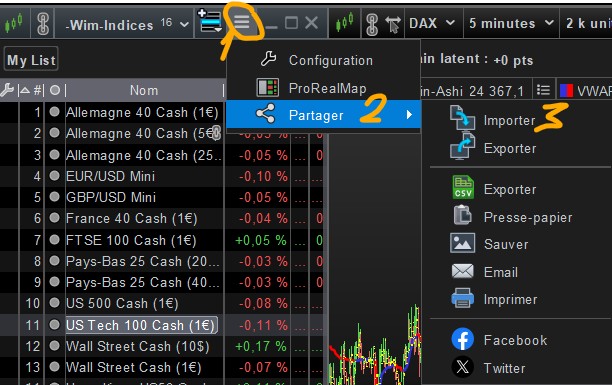
Of course you can import instrument lists, as well as exporting them. When exporting you can choose between ITF or CSV format. When importing you have the choice between ITF, CSV, TXT and maybe some more. On your LIST-window look for the sharing option, that’s when different export and import options are presented. The screen capture shows how it looks with my small LIST-window (in French version). I added a small CSV file which I used successfully for importing a list of instruments.
Ah thank you Wim, I was looking for the csv and the file formatting required (I assume for stocks i would put the LSE stock code (e.g. LLOY • LSE)) ?
WimParticipant
Junior
My example was with the exact naming by IG. But there is some intelligence built in the import function. If your name is close, PRT will search for the most likely instrument. Just experiment a little with this function. Your filename will be the name of the list. If you don’t like the result, modify it or delete it all the same and on to the next try.
Im testing out with IG Index as well 🙂
Thanks for your help