Hello all,
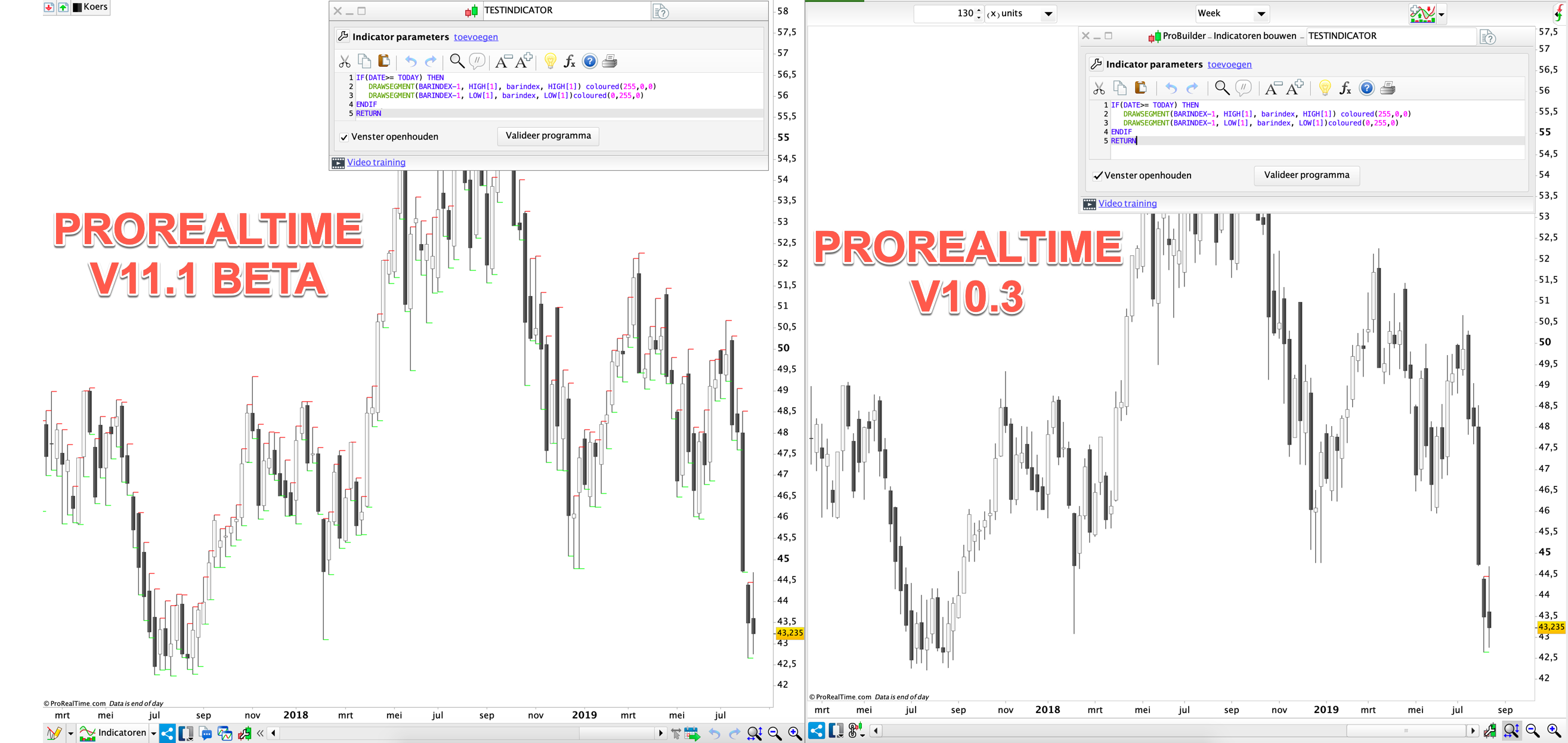
In prorealtime V10 I used the code “IF (DATE>=TODAY) THEN …” to identify the last bar on a daily chart (end of day data) (see screenshot in attachment).
In prorealtime V11 the code snippet “IF (DATE>=TODAY) THEN …” does not work anymore as you can see on the screenshot in
attachment. This is because the definition of “TODAY” changed in V11 compared to V10. Hence the same code produces a different result in V10 vs V11.
Does someone have a suggestion on how it is possible to determine the last bar on the chart in prorealtime V11 ?
I haven’t test it, but do you have live feed (not EOD data) for that particular instrument in your PRT v11?
Hello Nicolas,
I do not have live feed for that instrument, but the issue applies to all instruments.
I contacted a few weeks ago prorealtime support and they let me know that in v10.3 “Today” was considered as the date of the actual moment, while in V11 the definition of “Today” changed to the date of the “tested bar”.
They considered the definition of “Today” in v10.3 as a bug, because other time functions all applied to the “tested bar” and not to “the actual moment”. Hence the definition of “Today” was changed in V11 to make it consistent with other time constant definitions.
Unfortunately, using the old “Today” function was the only way, i was able to identify the last bar on my eof daily charts … do you have any suggestion on how it is possible to determine the last bar on the chart in prorealtime V11 ?
I think they should add another keyword to replicate the “bug” so that people relying on that behaviour would just have to replace a keyword.
Still it is very uncommon in the software industry to change the behaviour of instructions, keywords and system constants.
This affects all code written so far, forcing users to modify their existing software.
Usually when a different behaviour is needed a new keyword should be introduced.
I am reading several posts complaining about this.
What if eXcel would modify the behaviour of an existing formula?
Considering the previous behaviour a bug is a very unpleasant way of dealing, especially when not clearly and widely announced, thus leaving customers disappointed.
It seems PRT don’t pay too much attention to customers’ needs.
Hello Roberto,
I actually did what you suggested, I proposed them (end of august) to add another Time Constant Keyword to replicate the old “Today” behaviour. I received the feedback that the message was transferred to the engineers and that they are aware of the problem. The customer service was actually really good, always received a quick reply to my question. However, it is up to the technical people to actually solve the problem (which can not be that difficult 🙂 ). As we are now more than a month further without any change, I was wondering if someone has another suggestion to identify the last bar in V11 🙂
You are right, the TODAY instruction has been changed. I militated in the past to get an instruction that return a boolean result to know if we are on the last bar of the chart, and the TODAY instruction was the only way to simulate it by now.. But it is gone and it’s very annoying for a lot of functions we are all using..
While the changes made are more logical to what we could expect of such function to return, it doesn’t help us anymore to use it as a workaround to limit intensive loop for instance..
I’m about to make a new claim to get our “is the last bar on chart?” instruction!
Thanks Nicolas ! I hope they’ll take action now 🙂 !
Hello Nicolas,
Did you manage to get any feedback from Prorealtime on this subject ?
Yes, I can confirm that a new instruction will be added. It will return a boolean test to know the last bar has updated.
Good news. Thank you for the feedback!
The new instruction is “IsLastBarUpdate“.
 gsl
gslParticipant
New
Hi everybody,
Like some of you, I need to execute some instructions only on the last bar and use “Openday=today” and “Opentime=Currenttime” to identify the last bar in PRT v10.3. I was frustrated by the fact that the codes can’t not be excuted in PRT v11.0 due to the modification of the “Today” instruction. The new instruction “IsLastBarUpdated” doesn’t meet the specific need to identify the last bar.
After many attempts, I have found a solution to identify the last bar with PRT v11.0 as described below. It works for any timeframes M5, M15, H1, H4, etc., but I didn’t test for the timeframe daily, weekly, …. for which some adaptation may be necessary based on the same logic. Two parameters must be indicated: the timeframe of the current chart and the time of the first bar of day (both in minutes). This later is not necessary for M5, M15, H1 because the first bar always starts at 00:00. However, for H4, the first bar may starts at different time depending on the broker’s platform, 00:00 or 01:00 for example.
Hope it helps for those who need.
// Indicate the timeframe of the current chart, in minutes
TFMinutes=15

//Indicate the starting time of the first bar, in minutes
If TFMinutes=240 Then
FirstBarStartMinutes=60 //H4 first bar starts at 01:00 which depends on the broker’s platform
Else
FirstBarStartMinutes=0 //the first bar starts at 00:00 for other timeframes M1, M5, M15, H1
Endif

// Identify the last bar. The following instructions are self-explanory
TodayBarTotalMinutes=CurrentHour*60+CurrentMinute-FirstBarStartMinutes
LastBarTotalMinutes=TodayBarTotalMinutes mod TFMinutes
LastBarSpentHours=floor(LastBarTotalMinutes/60)
LastBarSpentMinutes=CurrentMinute mod TFMinutes
LastBarOpenHour=CurrentHour-LastBarSpentHours
LastBarOpenMinute=CurrentMinute-LastBarSpentMinutes
IsLastBar=(OpenHour=LastBarOpenHour) and (OpenMinute=LastBarOpenMinute)

// The structure involving the last bar
IF IsLastBar THEN
// adding the instructions which will be executed only on last bar
ELSE
// adding the instructions which will be executed for the other cases
ENDIF

RETURN
Always use the ‘Insert PRT Code’ button when putting code in your posts to make it easier for others to read.
Thank you 🙂