ICT- BREAKER + MACRO

Viewing 4 posts - 1 through 4 (of 4 total)
  • Author
    Posts
  • #253074 quote
    danskfilou
    Participant
    Veteran

    Bonjour à tous,

    J’aurai besoin d’un coup de pouce des pros du code.

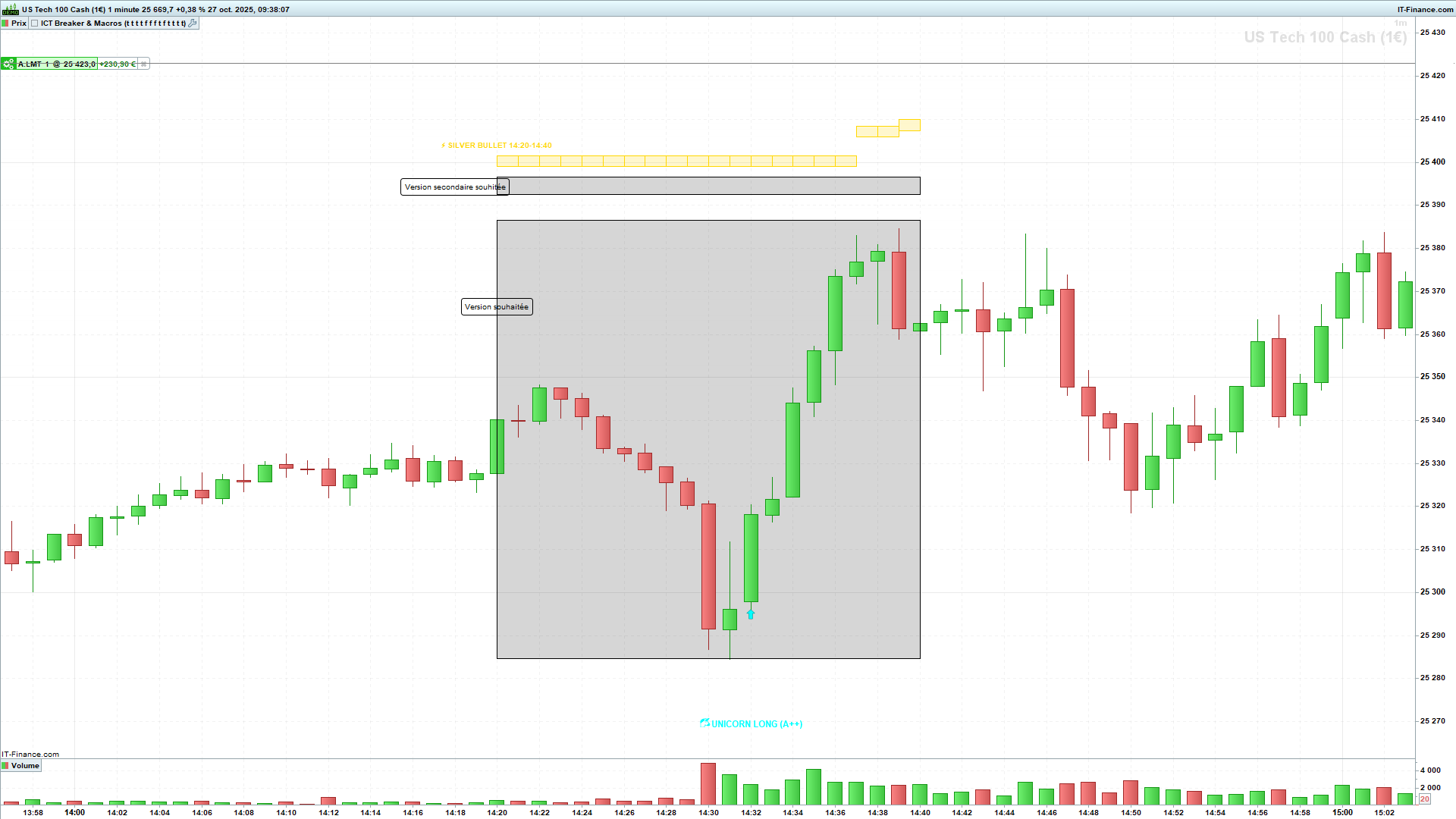
    Je souhaiterais dans l’indicateur ci-joint, que les horaires des macros soient dessinés d’un rectangle à partir de l’ouverture de la bougie jusqu’à la dernière bougie horaire, comme sur le dessin ou si cela n’est pas possible que les rectangles des macros qui se dessinent actuellement ne suivent pas la variation de prix (Version secondaire souhaité).

    Merci.

    ICT-Breaker-Macros.itf NASDAQ-1-minute.png NASDAQ-1-minute.png
    #253094 quote
    Iván González
    Moderator
    Legend

    Bonjour. Vous pouvez utiliser ce code pour voir comment ils sont calculés : https://www.prorealcode.com/prorealtime-indicators/ict-killzones-and-pivots/

    danskfilou and Ugo Blanco thanked this post
    #261052 quote
    Ugo Blanco
    Participant
    Junior

    Bonjour


    j’ais crée se code qui affiche les macros ICT pour indice avec les première FVH macro et la première FVG NY

    pour que sa fonctionne bien il faut être sur Heure de New York.


    // --- ICT Macros + FVG (Version Longueur Doublée + Labels à Droite) ---
    
    // 1. DÉFINITION DES MACROS
    t = time
    
    L1 = (t >= 023300 and t <= 030000)
    L2 = (t >= 040300 and t <= 043000)
    NY1 = (t >= 085000 and t <= 091000)
    NY2 = (t >= 095000 and t <= 101000)
    NY3 = (t >= 105000 and t <= 111000)
    NY4 = (t >= 115000 and t <= 121000)
    NY5 = (t >= 131000 and t <= 134000)
    NY6 = (t >= 151500 and t <= 154500)
    
    ActiveM = L1 or L2 or NY1 or NY2 or NY3 or NY4 or NY5 or NY6
    
    // 2. GESTION DES BOITES MACRO (Décalage +1 / +1)
    if ActiveM then
    if not ActiveM[1] then
    mTop = high
    mBot = low
    mStart = barindex + 1
    foundMacroFVG = 0
         
    if L1 or L2 then
    DRAWTEXT("LONDON", mStart, high + 15*pipsize) COLOURED(100,100,100)
    else
    DRAWTEXT("NY", mStart, high + 15*pipsize) COLOURED(100,100,100)
    endif
    else
    mTop = max(mTop, high)
    mBot = min(mBot, low)
    endif
    DRAWRECTANGLE(mStart, mTop, barindex + 1, mBot) COLOURED(128,128,128,12) BORDERCOLOR(0,0,0,0)
    endif
    
    // 3. DÉTECTION FVG
    fvgUp = (high[2] < low) and (close[1] > open[1])
    fvgDn = (low[2] > high) and (close[1] < open[1])
    
    // A. 1ère FVG NY (DÉCALAGE + LONGUEUR 100)
    once firstNYFound = 0
    if day <> day[1] then
    firstNYFound = 0
    CompteurNY = 0
    endif
    
    if t >= 093000 and t < 100000 then
    CompteurNY = CompteurNY + 1
    endif
    
    if firstNYFound = 0 and CompteurNY >= 3 then
    if fvgUp then
    fvgNYT = low
    fvgNYB = high[2]
    firstNYFound = 1
    // Extension à barindex + 100
    DRAWRECTANGLE(barindex, fvgNYT, barindex + 100, fvgNYB) COLOURED(255,165,0,40) BORDERCOLOR(0,0,0,0)
    DRAWTEXT("FVG NY", barindex + 100, fvgNYT) COLOURED(255,140,0)
    elsif fvgDn then
    fvgNYT = low[2]
    fvgNYB = high
    firstNYFound = 1
    DRAWRECTANGLE(barindex, fvgNYT, barindex + 100, fvgNYB) COLOURED(255,165,0,40) BORDERCOLOR(0,0,0,0)
    DRAWTEXT("FVG NY", barindex + 100, fvgNYT) COLOURED(255,140,0)
    endif
    endif
    
    // B. FVG DANS LES MACROS (DÉCALAGE + LONGUEUR 50)
    if ActiveM and foundMacroFVG = 0 and (barindex - mStart) >= 2 then
    if fvgUp then
    fvgMT = low
    fvgMB = high[2]
    foundMacroFVG = 1
    // Extension à barindex + 50
    DRAWRECTANGLE(barindex, fvgMT, barindex + 50, fvgMB) COLOURED(0,255,255,40) BORDERCOLOR(0,0,0,0)
    DRAWTEXT("FVG Macro", barindex + 50, fvgMT) COLOURED(0,180,180)
    elsif fvgDn then
    fvgMT = low[2]
    fvgMB = high
    foundMacroFVG = 1
    DRAWRECTANGLE(barindex, fvgMT, barindex + 50, fvgMB) COLOURED(255,0,255,40) BORDERCOLOR(0,0,0,0)
    DRAWTEXT("FVG Macro", barindex + 50, fvgMT) COLOURED(180,0,180)
    endif
    endif
    
    RETURN


    Nicolas, Iván González and robertogozzi thanked this post
    #261054 quote
    Nicolas
    Keymaster
    Legend

    Merci pour ce partage Ugo, c’est très sympa de ta part ! 😉

Viewing 4 posts - 1 through 4 (of 4 total)

  • You must be logged in to reply to this topic.

ICT- BREAKER + MACRO


ProBuilder : Indicateurs & Outils Personnalisés

New Reply
Author
author-avatar
danskfilou @danskfilou Participant
Summary

This topic contains 3 replies,
has 4 voices, and was last updated by Nicolas

1 month, 1 week ago.

Topic Details
Forum: ProBuilder : Indicateurs & Outils Personnalisés
Language: French
Started: 10/27/2025
Status: Active
Attachments: 2 files
Logo Logo
Loading...