How to use the optimiser in ProBackTest

Viewing 4 posts - 1 through 4 (of 4 total)

  • Author
    Posts
  • #22731 quote
    Assaf
    Participant
    New

    Hello,

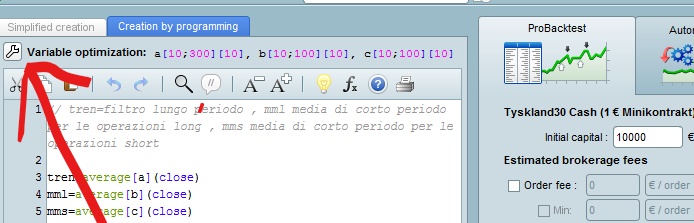
    I tried to backtest a strategy I created. Do you know how can I use the change variables option that enables the optimiser ? (Ont of the videos on Pro real time showed how to use this option, but I cannot see it in V 10.3 from some reason). I just want to test multiple combinations of variables so the optimiser will find me the optimal combination.

    Can I run the backtest on multiple securities ? I could only back test my strategy on one security at a time.

    Thanks a lot !

    Assaf

    #22741 quote
    Joachim Nilsson
    Participant
    Average

    Up in the left corner 🙂

    Nicolas thanked this post
    Skärmbild-40_LI.jpg Skärmbild-40_LI.jpg
    #22798 quote
    Assaf
    Participant
    New

    Thanks for that !

    What about the option of testing of multiple securities ?

    Cheers,

    Assaf

    #22799 quote
    GraHal
    Participant
    Master

    Hi Assaf

    Securities / instruments are backtested one at a time (not multiple).

    You can backtest / optimise  multiple variables at the same time, but it can be very slow. Best method is to use a wide increment (for each variable) and then narrow it down if need be.

    Cheers
    GraHal

Viewing 4 posts - 1 through 4 (of 4 total)

  • You must be logged in to reply to this topic.

ProRealAI ProRealAI New

Stuck on this ProBuilder code?

Describe what this topic is trying to build, in plain English, and ProRealAI writes the ProRealTime™ indicator, screener or system for you.

Available in 7 languages
Try ProRealAI

How to use the optimiser in ProBackTest


ProOrder: Automated Strategies & Backtesting

New Reply
Author
author-avatar
Assaf @assaf Participant
Summary

This topic contains 3 replies,
has 3 voices, and was last updated by GraHal

9 years, 7 months ago.

Topic Details
Forum: ProOrder: Automated Strategies & Backtesting
Language: English
Started: 01/27/2017
Status: Active
Attachments: No files
Logo Logo
Loading...