


How to trade on this?

Viewing 6 posts - 1 through 6 (of 6 total)

  • Author
    Posts
  • #53307 quote
    jebus89
    Participant
    Master

    Im still fairly new and learning to code. So far i have not touched indicators, so im wondering:

    How do you code this: https://www.prorealcode.com/prorealtime-indicators/williams-highs-lows/


    So that it takes trade long and short on every ellipse? (edit: i mean Long on arroup + ellipse and Short on arrowdown + ellipse)


    Big thanks 🙂


    ps: i have tried, i just cant get it to work!

    #53318 quote
    robertogozzi
    Moderator
    Master

    Use the “Insert/edit link” button to make a web reference clicky:https://www.prorealcode.com/prorealtime-indicators/williams-highs-lows/. You can either copy & paste it into your strategy (removing return and all graphical instructions), assigning each event a different value to a variable, or you may change the indicator to return a value according to what it detects, instead of displaying arrows and ellipses, something like this:

    //computation of the radius to draw ellipses
    ReturnValue = 0 (1= ellipse  2=arrowdown  3=arrowup)
    
    radius=average[200](range)/4
     
    //formula to compute short term swing points
    if (high>alto[1]) and not (high<high[1] and low>low[1]) then
     alto=high
     basso=low
     markup=barindex
     markhigh=high
    endif
    if (low<basso[1]) and not (high<high[1] and low>low[1]) then
     alto=high
     basso=low
     markdown=barindex
     marklow=low
    endif
     
    if alto<alto[1] and trend=1 then
     trend=0
     ReturnValue = 2
     drawarrowdown(markup,markhigh)
     mediummarkup=shortmarkup
     shortmarkup=markup
     longmarkhigh=mediummarkhigh
     mediummarkhigh=shortmarkhigh
     shortmarkhigh=markhigh
     //intermediate high swing points
     if longmarkhigh<mediummarkhigh and mediummarkhigh>shortmarkhigh then
      ReturnValue = 1
      DRAWELLIPSE(mediummarkup-1, mediummarkhigh-radius, mediummarkup+1, mediummarkhigh+radius)
     endif
    endif
     
    if basso>basso[1] and trend=0 then
     trend=1
     ReturnValue = 3
     drawarrowup(markdown,marklow)
     mediummarkdown=shortmarkdown
     shortmarkdown=markdown
     longmarklow=mediummarklow
     mediummarklow=shortmarklow
     shortmarklow=marklow
     //intermediate low swing points
     if longmarklow>mediummarklow and mediummarklow<shortmarklow then
     ReturnValue = 1
      DRAWELLIPSE(mediummarkdown-1, mediummarklow-radius, mediummarkdown+1, mediummarklow+radius)
     endif
    endif
     
     
    //drawcandle(open,high,low,close)
    return  ReturnValue
    
    #53381 quote
    jebus89
    Participant
    Master
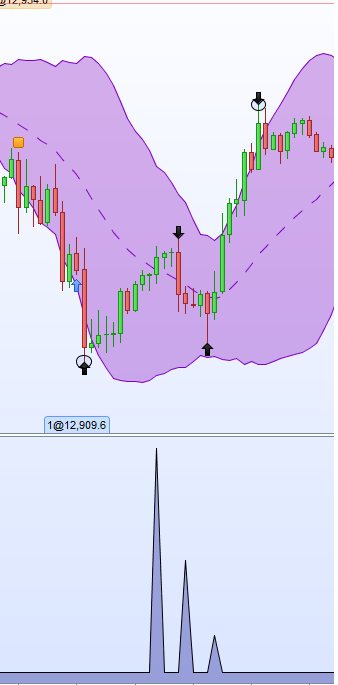
    Big thanks Nicolas, i thought about the “return as value” i just didnt know how to code it correctly 🙂 My values was all over the place! Edit: Hmm doesnt seem to work correctly nicolas! 🙂 photo included
    asasas.png asasas.png
    #53407 quote
    robertogozzi
    Moderator
    Master

    I am Roberto, not Nicolas.

    Line 2 of the above example needs to add “//” (double slashes to comment text) after “=0” or it will trigger an error message.

    If you want to use that indicator on the price chart, you don’t have to modify the original code, just use it as is.

    The example above was made to be CALLed or embedded in a strategy or, but it’s pretty ugly, displayed under your chart.

    To call it from inside your strategy:

    indicator1 = CALL "My Indicator"
    IF indicator1 = 1 THEN....        //Ellipse found
    .
    .


    #53431 quote
    jebus89
    Participant
    Master
    Oh lol, sorry Roberto i think i was looking at 2 posts at the same time 😛 I saw the error and added the // but as u can see in the photo i attached, the value of the indicator is alot slower then the arrows and ellipses on the pricechart!
    #53464 quote
    robertogozzi
    Moderator
    Master

    I can’t really detect why it behaves like that. I hope Nicolas can help us.  

Viewing 6 posts - 1 through 6 (of 6 total)
  • You must be logged in to reply to this topic.

How to trade on this?


ProOrder: Automated Strategies & Backtesting

New Reply
Author
author-avatar
jebus89 @jebus89 Participant
Summary

This topic contains 5 replies,
has 2 voices, and was last updated by robertogozzi
8 years, 3 months ago.

Topic Details
Forum: ProOrder: Automated Strategies & Backtesting
Language: English
Started: 11/20/2017
Status: Active
Attachments: 1 files
Logo Logo
Loading...
