If the marked falls uncontrolled, and the code keeps buying on the set conditions and the code sells on stop loss. How can I put in code to for example stop the auto trade if an amount of money is lost during the day?
Hi Nuf
Have a look at QUIT, positionperf and strategyprofit … add conditions re current day and you may get what you want?
Let us know how you get on … put your code snippets on here for help / improvement.
Cheers
GraHal
Thanks.
Found what I was looking for.
 Eric
EricParticipant
Master
and if you use IG its easy to open multiple accounts from the first opened
if you dont want to put “all the eggs in the same basket”
Hi Nuf
Might you share what you found / how to do it please … then we will know?
@Eric … how do you get multiple Demo Accounts with IG or do you mean only multiple Live Accounts? I opened a second account but it was a Live Account.
Thanks
GraHal
Ah right good … that will Quit the Algo if your equity drops > 200 (as example 2 in your link) from your starting equity, so 10k start – 200 if equity drops to £9.8K.
Your original post stated stop the auto trade if an amount of money is lost during the day … and by that I thought you meant during any day?? This is something I have wanted also! For example, if an extreme condition occurs for which none of my Algos are designed to cope (e.g. outbreak of war) then a drop of x amount quits all Algos by using a Quit condition in each separate Algo, but good for each day. So, for example, Equity 10k start + 5k profit but drops by 1k to 14k then Algo Quits. Quit in your ‘example 2 link’ will not do that because the Algo is still 4k in profit overall.
Amyway if you / anybody manages to get a ‘Quit for the day’ coded up please share with us.
Thanks
GraHal
Hi.
Maybe I got it wrong. I interpreted the code for quitting the auto trade. In the opening it say:
“Instruction used to stop a trading system. All opened, stop and limit orders are close when the instruction is used.
Stopped strategy with the QUIT instruction cannot be re-launched automatically by code. Only a manual intervention can do it.”
I am new to this, so I am not sure.
Nufstad is right about the QUIT instruction, it does exactly what it is described in the documentation.
If you want to “quit for the day”, then the usual code snippet from the blog should do the trick : https://www.prorealcode.com/blog/learning/max-profit-loss-day-trading-strategy/
EricParticipant
Master
@GraHal
yes i mean live accounts
but if you are with IG.UK and have a live SB account i think you can open a live CFD account (from my ig) and demo with both?
Hello! When I use the same code with the exact same setting my code uses different strategis in either Backtest or Auto trading. The program does not trade the same in the different programs with the same time settings.
CODE
Used for Germany 30 Cash (1euro mini)
// Definition of code parameters
DEFPARAM CumulateOrders = False // Cumulating positions deactivated
// Conditions to enter long positions
indicator1 = RSI[10](close)
indicator2 = RSI[12](close)
c1 = (indicator1 >= indicator2)
IF c1 THEN
BUY 3 CONTRACT AT MARKET
ENDIF
// Conditions to exit long positions
indicator3 = Stochastic[10,6](open)
indicator4 = Stochastic[20,6](open)
c2 = (indicator3 <= indicator4)
IF c2 THEN
SELL AT MARKET
ENDIF
// Stops and targets
SET STOP pTRAILING 1
IF StrategyProfit<-200 then
QUIT
ENDIF
Anyone with the experience to solve my problem?
Hi Gurra
I assume you are asking about QUIT? If Yes, I would expect your code
IF StrategyProfit<-200 then
QUIT
ENDIF
to Quit the Algo if your starting equity drops > 200, so 10k start – 200 … Algo stops if equity drops to £9.8K. As it says in the documentation … Stop the strategy if the actual profit is losing 200 of the money account.
Cheers
GraHal
If you are not asking about QUIT then your code is probably executing different in Backtest versus Demo Forward Test due to subtle differences betwen Backtest and Demo Forward Test and we all experience these subtle differences.
Also you have SET STOP pTRAILING 1 … I doubt this will work on any instrument as 1 point is far too low to be acceptable (to yuor broker) and iny case you would be stopped out far too often and so your Algo is not robust. Try SET STOP pTRAILING 5 (or 10 etc)
Let us know how you get on please.
Cheers
GraHal
Hello Gurra,
>> Please update your country flag in your profile. Thank you 🙂 <<
>>
For clarity of messages on ProRealCode’s forums, please use the “insert PRT code” button to separate the text of the code part! Thank you! <<
Hi Noobs
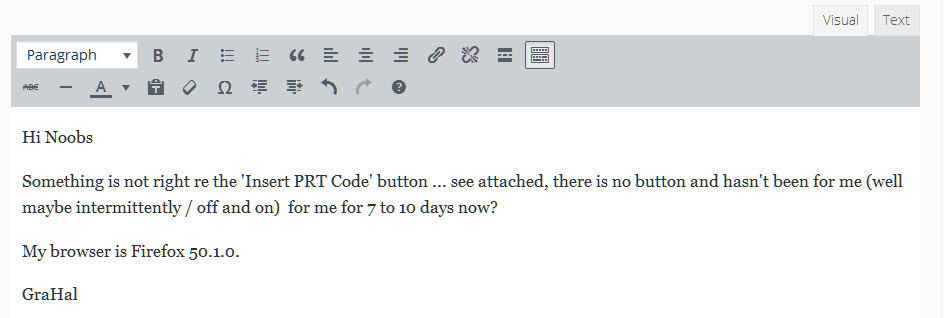
Something is not right re the ‘Insert PRT Code’ button … see attached, there is no button and hasn’t been for me for 7 to 10 days now (well maybe intermittently / off and on??).
I’m on Windows 10, my browser is Firefox 50.1.0.
GraHal