


How to show stop/limit amount in currency

Viewing 3 posts - 1 through 3 (of 3 total)
  • Author
    Posts
  • #172360 quote
    geetrade
    Participant
    Junior

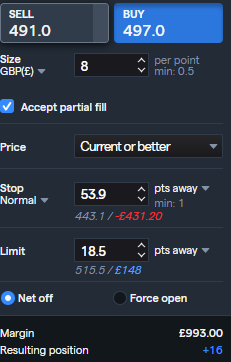
    I use PRT via IG (my broker). In my broker platform in the deal ticket I can see the £ amount loss or gain under my limit/stop.

    How can I show that in PRT? I must be missing something obvious as I am currently working out manually on calculator or using my web platform to show me, then placing trade in PRT. I would like to see this information in PRT before making a trade.

    Thanks

    DealTicket.png DealTicket.png
    #172637 quote
    RafaelN
    Moderator
    Senior

    Hello, this feature should be available by default on the order labels of your charts but if not, you may want to check your platform settings: from your main toolbar go to Settings > Trading > Display, and in Gains set the options of the different menus as best fits what you are looking for.

    If the issue you have is that the labels only display points and not amounts, maybe you have unintentionally hidden your trading data: to change this go to Settings > Shortcuts > Menus > Trading, and in the last of the list called “Hide trading data” set a key and use it, and see if that solves it.

    If despite this you still aren’t able to see your stop/limits amounts you should send PRT a technical report from Help > Help Center > I am having a technical issue > Other.


    Have a nice day

    #172970 quote
    geetrade
    Participant
    Junior

    ahh yes I can see it now, thanks.

Viewing 3 posts - 1 through 3 (of 3 total)

  • You must be logged in to reply to this topic.

How to show stop/limit amount in currency


Platform Support: Charts, Data & Broker Setup

New Reply
Author
author-avatar
geetrade @geetrade Participant
Summary

This topic contains 2 replies,
has 2 voices, and was last updated by geetrade

4 years, 7 months ago.

Topic Details
Forum: Platform Support: Charts, Data & Broker Setup
Language: English
Started: 06/24/2021
Status: Active
Attachments: 1 files
Logo Logo
Loading...
