


How to scan for NYSE and NASDAQ in one scanning window

Viewing 4 posts - 1 through 4 (of 4 total)

  • Author
    Posts
  • #124707 quote
    muqwishi
    Participant
    New

    Hello,

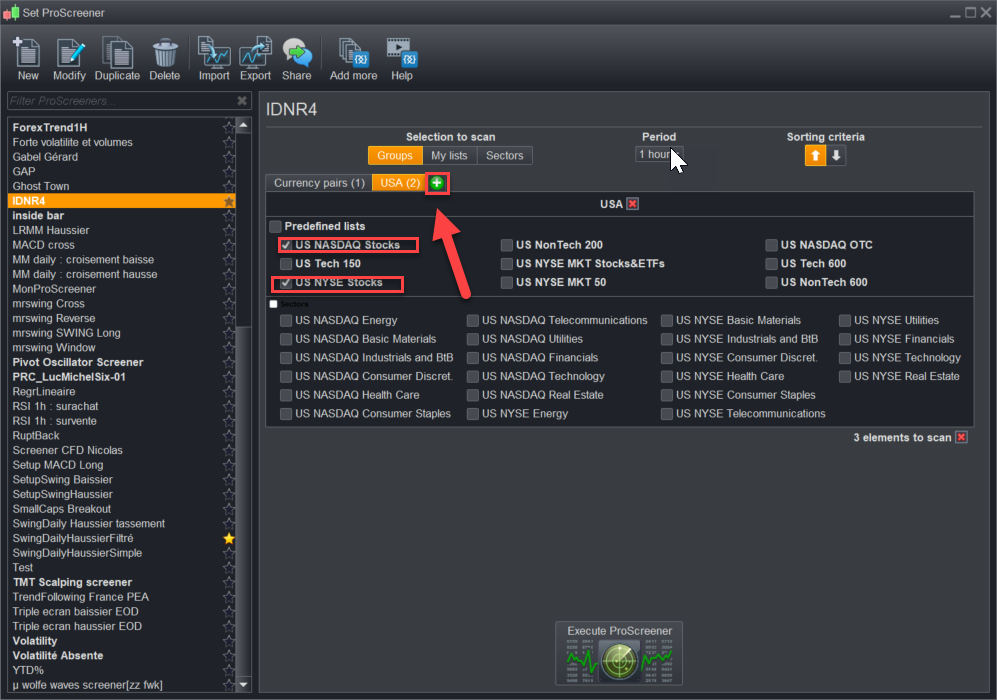
    How to scan for NYSE and NASDAQ stocks in one scanning window rather than selecting them individually?


    Thank you

    #124752 quote
    Nicolas
    Keymaster
    Master

    Are you using version 11 or a prior version please?

    #124804 quote
    muqwishi
    Participant
    New

    I’m using demo account, V.11.1

    #124866 quote
    Nicolas
    Keymaster
    Master

    In the ProScreener window, click on + symbol and check the boxes of NASDAQ and NYSE stocks (like I did in the attached picture).

    nyse-and-nasdaq-stocks-screeners.png nyse-and-nasdaq-stocks-screeners.png
Viewing 4 posts - 1 through 4 (of 4 total)
  • You must be logged in to reply to this topic.

How to scan for NYSE and NASDAQ in one scanning window


Platform Support: Charts, Data & Broker Setup

New Reply
Author
author-avatar
muqwishi @muqwishi Participant
Summary

This topic contains 3 replies,
has 2 voices, and was last updated by Nicolas

5 years, 10 months ago.

Topic Details
Forum: Platform Support: Charts, Data & Broker Setup
Language: English
Started: 04/05/2020
Status: Active
Attachments: 1 files
Logo Logo
Loading...
