How to Remove an Overlaid Instrument (Comparison Line)

Viewing 2 posts - 1 through 2 (of 2 total)

  • Author
    Posts
  • #245902 quote
    pjstew
    Participant
    New

    I have selected another instrument to overlay a chart and want to remove it. How?  PRT V12 Apple OSX M1

    NOTE:  I solved the problem by re-selecting the chart settings.

    #245911 quote
    Iván González
    Moderator
    Master

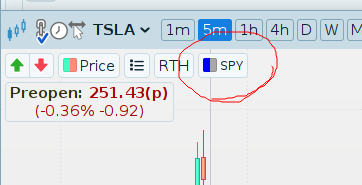
    Hello. In the top left corner, you will see the comparison element you added. If you left-click on it, you’ll see the option to remove it.
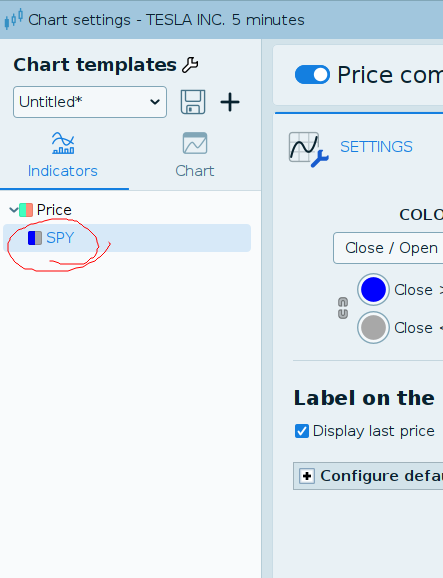
    You can also do this from the price panel settings.
    I’m attaching screenshots.

    2025-04-15_13-10_1.png 2025-04-15_13-10_1.png 2025-04-15_13-10.png 2025-04-15_13-10.png
Viewing 2 posts - 1 through 2 (of 2 total)
  • You must be logged in to reply to this topic.

How to Remove an Overlaid Instrument (Comparison Line)


Platform Support: Charts, Data & Broker Setup

New Reply
Author
author-avatar
pjstew @pjstew Participant
Summary

This topic contains 1 reply,
has 2 voices, and was last updated by Iván González

10 months ago.

Topic Details
Forum: Platform Support: Charts, Data & Broker Setup
Language: English
Started: 04/15/2025
Status: Active
Attachments: 2 files
Logo Logo
Loading...