Yeah why not … min = 0 max = 1 step = 1 ??
@Fran55
There are multiple topics on how to use the walk forward analysis tool, this one for example: https://www.prorealcode.com/topic/walk-forward-analysis/
Hi,
I have read this thread and also links therein. I think I understand the walk forward process and its importance to achieve the robustness required.
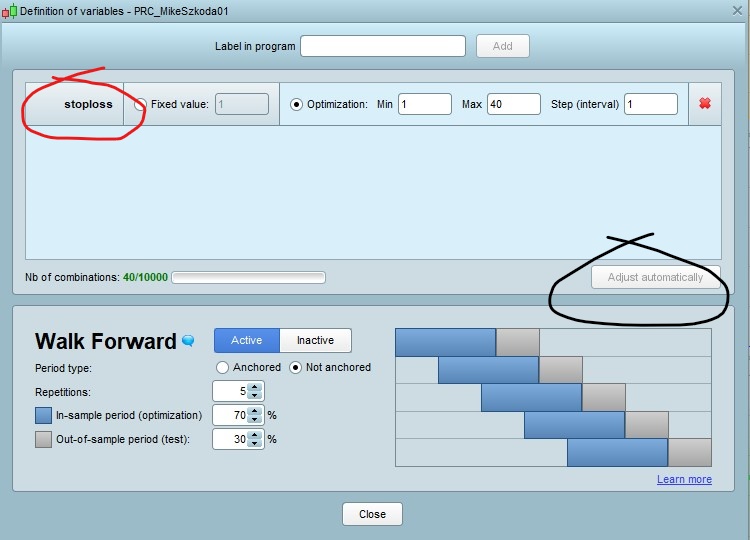
I have attached the opened walk forward window………..and to be honest not sure what goes on or in here? My understanding is that you insert your variables from your program and the walk forward applies them as per settings attached?. I have circled the ‘Adjust automatically’ in black but this remains grey and doesn’t do anything? I have inserted the ‘stoploss’ as in my program which is set at 40 but from what i can see from my results after the walk through it really means nothing to me.
There is no explanation of this ‘Definitions of variables’ window and its use/application…………………..am I missing something?
A reply in layman’s terms would be great for me to progress here.
thanks Mike
‘adjust automatically’ button is there to reduce the Nb of Combinations when you try to optimize too many variables, so that it can’t exceed the max combinations possible (allowed) by the backtest server.
Before making walk forward, i suggest you watch this short video on how to make an optimization: https://www.youtube.com/watch?v=qCbWAJLyZFQ
(the platform has changes a bit since this video but the process is the same).
Nicolas
Thanks for the link.exactly what I was looking for.
Mike
The old Video explained exactly what I was looking for ….to an extent.
I am only using the PRT 10.3 with IG and it only allows me to go back 100,000 unit period, is there a way to increase this size to gather larger data?
In the video optimize report, you actually see the test results for all the variables and in turn select them. But the only visible results for the variables I see after I have tested are when you hover your mouse over the results at the bottom of the equity curve – a little box pops up displaying your variables for that particular test result…….I use the default test of 5 repetitions at 70/30 non anchored. Each of the 5 results has different variables?….which do you select? Tests 4 and 5 had the same variables used there – do I use these similar variables going forward and then reoptimize say every 2 months so that I readjust my variables with tests 4 and 5 again and so forth etc?
Finally, my question on the Walk Forward Efficiency Ratio displayed in the Detailed Report – I understand that >=50% indicates the system may be robust…………does it also mean any figure up to 100%? And anything after that ie 100% plus indicates that it is possibly over optimized?
Clarification would be great so I can begin to understand how to interpret the results.
Many thanks.
Puedes ver 200000 barras con una cuenta promocionada y gratuita desde la web oficial de prt.
Pero eso te exige una cuenta nueva.
You can see 200,000 bars with a promoted and free account from the official prt website.
But that requires a new account.
In my experience with WF there are very few black and white answers?
- If you were to get the same variable value for each of the 5 periods and each period is profitable and above 50% ish WFE … then you may have a good Algo??
2. If you get different variable value for each of the 5 periods and each period is profitable and above 50% ish WFE … then you may have a good Algo, but you would need to re-optimise every length of period??
3. If you get different variable value for each of the 5 periods and some periods show some profit then choose the variable values for the period showing the most profit … but you would need to re-optimise every length of period??
4. If you get different variable value for each of the 5 periods and the most recent period show profit then choose the variable values for this most recent period … reason : this most recent period is most likely to be similar to what market action is doing if you then launch your Algo very soon??
I’m sure there are more scenarios, maybe others can add or I may add more later … got to go now sorry.
@Fran55
Only post in the language of the forum that you are posting in. For example English only in the English speaking forums and French only in the French speaking forums.
Thank you 🙂
GraHal
Again, thank you for this, it helps a lot