How to optimise a custom indicator?

Viewing 8 posts - 1 through 8 (of 8 total)

  • Author
    Posts
  • #102726 quote
    VPT PRT
    Participant
    Junior

    Hello everyone,


    I’m trying to optimise a custom indicator (with lost of input parameters) and have watched the optimisation video tutorials on how one might add in the optimisation variables for an MA crossover system.   This is a crossover system too but is based on TSI.


    Ive defined the two variables I want to optimise and the step intervals etc…

    I have the below in the code:

    // Conditions to enter long positions
    indicator2, indicator1, ignored, ignored, ignored = CALL "TSI-on-TSI"[1, 0, 2, 10, 20, 100, 0.85, 1, 0.35, 0.002, 10, 50, 2, 13, 0, 14, 15, 10, 100, 4, 0, 14]
    c1 = (indicator1 > indicator2)


    So I change the specific numerical values of the inputs I want to optimise to the label I have defined like is shown in the tutorial.  I end up with this:


    // Conditions to enter long positions
    indicator2, indicator1, ignored, ignored, ignored = CALL "TSI-on-TSI"[1, 0, 2, 10, 20, 100, 0.85, 1, 0.35, 0.002, 10, 50, [short], [long], 0, 14, 15, 10, 100, 4, 0, 14]
    c1 = (indicator1 > indicator2)


    Obviously I do this for entering short positions and exiting positions too.


    But I always end up with a syntax error?


    Anyone give me any pointers where I’m going wrong?


    Many Thanks

    #102727 quote
    GraHal
    Participant
    Master

    Please confirm you are using the Optimiser??

    Your code above look as though you are hard coding the step intervals etc into your System code??

    #102730 quote
    Nicolas
    Keymaster
    Master

    If you want to use the optimiser, replace the numbers with variables names you add in the optimization settings window, that’s where you control the start/end and step of each value.

    If the 2 variables names are short and long, then you are good, but remove the brackets!!

    #102745 quote
    Vonasi
    Moderator
    Master

    VPT PRT – Please try to remember to use the ‘Insert PRT Code’ button when posting code. I have tidied up your post for you 🙂

    #102758 quote
    VPT PRT
    Participant
    Junior

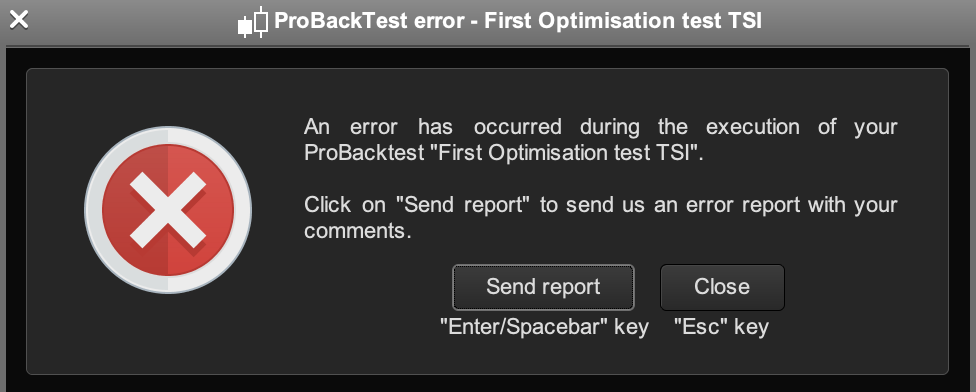
    Thanks for the help gents.  I’ve removed the brackets and started the optimisation several times which it now lets me do (no syntax error) but the optimisation never starts (just says 0%) then I get this error window?

    Screenshot-2019-07-17-at-16.11.23.png Screenshot-2019-07-17-at-16.11.23.png
    #102760 quote
    VPT PRT
    Participant
    Junior

    Thank you for tidying up the post – will do!

    #102763 quote
    Nicolas
    Keymaster
    Master

    That’s a generic error message that could mean a lot of things..

    Look for any division made in the code and ensure that no division by zero is possible.

    #102765 quote
    robertogozzi
    Moderator
    Master

    Try using variable for ALL parameters, then comment out the ones you want to optimize (p13 and p14), until they are ok:

    // Conditions to enter long positions
    p01=1
    p02=0
    p03=2
    p04=10
    p05=20
    p06=100
    p07=0.85
    p08=1
    p09=0.35
    p10=0.002
    p11=10
    p12=50
    //p13=2
    //p14=13
    p15=0
    p16=14
    p17=15
    p18=10
    p19=100
    p20=4
    p21=0
    p22=14
    indicator2, indicator1, ignored, ignored, ignored = CALL "TSI-on-TSI"[p01, p02, p03, p04, p05, p06, p07, p08, p09, p10, p11, p12, p13, p14, p15, p16, p17, p18, p19, p20, p21, p22]
    c1 = (indicator1 > indicator2)
Viewing 8 posts - 1 through 8 (of 8 total)

  • You must be logged in to reply to this topic.

How to optimise a custom indicator?


ProOrder: Automated Strategies & Backtesting

New Reply
Author
author-avatar
VPT PRT @vpt-prt Participant
Summary

This topic contains 7 replies,
has 5 voices, and was last updated by robertogozzi
6 years, 7 months ago.

Topic Details
Forum: ProOrder: Automated Strategies & Backtesting
Language: English
Started: 07/17/2019
Status: Active
Attachments: 1 files
Logo Logo
Loading...