







How to know output from indicator when programming?

Viewing 15 posts - 16 through 30 (of 52 total)
  • Author
    Posts
  • #234420 quote
    inverse
    Participant
    New

    I  think Peter’s been around html for a while, a lot of that looks closely related, perhaps best practice structures etc, either way, yes, looks good and makes digging about less a problem, won’t eliminate it but everything helps when there’s a ton of code.

    #234450 quote
    inverse
    Participant
    New

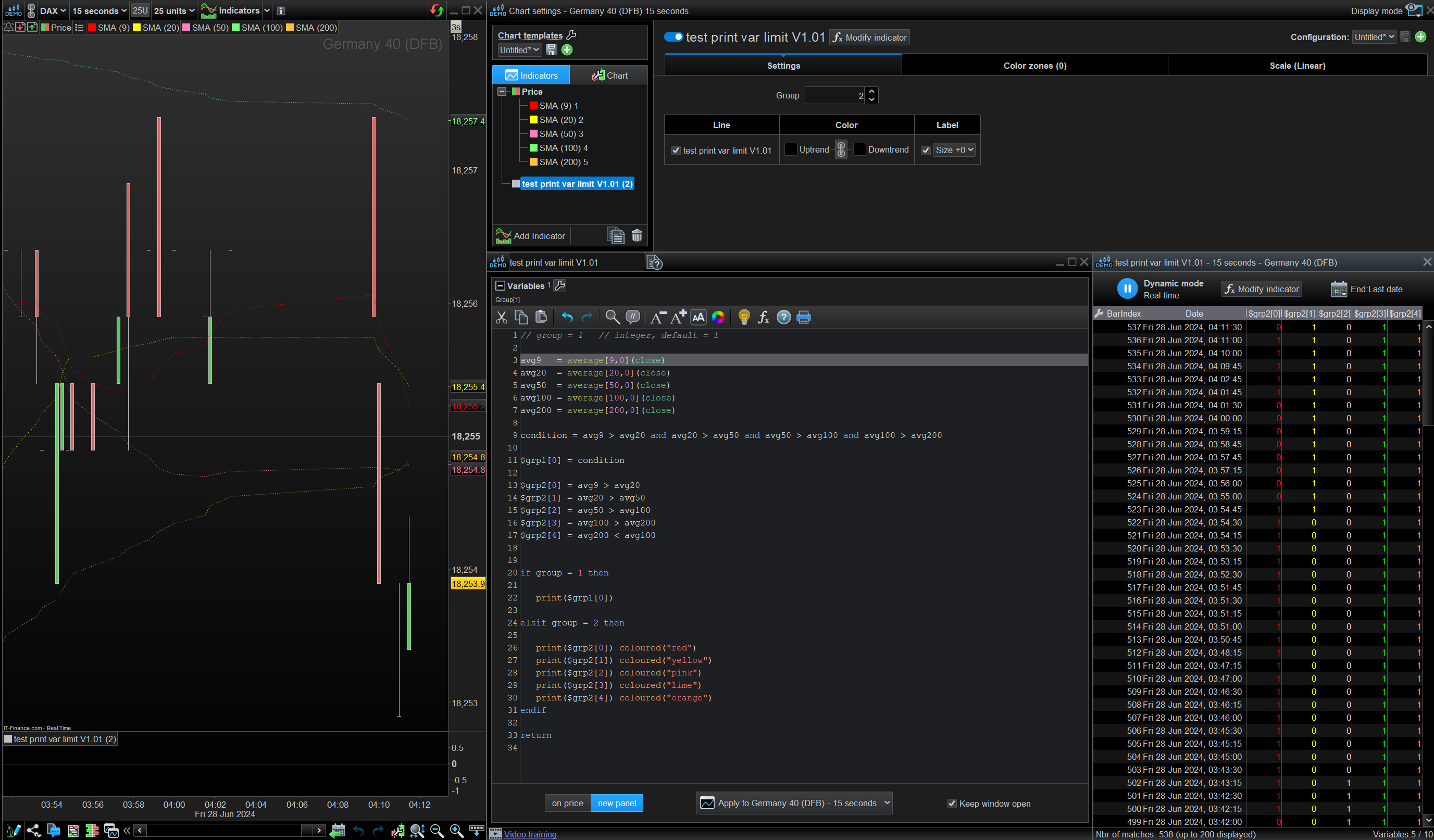
    The condition and various sets of SMA are assigned to arrays. The group variable chooses which array is printed. group 1 is default and show the overall condition. If that need investigation, changing to group 2 shows logic behind condition. This allow switching back and forth at will.

    Thanks druby.

    Sorry I didn’t reply earlier.

    Sounds like you might be able to print out what was the ‘last known’ condition of an array based on other metrics triggering it, perhaps historical evts too?.

    Can you timestamp (perhaps use barindex, just guessing) so comparisons can be made between 2 array conditions and display that last occurring event? Chicken and egg kind of thing but know that at a specific point (previous tod / barindex?) you had X event occur?

    If so can this kind of setup be used in an auto-trader?

    Not sure if I fully understood what’s been said but do remember @PeterSt saying that diving into arrays while useful could also be my undoing (no offence taken btw, just implying they’re complexities for a newbie which is fair enough!)

    #234452 quote
    druby
    Participant
    New

    No problem!

    Good point, if I am following you right.

    Image shows a corrected version of the SMA example, where I put in the correct values for the averages, doh!, and colour coded the average conditions along with a chart.

    With Group set to 2, and looking at the print list, you can see where each individual condition changed from false to true.

    And as you point out, your looking at values of the array[n] from previous bars.

    Though the Print() list, shows the previous values, you would only be able to access the last value of an array[index] in code.


    Variables usually hold a value for each bar. Since the var[n] of a variable is an offset from current bar,  barindex is used to look back to the right location.

    Arrays are different, in that, you can’t access a previous value of a specific index. They are useful for holding a specific number of values.

    If you store the barindex, every time some condition is met, then you can use that to, look back at all the variables and values at that bar.

    Also  BarsSINCE(Condition,Occurrence) keyword can be used to look for last occurrence of certain variables.


    inverse thanked this post
    Screenshot-2024-06-28-041310.png Screenshot-2024-06-28-041310.png test-print-var-limit-V1.011.itf
    #234458 quote
    inverse
    Participant
    New

    I think I’m having a moment here  … 😮

    I looked at barrsince a while back and it was promising, no idea why I overlooked it here.

    If I can print it, I should be able to ‘barrsince it’ (maybe) ….. again with the good gear druby … 🙂

    I’ll see if I can build a bit of logic around it.

    Unfortunately tonite I’ve needed to go to a 15K bar count chart, given that’s the case and preload bars on pro-order is 10k is there a way to limit an auto-trader to wait until there’s 15 or 20k of massageable data? We can limit times and forbid days surely there’s a bar count min. limit that could also be doable?

    #234461 quote
    PeterSt
    Participant
    Master
    PreLoadBarsSet = 15000
    
    If BarIndex > PreLoadBarsSet then
    
      // all of your code
    
    endif   // End of all of your code

    This could start out with the normal DefParam PreLoadbars (= 10000) and it will imply a 5000 bar wait for you. With seconds that could be OK. With hours not so much.

    🙂

    inverse and druby thanked this post
    #234469 quote
    druby
    Participant
    New

    Was looking at the same solution, but your implementation appears quite elegant.

    I think the max preloadbars  setting is 10000, however setting to 15000 and with the logic, does the trick.

    #234488 quote
    inverse
    Participant
    New


    Thanks Peter.

    I really wish there was a list of gotachs and this isn’t even one of those!

    Yes, cough, hours could be a problem. Cheeky.

    I’m not sure why there’s an issue from time to time where 10k bars is okay and at other times it hold up indicators printing, tonite 12k seems to be the sweetspot – I guess as a system is made active on the PRT servers and once the ‘preloads’ acquired it’ll remain in a buffered state, what happens once the system is restarted will we need to buffer the data again?

    I’ll keep digging away.

    Thanks again.

    #234489 quote
    druby
    Participant
    New

    With higher time periods, and/or beyond with the preloadbars limit, I suppose the first question is what needs those additional bars.

    If  further  bars are needed to calculate an indicator, say moving Average etc, then there could be an option to pre calculate default

    values for those, and syncronise a start point in the preload area. Then continue from there.

    If there’s a need to look back beyond the preloadbars at earlier values, then that’s going to be a bit more difficult.

    First thought, call a file with the data.

    More untried idea’s.

    inverse thanked this post
    #234507 quote
    PeterSt
    Participant
    Master

    what happens once the system is restarted will we need to buffer the data again?

    Yes … 🙁
    For Live as well as Backtesting. With Backtesting it only means you’ll have less backtesting period (which latter will not be a real pain).

    The idea would really be to avoid the whole issue; change your approach. Sit back and consider that using historical data to predict the future may lead to over-fitting in the first place.

    inverse thanked this post
    #234508 quote
    PeterSt
    Participant
    Master

    First thought, call a file with the data.

    … which is not possible in PRT. But you could collect the data over time and incorporate it in the “preload math”.
    The data further back in history could be collected by PRT itself by means of a rougher time frame and special backtest run and then merged into the time frame you want to use by means of

    Once TotalSofar = 427006311       // Accumulated outside of this program code (e.g. accumulated Close values like 17080 for the 25000 bars (below)).
    Once TotalSofarCount = 25000      // The "OOS" counted instances of virtual bars.
    TotalSofarCount = TotalSofarCount + 1   // Will be 25001 the first time your program is called.
    
    // Now accumulate further with the bars encountered in real time or backtesting.
    
    TotalSofar = TotalSofar + Close   // Or whatever it is you accumulate over.
    MyAverage = TotalSofar / TotalSofarCount

    Of course this will be more complicated in your real life, but it is about the gist;
    If you counted 427006311 of total value with the rougher time frame of 10 times what you normally use (say 10 hours instead of 1 hour), you will have counted 2500 bars. This now becomes thus 2500 times 10 = 25000 for the code you are using for real. If you would test with this 10 times for starters, you will learn soon what you need to do for real, in order for the result will be “linear”. Have accomplished that ? then you can go to 100 times; without further testing you will now have 250000 bars of history accumulated right when the program starts.
    For the 10 times example, the second half of the sample code above will read as

    TotalSofar = TotalSofar + Close            // 427206663 = 427006311 + 200320   // 200320 is the current close value for the first bar read.
    MyAverage = TotalSofar / TotalSofarCount   // 427206663 / 25001 = 17087.5817

    Again, your real life will be more complicated, depending on what you calculate. Try an Exponential Moving Average to get the gist of *that*.

    I hope I presented the ad-hoc numbers a bit OK-ish (because of the lack of consistency check with real data). It is only about the gist of it all …

    inverse and druby thanked this post
    #234559 quote
    druby
    Participant
    New

    Interesting concept, echo real life comment and question approach.

    If  ‘idea’ is way out of ‘box’ , is it the right box, or is, ideal is way out there.

    Re: call file

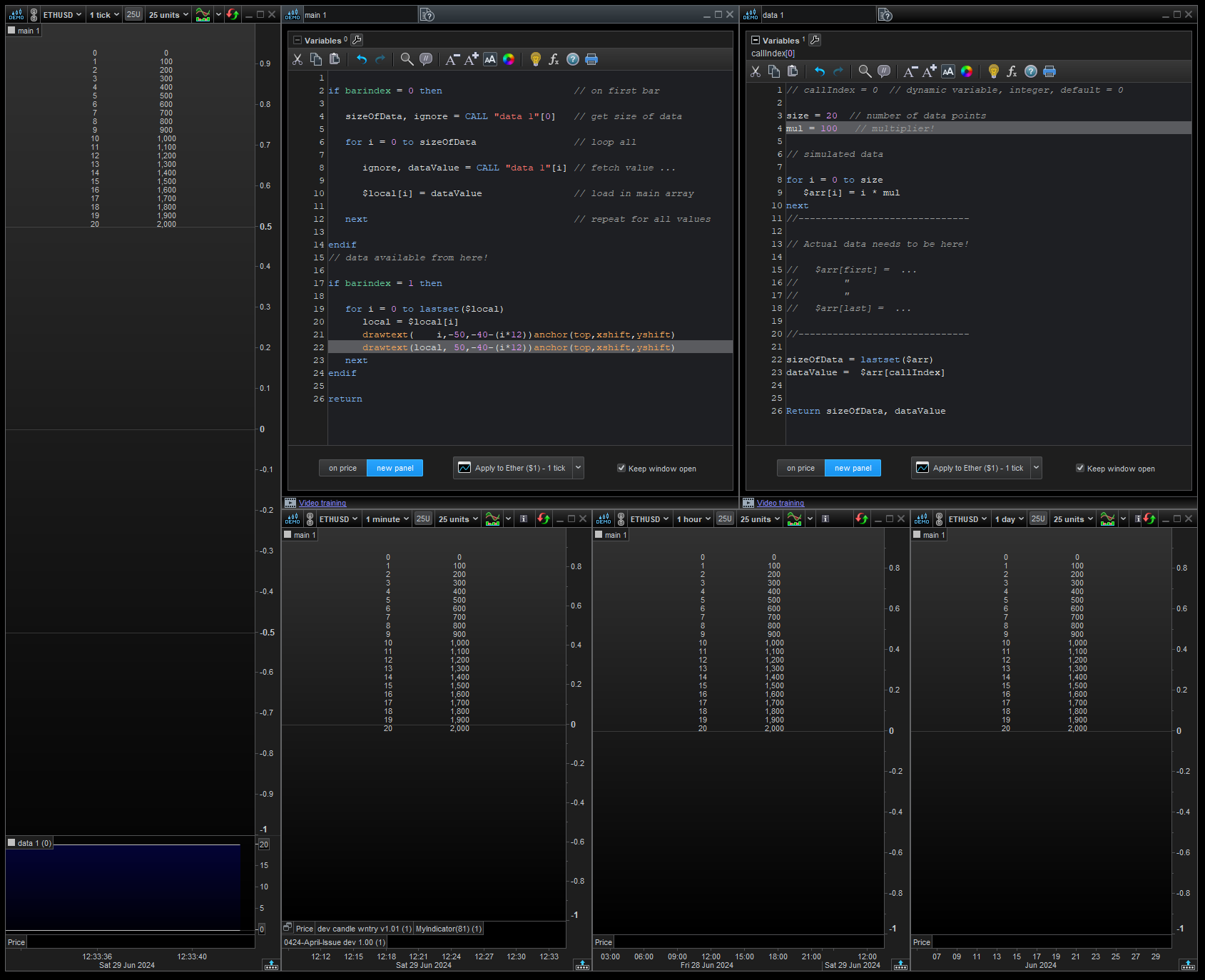
    Image shows data file holding array values, simulated with loop.

    Main file loops the call, and copy’s each value to a local array.

    Once copied, data available in main, and data file not required again.

    Additional, if main is in several charts, changing values in data file, size and/or mul,

    ripples through all main instances, on data file re – apply.

    It appears to work in back test, not tried with proOrder.

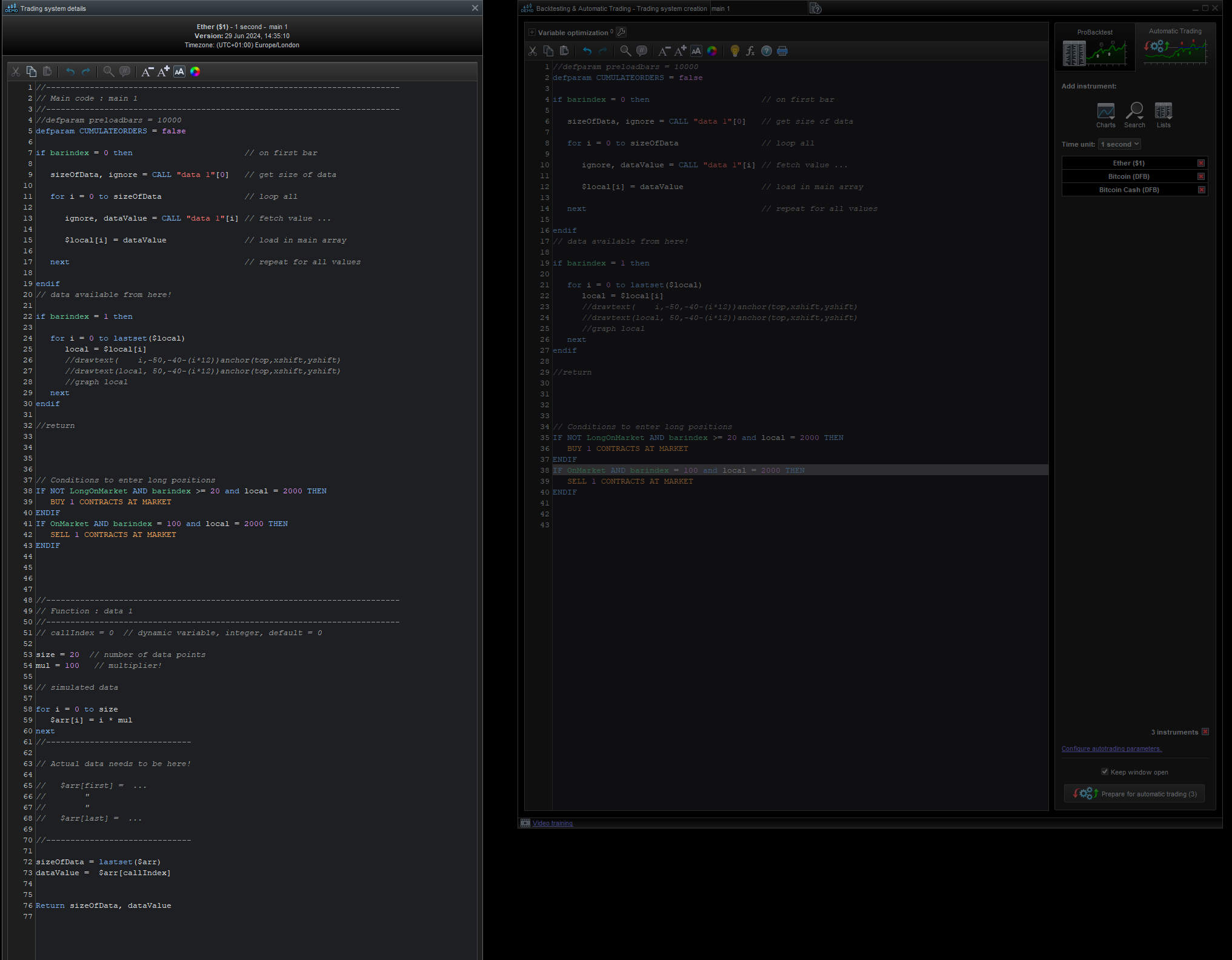
    Image2, A proOrder file appears to append all file’s into one, so I don’t see why not.

    PeterSt and inverse thanked this post
    Screenshot-2024-06-29-123354.png Screenshot-2024-06-29-123354.png Screenshot-2024-06-29-150318.png Screenshot-2024-06-29-150318.png main-1.itf data-1.itf
    #234564 quote
    druby
    Participant
    New

    Further, the proOrder file will take the up to date file when compiled, but any edits after won’t be included.

    The data file, can be updated at any time, But a new proOrder file will need compiling for them to take affect.

    inverse thanked this post
    #234567 quote
    PeterSt
    Participant
    Master

    That idea is really great because it uses the “data fill” indicator as a subroutine, which can be reused in all the strategies for that instrument of concern.

    I am adding this seemingly superfluous text because the fact that it acts as a subroutine may not be clear to everyone. Also, it won’t consume extra slowness because of the call principle in PRT (which is relatively very slow). This is because it happens only once (If BarIndex = 0).

    inverse thanked this post
    #234572 quote
    druby
    Participant
    New

    From the instrument side of things, and the lack of ability to change or identify the instrument.

    At one point I was drawing a number of sup/res lines on the DAX, wall street, and bitcoin.

    I used the ‘subRoutine’ technique for my sup/res lines, edit +/- the lines and used some logic to determine which instrument I was on.

    With the fact that the normal range of these instruments were far apart from each other, that was one test.

    A second one was, having a constant of a closed value for each instrument with a date/ time reference .

    Chances of both appearing on two different instruments are very remote.

    Maybe more possible over a larger number of instrument, but then use more than  1 reference value.

    It worked quite well, when I change the chart to another instrument, the correct lines were drawn.

    If I went on a random instrument I got a warning message, plus no lines.

    Same message if no reference match, if it fell beyond historical bars loaded.

    Also depending on, which candle you picked, could determine if lines drawn on different timeframes 5m,15m,30, 1h, 4h candle.

    I don’t think I implemented all the these idea’s, because I moved onto other stuff, but it did the job at the time.

    PeterSt and inverse thanked this post
    #234573 quote
    Haidar ali
    Participant
    New

    Hello, I would like to correct the code in the platform’s dialect, please

        a = 31verlay=true) c = 14 heikin = false // Set to false based on your preference // ATR Calculation xatr = ta.atr(c) nLoss = a * xatr // Source selection src = heikin ? ta.hlc3 : close // Variables var float xatrTrailingStop = na var pos = 0 // Calculation of the trailing stop if bar_index < c xatrTrailingStop := na pos := 0 else if src > nz(xatrTrailingStop[1]) and src[1] > nz(xatrTrailingStop[1]) xatrTrailingStop := math.max(nz(xatrTrailingStop[1]), src – nLoss) else if src < nz(xatrTrailingStop[1]) and src[1] < nz(xatrTrailingStop[1]) xatrTrailingStop := math.min(nz(xatrTrailingStop[1]), src + nLoss) else if src > nz(xatrTrailingStop[1]) xatrTrailingStop := src – nLoss else xatrTrailingStop := src + nLoss // Position logic if src[1] < nz(xatrTrailingStop[1]) and src > xatrTrailingStop pos := 1 else if src[1] > nz(xatrTrailingStop[1]) and src < xatrTrailingStop pos := -1 else pos := pos[1] // Trading conditions ema = ta.ema(src, 1) above = ta.crossover(ema, xatrTrailingStop) below = ta.crossunder(ema, xatrTrailingStop)

    buy1 = src > xatrTrailingStop and above sell1 = src < xatrTrailingStop and below

    // Plot signals and trades if buy1 strategy.entry(“Buy”, strategy.long)

    if sell1 strategy.entry(“Sell”, strategy.short)

    // Plot trailing stop plot(xatrTrailingStop, color=color.red, title=”ATR Trailing Stop”)

Viewing 15 posts - 16 through 30 (of 52 total)
  • You must be logged in to reply to this topic.

How to know output from indicator when programming?


Platform Support: Charts, Data & Broker Setup

New Reply
Author
Summary

This topic contains 51 replies,
has 7 voices, and was last updated by JS

1 year, 7 months ago.

Topic Details
Forum: Platform Support: Charts, Data & Broker Setup
Language: English
Started: 06/26/2024
Status: Active
Attachments: 21 files
Logo Logo
Loading...
