


How to know last bar on the chart

Viewing 4 posts - 1 through 4 (of 4 total)

  • Author
    Posts
  • #56751 quote
    Tobees
    Participant
    New

    Hi,

    I’m starting coding with PRC and I have some problems with the following:

    To know if the last bar on the chart (most right one) I use the following code:  ===>>    If date=Today then

    This works perfect for daily charts but dosn’t work for weekly and/or monthly charts.

    So how can I determine when I reach the last bar on the chart (most right one, current week or month)

    Thnx

    #56760 quote
    Nicolas
    Keymaster
    Master

    You can get a code snippet in this thread: How to know EOF? the last barindex?

    It returns true if the current bar is the last known one.

    #56764 quote
    Tobees
    Participant
    New

    Nicolas,

    LastBarOnChart=currenttime=opentime and date=today 

    ==> doesn’t work like I need it.

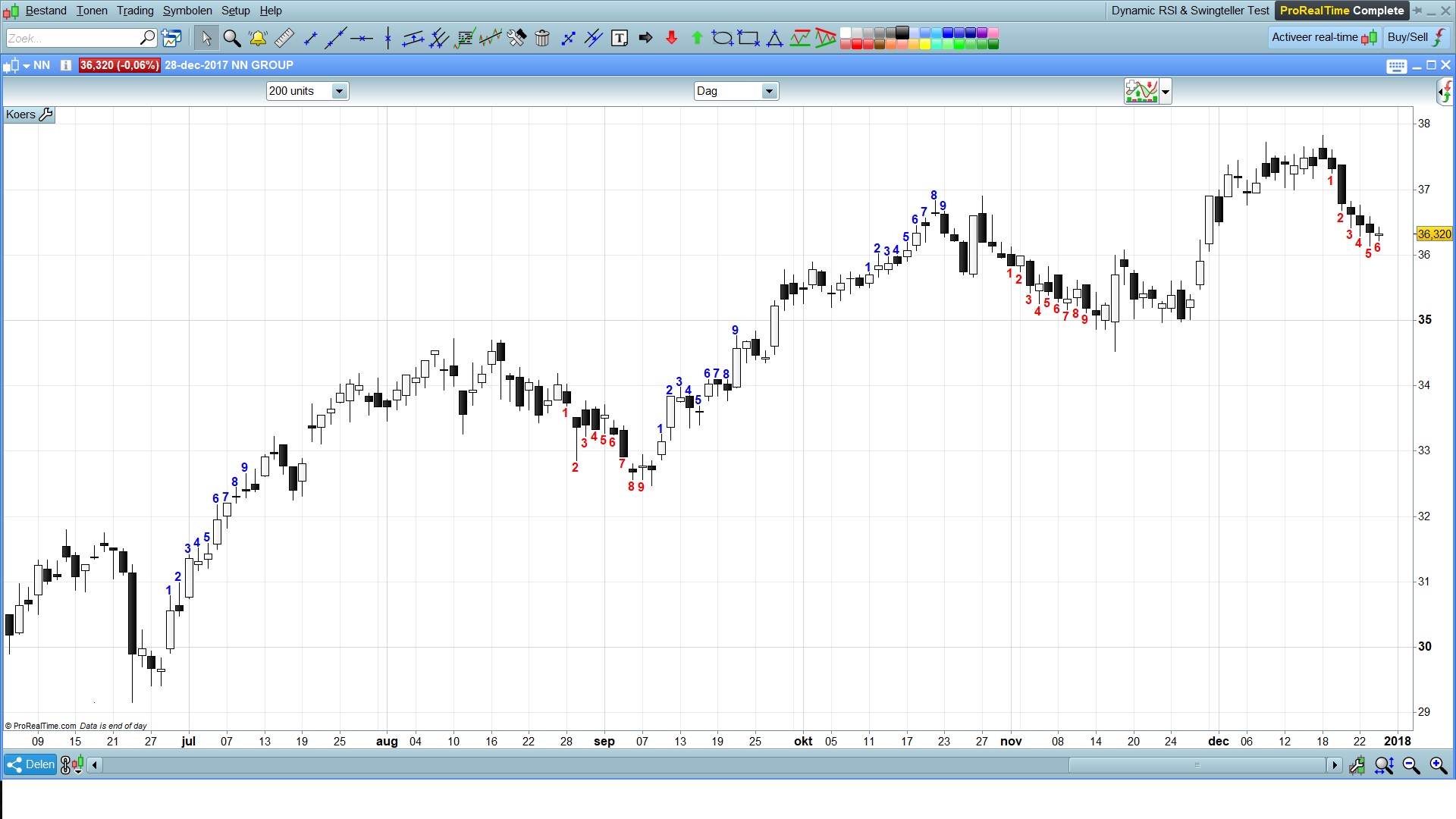
    I enclose the programming, it is the Swing Counter Indicator. I think you wrote it, I modified it a litle.µ

    This code works fine with daily charts, it doesn’t work with charts on weekly or monthly basis.

    How can I make it work for whatever period I use (fi week – month)

    //Swing Counter | indicator
    //Version 1.1 | 28.12.2017
    //Author: Tobees
    
    //Based on: PRC_swing teller live count2 | indicator
    //07.04.2017
    //Nicolas @ www.prorealcode.com
    
    //Description Indicator:
    //This indicator is based on the "PRC_swing teller live count2 | indicator" written by Nicolas. I modified it a little => when the swing doesn’t succeed in //reaching its full up or downswing (+9 or -9) it will be discarded and not drawn on the chart.
    //This indicator is a part of a swing strategy described as follows by users in the forum:
    //Swing +1 starts when the candle closes higher then the 4 candles before.
    //Swing -1 starts when the candle closes lower then 4 candles before.
    //When a Fully swing has appeared (Swing 1 -> 9) it stops counting because the 10th candle is called the resting candle.
    //If the 11th candle also closes higher then the 4 candles before the swing starts again at swing 1 (in blue colour and red for -1). Also if a swing doesn’t //succeed in reaching number 9, the swing has failed and will NOT be drawn on the chart.
    //The main purpose of this indicator is to signal a reversal. When a full swing +9 or -9 has appeared the chances of an upcoming bottom or a top increases a lot. //A fully upswing +9 combined with a red 10th candle suggest to exit your long position. Its the same for a downswing -9 combined with a 10th green candle means //exit your short position.
    
    //Variables:
    //CountDistance: The 1 to 9 numbers distance form high or low of candlestick can be modified with the "CountDistance" setting.
    //Swingpointer:  Points to 4 bars ago
    //Upcount:       UpSwing Counter
    //DownCount:     DownSwing Counter
    //BarPointer:    Identifies the bar on wich above (or below) the SwingNr will be drawn
    //SwingNr:       Contains the Swing number in the Up or DownSwing
    //Last9Bar:      Used to identify the 10th bar after a succesfull Swing - Resting Bar
    
    Once SwingPointer=4
    //LastBarOnChart=currenttime=opentime and date=today
    LastBarOnChart=date=today
    
    //continue swing Up
    if UpCount>0 and Close>Close[SwingPointer] then
    DownCount=0
    UpCount=UpCount+1
    //Draw Full Upswing (9 downto 1) or draw Ongoing Upswing if Last bar on chart
    if UpCount=9 or LastBarOnchart then
    BarPointer=0
    for SwingNr=Upcount downto 1 do
    drawtext("#SwingNr#",barindex-BarPointer,high[BarPointer]+CountDistance*pointsize,Dialog,Bold,16) coloured(0,0,250)
    BarPointer=BarPointer+1
    next
    last9bar=barindex
    //Reset UpSwing Counter
    UpCount=0
    endif
    //Failed UpSwing
    elsif UpCount>0 and Close<Close[SwingPointer] then
    //Reset UpSwing Counter
    UpCount=0
    endif
    
    //Continue DownSwing
    if DownCount>0 and Close<Close[SwingPointer] then
    UpCount=0
    DownCount=DownCount+1
    //Draw Full Downswing (9 downto 1) or draw Ongoing DownSwing if Last bar on chart
    if DownCount=9  or LastBarOnChart then
    BarPointer=0
    for SwingNr=DownCount downto 1 do
    drawtext("#SwingNr#",barindex-BarPointer,low[BarPointer]-CountDistance*pointsize,Dialog,Bold,16) coloured(255,0,0)
    BarPointer=BarPointer+1
    next
    last9bar=barindex
    //Reset DownSwing Counter
    DownCount=0
    endif
    //Failed DownSwing
    elsif DownCount>0 and Close>Close[SwingPointer] then
    //Reset DownSwing Counter
    DownCount=0
    endif
    
    //Begin Upswing
    if UpCount=0 and barindex-last9bar>1 then
    if close>close[SwingPointer] then
    UpCount=1
    DownCount=0
    if LastBarOnChart then
    //Draw Start of UpSwing (only Today's bar)
    drawtext("1",barindex,high+CountDistance*pointsize,Dialog,Bold,16) coloured(0,0,250)
    endif
    endif
    endif
    
    //Begin Downswing
    if DownCount=0 and barindex-last9bar>1 then
    if close<close[SwingPointer] then
    DownCount=1
    UpCount=0
    if LastBarOnChart then
    //Draw Start of DownSwing (only Today's bar)
    drawtext("1",barindex,low-CountDistance*pointsize,Dialog,Bold,16) coloured(255,0,0)
    endif
    endif
    endif
    
    return
    
    #56813 quote
    Tobees
    Participant
    New

    Hi,

    With try and error I found out the following:

    I replaced ==> LastBarOnChart=date=today

    with ==> Daylastbar=date=today                                     //true if last bar on daychart is today – most right one on the chart
    Weeklastbar=date-dayofweek+1=today        //true if last bar on weekchart is this week – most right one on the chart
    Monthlastbar=date-day+1=today                   //true if last bar on monthchart is this month- most right one on the chart

    And used these variables in the “if” conditions. => Are these calculations, to check if the most right bar in the day, week or month chart is the last one available (EOF) and therefore Today, correct??

    So the code becomes as follows:

    Once SwingPointer=4
    
    Daylastbar=date=today
    Weeklastbar=date-dayofweek+1=today
    Monthlastbar=date-day+1=today
    
    //continue swing Up
    if UpCount>0 and Close>Close[SwingPointer] then
    DownCount=0
    UpCount=UpCount+1
    //Draw Full Upswing (9 downto 1) or draw Ongoing Upswing if Last bar on chart
    if UpCount=9 or Daylastbar or Weeklastbar or Monthlastbar then
    BarPointer=0
    for SwingNr=Upcount downto 1 do
    drawtext("#SwingNr#",barindex-BarPointer,high[BarPointer]+CountDistance*pointsize,Dialog,Bold,16) coloured(0,0,250)
    BarPointer=BarPointer+1
    next
    last9bar=barindex
    //Reset UpSwing Counter
    UpCount=0
    endif
    //Failed UpSwing
    elsif UpCount>0 and Close<Close[SwingPointer] then
    //Reset UpSwing Counter
    UpCount=0
    endif
    
    //Continue DownSwing
    if DownCount>0 and Close<Close[SwingPointer] then
    UpCount=0
    DownCount=DownCount+1
    //Draw Full Downswing (9 downto 1) or draw Ongoing DownSwing if Last bar on chart
    if DownCount=9  or Daylastbar or Weeklastbar or Monthlastbar then
    BarPointer=0
    for SwingNr=DownCount downto 1 do
    drawtext("#SwingNr#",barindex-BarPointer,low[BarPointer]-CountDistance*pointsize,Dialog,Bold,16) coloured(255,0,0)
    BarPointer=BarPointer+1
    next
    last9bar=barindex
    //Reset DownSwing Counter
    DownCount=0
    endif
    //Failed DownSwing
    elsif DownCount>0 and Close>Close[SwingPointer] then
    //Reset DownSwing Counter
    DownCount=0
    endif
    
    //Begin Upswing
    if UpCount=0 and barindex-last9bar>1 then
    if close>close[SwingPointer] then
    UpCount=1
    DownCount=0
    if Daylastbar or Weeklastbar or Monthlastbar then
    //Draw Start of UpSwing (only Today's bar)
    drawtext("1",barindex,high+CountDistance*pointsize,Dialog,Bold,16) coloured(0,0,250)
    endif
    endif
    endif
    
    //Begin Downswing
    if DownCount=0 and barindex-last9bar>1 then
    if close<close[SwingPointer] then
    DownCount=1
    UpCount=0
    if Daylastbar or Weeklastbar or Monthlastbar then
    //Draw Start of DownSwing (only Today's bar)
    drawtext("1",barindex,low-CountDistance*pointsize,Dialog,Bold,16) coloured(255,0,0)
    endif
    endif
    endif
    
    return
Viewing 4 posts - 1 through 4 (of 4 total)
  • You must be logged in to reply to this topic.

How to know last bar on the chart


ProBuilder: Indicators & Custom Tools

New Reply
Author
author-avatar
Tobees @tobees Participant
Summary

This topic contains 3 replies,
has 2 voices, and was last updated by Tobees

8 years, 1 month ago.

Topic Details
Forum: ProBuilder: Indicators & Custom Tools
Language: English
Started: 12/28/2017
Status: Active
Attachments: 1 files
Logo Logo
Loading...
