


How To Have Multi Timeframes In 1 Scan?

Viewing 2 posts - 16 through 17 (of 17 total)
  • Author
    Posts
  • #59853 quote
    nealhartnealhart
    Participant
    Junior

    Hi, I really need all the timeframes mentioned to be running and show as a live scan as the conditions are met, as per the other one I seen working.

    Sorry I don’t full understand the complexities, but just do what you think will work best.

    I will now supply you the exact code criteria for the buy side  1st and sells at the bottom.

    indicator1 = Average[1](Stochastic[3,1](close))
    c1 = (indicator1 CROSSES UNDER 22)
    
    indicator2 = MACDline[8,26,9](close)
    c2 = (indicator2 > 0)
    
    
    SCREENER[c1 AND c2] (null AS "null")
    indicator1 = Average[1](Stochastic[3,1](close))
    c1 = (indicator1 CROSSES OVER 78)
    
    indicator2 = MACDline[8,26,9](close)
    c2 = (indicator2 < 0)
    
    
    SCREENER[c1 AND c2] (null AS "null")


    Thanks again

    #60143 quote
    robertogozzirobertogozzi
    Moderator
    Legend

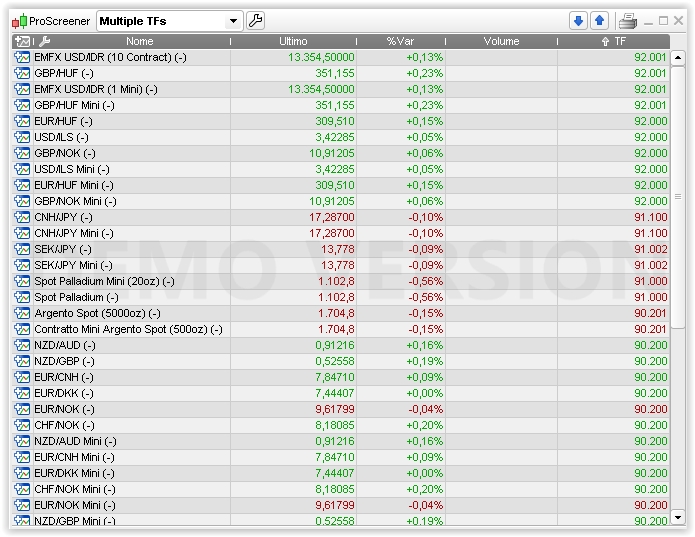
    That’s my idea on how to manage multiple buy/sell conditions on multiple TFs:

    // returns 9 followed by:
    //     TF                  daily   4hours    1hour    15min
    // Buy condtions             1        1        1        1
    // Sell conditions           2        2        2        2
    // No condition met          0        0        0        0
    //
    // For examnple, a returned value of 92001 means than on the Daily TF a SELL condition was met (digit 2), wbhile on the 15min TF a BUY condition
    // was met (digit 1). For all other TFs no condition was met.
    //
    
    x = 90000                                              //Start with 90000 not to lose leading 0's
    
    TIMEFRAME(daily)
    indicator1 = Average[1](Stochastic[3,1](close))       //Buy
    c1 = (indicator1 < 28)
    indicator2 = MACDline[12,26,8](close)
    c2 = (indicator2 > 0)
    indicator1a = Average[1](Stochastic[3,1](close))      //Sell
    c1a = (indicator1a CROSSES OVER 78)
    indicator2a = MACDline[8,26,9](close)
    c2a = (indicator2a < 0)
    
    TIMEFRAME(4 hours)
    indicator3 = Average[1](Stochastic[3,1](close))       //Buy
    c3 = (indicator3 < 28)
    indicator4 = MACDline[12,26,8](close)
    c4 = (indicator4 > 0)
    indicator3a = Average[1](Stochastic[3,1](close))      //Sell
    c3a = (indicator3a CROSSES OVER 78)
    indicator4a = MACDline[8,26,9](close)
    c4a = (indicator4a < 0)
    
     TIMEFRAME(1 hour)
    indicator5 = Average[1](Stochastic[3,1](close))       //Buy
    c5 = (indicator5 < 28)
    indicator6 = MACDline[12,26,8](close)
    c6 = (indicator6 > 0)
    
    indicator5a = Average[1](Stochastic[3,1](close))      //Sell
    c5a = (indicator5a CROSSES OVER 78)
    indicator6a = MACDline[8,26,9](close)
    c6a = (indicator6a < 0)
     
    TIMEFRAME(15 minutes)
    indicator7 = Average[1](Stochastic[3,1](close))        //Buy
    c7 = (indicator7 < 28)
    indicator8 = MACDline[12,26,8](close)
    c8 = (indicator8 > 0)
    
    indicator7a = Average[1](Stochastic[3,1](close))      //Sell
    c7a = (indicator7a CROSSES OVER 78)
    indicator8a = MACDline[8,26,9](close)
    c8a = (indicator8a < 0)
     
    TIMEFRAME(default)
    
    IF c1 AND c2 THEN
    x = x + 1000                                       //Dazily BULLish
    ELSIF c1a AND c2a THEN
    x = x + 2000                                       //Daily BEARish
    ENDIF
    
    IF c3 AND c4 THEN
    x = x + 100                                       //4 Hours BULLish
    ELSIF c3a AND c4a THEN
    x = x + 200                                       //4 Hours BEARish
    ENDIF
    
    IF c5 AND c6 THEN
    x = x + 10                                       //1 Hour BULLish
    ELSIF c5a AND c6a THEN
    x = x + 20                                       //1 Hour BEARish
    ENDIF
    
    IF c7 AND c8 THEN
    x = x + 1                                       //15 Minutes BULLish
    ELSIF c7a AND c8a THEN
    x = x + 2                                       //15 Minutes BEARish
    ENDIF
    
    SCREENER[x] (x AS "TF")
    Multiple-TFs.itf Multiple-TFs.jpg Multiple-TFs.jpg
Viewing 2 posts - 16 through 17 (of 17 total)
  • You must be logged in to reply to this topic.
ProRealAI ProRealAI New

Stuck on this ProBuilder code?

Describe what this topic is trying to build, in plain English, and ProRealAI writes the ProRealTime™ indicator, screener or system for you.

Available in 7 languages
Try ProRealAI

How To Have Multi Timeframes In 1 Scan?

ProScreener: Market Scanners & Detection

New Reply
Author
author-avatar
nealhart @nealhart Participant
Summary

This topic contains 16 replies,
has 4 voices, and was last updated by robertogozzirobertogozzi
8 years, 8 months ago.

Topic Details
Forum: ProScreener: Market Scanners & Detection
Language: English
Started: 12/23/2017
Status: Active
Attachments: 2 files
ProRealCode ProRealCode
Loading...


