How to find Best Performing Algo this Week?

Viewing 9 posts - 16 through 24 (of 24 total)
  • Author
    Posts
  • #241051 quote
    JS
    Participant
    Senior

    The point, as I see it, is that “ProOrder AutoTrading” only displays the current profit and position and does not retain any historical information…
    If you want data for a specific time period, you will need to perform a “backtest”…

    (the only data available is the trade data like price, open time, exit time, number of contracts, etc… all the rest must be calculated)

    #241052 quote
    GraHal
    Participant
    Master

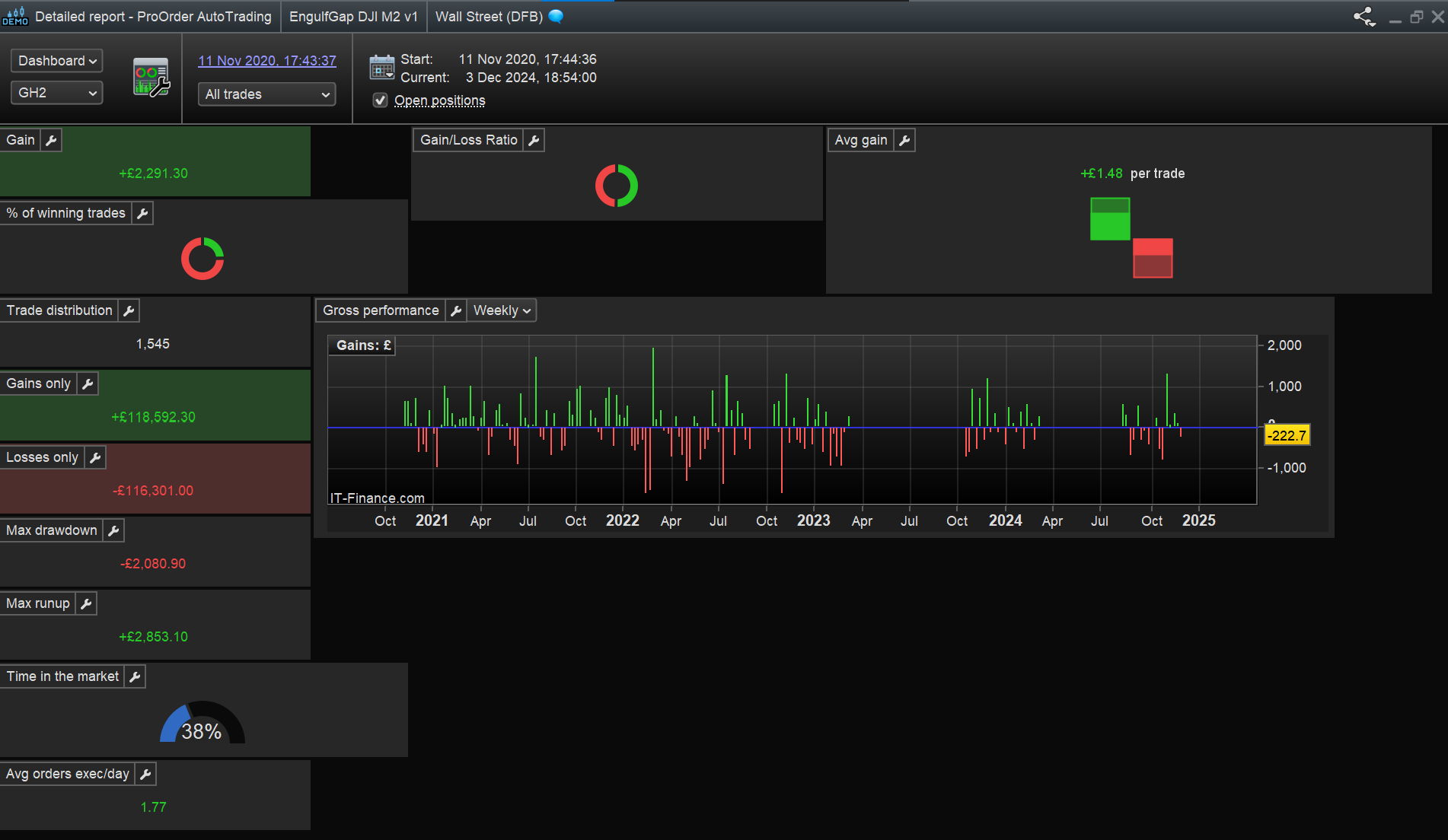
    does not retain any historical information

    So where is attached coming from?

    Screenshot-2024-12-03-185544.png Screenshot-2024-12-03-185544.png
    #241054 quote
    JS
    Participant
    Senior

    The detailed report is calculated from the “trade” data… (this is the data of the positions that have been executed)

    #241055 quote
    GraHal
    Participant
    Master
    It is the data of executed positions that I would look at to pick out the best performing Last Week. If there was a Period widget, I would set it to Previous Week and then sort the Total Gain column and look at, for example, the top 3 Total Gainers (for 1 week only – Note). I might then, for example, consider these ‘top 3’ have the best chance of continuing their good performance in the coming week and so I might set them running on Real Live for a week.
    #241056 quote
    JS
    Participant
    Senior

    Can you view the “performance” without having the detailed report calculated…?

    Again, my point is that you don’t know the “performance” without a calculation that needs to be executed…

    #241057 quote
    GraHal
    Participant
    Master
    Ah I see where you are coming from now. Total Gain for a Period / Last Week will do for a Starter then I can click on the Detailed Report icon to get the Detailed Report for Last Week only and also check equity curve and positions (for last week only) to make sure all looks good, i.e. is not a high Total Gain driven by a few ‘fluke trades’. Currently I have 100 Systems running and if I sort the column Total Gain then Systems at the top are Systems that have been running for a few months.
    JS thanked this post
    #241058 quote
    GraHal
    Participant
    Master
    I also submitted (earlier this year) direct to PRT a Suggestion that a column be added to the ‘ProOrder Portfolio window’ to show Average Gain and a separate column for No. of Trades … these could then be sorted by column and will add another useful analysis tool. Above additional columns would be selectable by users as is the current configuration of columns.
    JS and inverse thanked this post
    #241060 quote
    inverse
    Participant
    New
    I’d imagine it could be a reasonable laundry list but you could ‘snippet’ the wish-list and features that are problematic seeing there aren’t release notes with caveats. Really wish I could add some useful IP but I’m so green I’ve not even broken ground in terms of systems and useful feedback … 🙁
    GraHal thanked this post
    #242139 quote
    GraHal
    Participant
    Master
    After such a weird week’s trading (maybe only in my opinion?) I am again wanting to know which of my Systems did best and which did worst this week? It is incomprehensible that the PRT Platform does not provide readily available tools to achieve above??
Viewing 9 posts - 16 through 24 (of 24 total)
  • You must be logged in to reply to this topic.

How to find Best Performing Algo this Week?


Platform Support: Charts, Data & Broker Setup

New Reply
Author
Summary

This topic contains 23 replies,
has 6 voices, and was last updated by GraHal
1 year, 1 month ago.

Topic Details
Forum: Platform Support: Charts, Data & Broker Setup
Language: English
Started: 12/01/2024
Status: Active
Attachments: 4 files
Logo Logo
Loading...