


How to define a Retracement Bar

Viewing 6 posts - 1 through 6 (of 6 total)
  • Author
    Posts
  • #188583 quote
    Mary
    Participant
    Average

    Hello,

    I want to place an indicator arrow on a candle bar that has retraced down 45 % from its high, so the wick is at least 45% down from the candle top to the body, how do I define it in Prorealtime?  Same goes for retracement from low of candle, wick retraces at least 45% up from low of candle to body.

    I made this code below but its not correct because its giving me Close and not Retracement of actual wick like I want. Can someone  please help. Thank you.

    IF close <= low + Range * 0.45 THEN
    DRAWARROWDOWN (barindex[1],HIGH [1])coloured(255,10,10)
    elsif close >= low + Range *0.45 THEN
    DRAWARROWUP(barindex[1],low[1])coloured(10,255,10)
    endif
    RETURN

    #188584 quote
    robertogozzi
    Moderator
    Master

    This should do (not tested):

    UpperWick = high - max(open, close)
    LowerWick = min(open,close) - low
    UpperRetracement = (UpperWick >= (range * 0.45))
    LowerRetracement = (LowerWick >= (range * 0.45))
    IF UpperRetracement THEN

       DRAWARROWDOWN (barindex[1],HIGH [1])coloured(255,10,10)
    
elsif LowerRetracement THEN
       DRAWARROWUP(barindex[1],low[1])coloured(10,255,10)

    endif
    RETURN
    #188585 quote
    Mary
    Participant
    Average

    Hi Robert,

    Thank you! Got it working! Thank you very much!

    #188586 quote
    Mary
    Participant
    Average

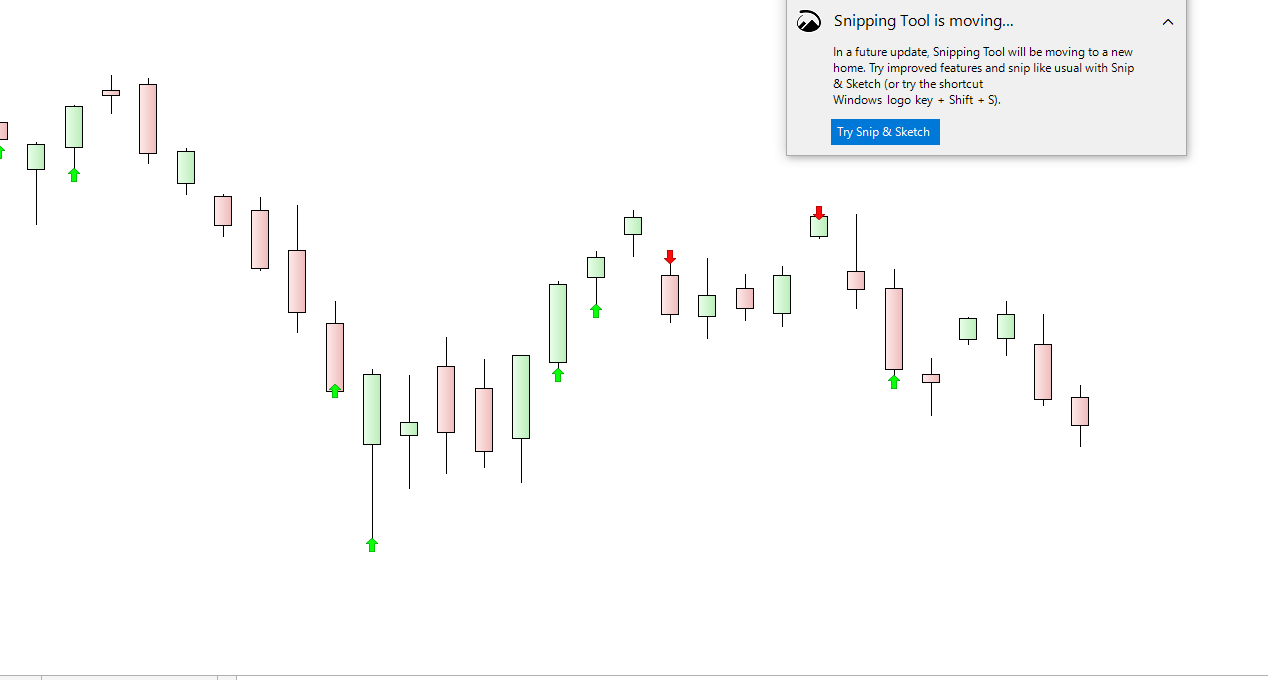
    Hi Robert, after testing this code I find that it is incorrect somehow. If you look at my attached pic below the wicks are not retraced at least 45% of the range as you can see in the pic where the indicators are marked, somehow the code is not picking it up. Any way to adjust it please? Thank you.

    UpperWick = high – max(open, close)
    LowerWick = min(open,close) – low
    UpperRetracement = (UpperWick >= (range * 0.45))
    LowerRetracement = (LowerWick >= (range * 0.45))
    IF UpperRetracement THEN
    DRAWARROWDOWN (barindex[1],HIGH [1])coloured(255,10,10)
    elsif LowerRetracement THEN
    DRAWARROWUP(barindex[1],low[1])coloured(10,255,10)
    endif
    RETURN

    Wicks-are-shorter-then-body.png Wicks-are-shorter-then-body.png
    #188595 quote
    robertogozzi
    Moderator
    Master

    It sounds correct.

    Arrows are plotted on the prior candlestick.

    Remove [1]  from the plotting instructions.

    #188629 quote
    Mary
    Participant
    Average

    Thank you Robert, its working now!

Viewing 6 posts - 1 through 6 (of 6 total)
  • You must be logged in to reply to this topic.

How to define a Retracement Bar


ProBuilder: Indicators & Custom Tools

New Reply
Author
author-avatar
Mary @mila Participant
Summary

This topic contains 5 replies,
has 2 voices, and was last updated by Mary

3 years, 11 months ago.

Topic Details
Forum: ProBuilder: Indicators & Custom Tools
Language: English
Started: 02/21/2022
Status: Active
Attachments: 1 files
Logo Logo
Loading...
