how to count zigzag moves

Viewing 5 posts - 1 through 5 (of 5 total)
  • Author
    Posts
  • #215033 quote
    renzocarioca
    Participant
    Junior

    Hi

    I would like to count the quantity of zigzag moves of an index/security of a chart

    ex: zigzag moves of 5% of the SPX index

    I have tried a few things but what I get is kind strange,  is it possible? The last attempt was this one but it gives an error message (the following variable is undefined: count )

    thank you

    a= ZigZagPoint[10](close)
    b=count[a]
    c=cumsum (b)
    return c

    #215034 quote
    robertogozzi
    Moderator
    Master

    Firstly, COUNT is not defined anywhere thus can’t be used.

    Secondly, ZIGZAG returns a value each bar, it doesn’t count swing points, so counting it will return a huge number.

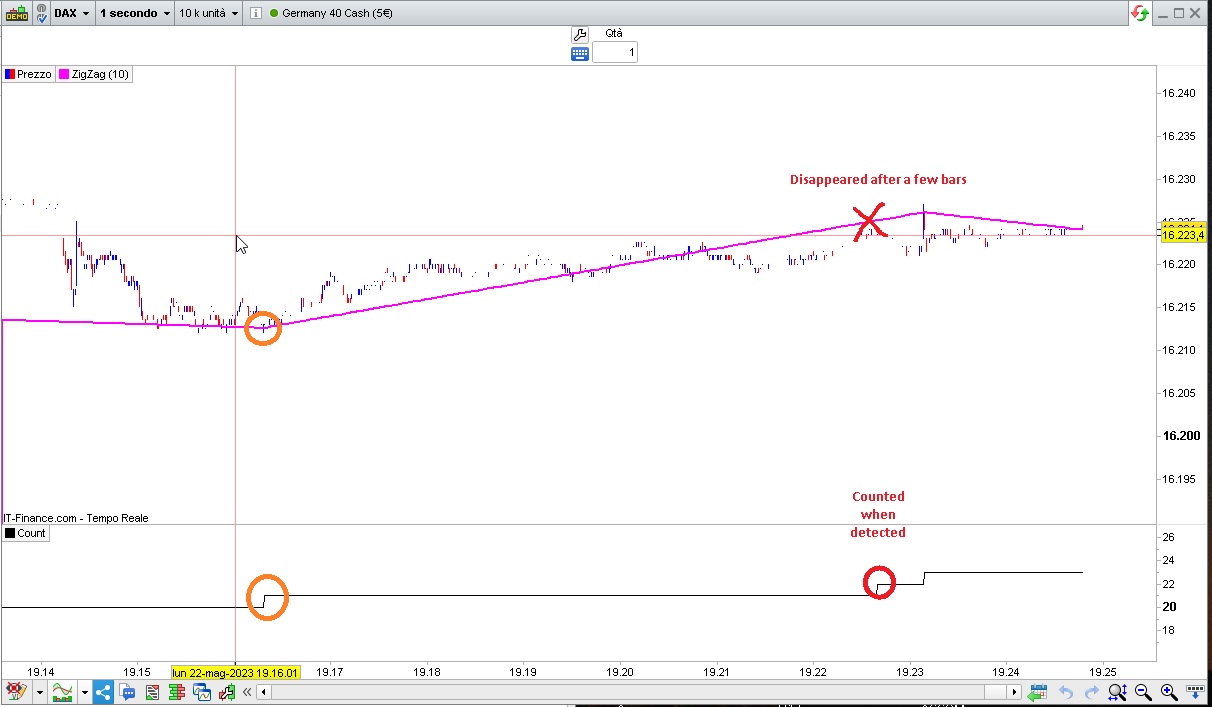
    Thirdly, you can count swing points with this code, but it’s useless as it’s a repainting, so it may change any swing point several bars after they have already been counted as you will easily spot on a 1-second TF (see my attached pic):

    ONCE Count = 0
    myZZ    = ZigZagPoint[10](close)
    SwingHI = (myZZ < myZZ[1]) AND (myZZ[1] > myZZ[2])
    SwingLO = (myZZ > myZZ[1]) AND (myZZ[1] < myZZ[2])
    IF SwingHI OR SwingLO THEN
       c = c + 1
    ENDIF
    return c AS "Count"
    #215036 quote
    JS
    Participant
    Senior
    (Sorry same time as Roberto)

    Hi,

    You can try this one…

    I think the calculation of the ZigZag is incorrect, for example if I set a 5% change (from bottom to top or vice versa) then the number of change (points) is incorrect…??

    PercentChange=5
    
    ZZ=ZigZag[PercentChange](Close)
    
    If ZZ[1]<ZZ[2] and ZZ>ZZ[1] then
    BottomCount=BottomCount+1
    ElsIf ZZ[1]>ZZ[2] and ZZ<ZZ[1] then
    TopCount=TopCount+1
    EndIf
    
    TotalCount=BottomCount+TopCount
    
    Return BottomCount as "BottomCount", TopCount as "TopCount", TotalCount as "TotalCount"

    #215045 quote
    renzocarioca
    Participant
    Junior
    Thank you  it works,  just return totalcount    
    PercentChange=5
    
    
    ZZ=ZigZag[PercentChange](Close)
    
    
    If ZZ[1]<ZZ[2] and ZZ>ZZ[1] then
    BottomCount=BottomCount+1
    ElsIf ZZ[1]>ZZ[2] and ZZ<ZZ[1] then
    TopCount=TopCount+1
    EndIf
    
    
    TotalCount=BottomCount+TopCount
    
    
    Return BottomCount as "BottomCount", TopCount as "TopCount", TotalCount as "TotalCount"
     
    #215058 quote
    robertogozzi
    Moderator
    Master
    Two is better than one 🙂
    renzocarioca thanked this post
Viewing 5 posts - 1 through 5 (of 5 total)

  • You must be logged in to reply to this topic.

how to count zigzag moves


ProBuilder: Indicators & Custom Tools

New Reply
Author
Summary

This topic contains 4 replies,
has 3 voices, and was last updated by robertogozzi
2 years, 8 months ago.

Topic Details
Forum: ProBuilder: Indicators & Custom Tools
Language: English
Started: 05/22/2023
Status: Active
Attachments: 2 files
Logo Logo
Loading...