


How to collapse the Order Bar

Viewing 5 posts - 1 through 5 (of 5 total)

  • Author
    Posts
  • #178963 quote
    dbl007
    Participant
    Junior

    I want to hide the position and pending order from the chart.

    I set the option ‘Hide position and pending orders’ when Order Bar is collapsed in Trading Option/Order Display panel

    But I do I ‘collapse’ the order bar? where is the order bar?

    Thank you.

    #178964 quote
    JC_Bywan
    Moderator
    Master

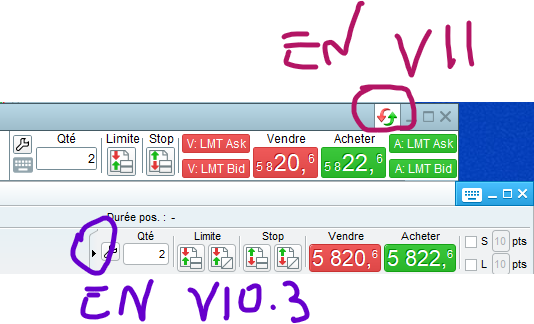
    Hi, depending on your PRT version, you collapse the order bar by clicking on the arrows inside the circle in attached image.

    ZeroCafeine thanked this post
    #178966 quote
    GraHal
    Participant
    Master

    Re Positions and Orders … I put the Suggestion below to PRT a few days ago …

    SUGGESTION – Screen Cluttered by Orders & Position Buttons

    Hello

    Please might you consider some way to reduce the size of Orders & Positions (O&P’s) buttons showing on Charts or even to have tick boxes to show / conceal altogether.

    As you can see from attached, my screen is cluttered by O&P’s buttons and even so there are 2 more O&P’s that are not showing because there is no room for them to show.

    Suggestions to consider …

    1. Tick box to reduce O&P’s buttons using a slider (located on same screen as the font size slider).
      (This may be the easiest option to implement (?) and also ensures users would be happy as they can reduce button size as required).
    2. Tick box to show O&P’s only when hovering over Orders or Positions on the menu bar (see red arrowheads on attached screen shot).
    3. Provide small ‘placeholder icons‘ for O&P’s which show details as now – but only when the ‘placeholder icon’ is hovered over.
    4.  It would also be useful to have a Tick Box to select to show Manual O&P’s only, Auto A&P’s only or both Manual & Auto.
      (This should not be needed if any / all of 1,2 or 3 are provided).
    #178967 quote
    GraHal
    Participant
    Master

    I recorded my Suggestion (above) in the Log below.

    Anybody feel free to add your Suggestions (after you have posted direct to PRT) …

    PRT
    Improvements
    Log

    #179042 quote
    dbl007
    Participant
    Junior

    Thks everyone. I now know how to collapse the order bar. Haha.

Viewing 5 posts - 1 through 5 (of 5 total)
  • You must be logged in to reply to this topic.

How to collapse the Order Bar


ProRealTime platform support

New Reply
Author
author-avatar
dbl007 @dbl007 Participant
Summary

This topic contains 4 replies,
has 3 voices, and was last updated by dbl007

4 years, 3 months ago.

Topic Details
Forum: ProRealTime platform support
Language: English
Started: 10/03/2021
Status: Active
Attachments: 1 files
Logo Logo
Loading...

