Hi,
Looking for help with code.
How to buy/sell on Close of a day? for forex, which 24hrs trading.
I saw we can execute at a specific time (23hrs 30min 00sec), so used below code, but did not work.
IF time >=233000 THEN
SELL AT MARKET
ENDIF
Thanks in advance,
Karun
Also saw a changelog on https://www.prorealtime.com/en/trading-system-programming-changelog
the following instructions have been removed:
- ThisBarOnClose
- TodayOnClose
- TomorrowClose
How do we accomplish similar operations? sell/buy at a specific time?
Hi Karun, if you mean exit all positions at the end of the day, you can use the FlatAfter instruction:
//exit all positions and prevent new ones to be launched until the end of the day
defparam flatafter = 233000
Is that what you were looking for?
Hi Nicolas,
Thanks for your help.
But I am looking for something like this.
IF MyCondition AND time > 233000 THEN
SELL AT MARKET
ENDIF
When I trade manually, I check for MyCondition 30 min before market and close my position manually, so want to do the same in backtesting.
Ok, so there may be something wrong into your “MyCondition” statement? Because “time>233000” is ok.
And “SELL AT MARKET”, close the actual buy conditions on market.
Here is my code. made it simple, condition to be when closes above MA5. May be I shouldn’t take close of day and close of MA, right?
// Conditions to exit long positions
indicator2 = close
indicator3 = ExponentialAverage[5](close)
LongExitCondition = (indicator2 >= indicator3)
IF LongOnMarket AND LongExitCondition AND TIME > 233000 THEN
SELL AT MARKET
ENDIF
How do I get price and Average[5] at a specific time (233000)?
You are already doing it right. On which timeframe do you use this strategy?
Daily. Below code does not work. It does not close at specified time. What am I doing wrong here?
// Conditions to exit long positions
indicator2 = close
indicator3 = ExponentialAverage[5](close)
LongExitCondition = (indicator2 >= indicator3)
IF LongOnMarket AND LongExitCondition AND TIME > 233000 THEN
SELL AT MARKET
ENDIF
That’s why it doesn’t work I think. It’s because you are testing an hour that it is never met on the daily bar. Because 00.00.00 hour is not superior to 23.30.00.
Hi Nicolas,
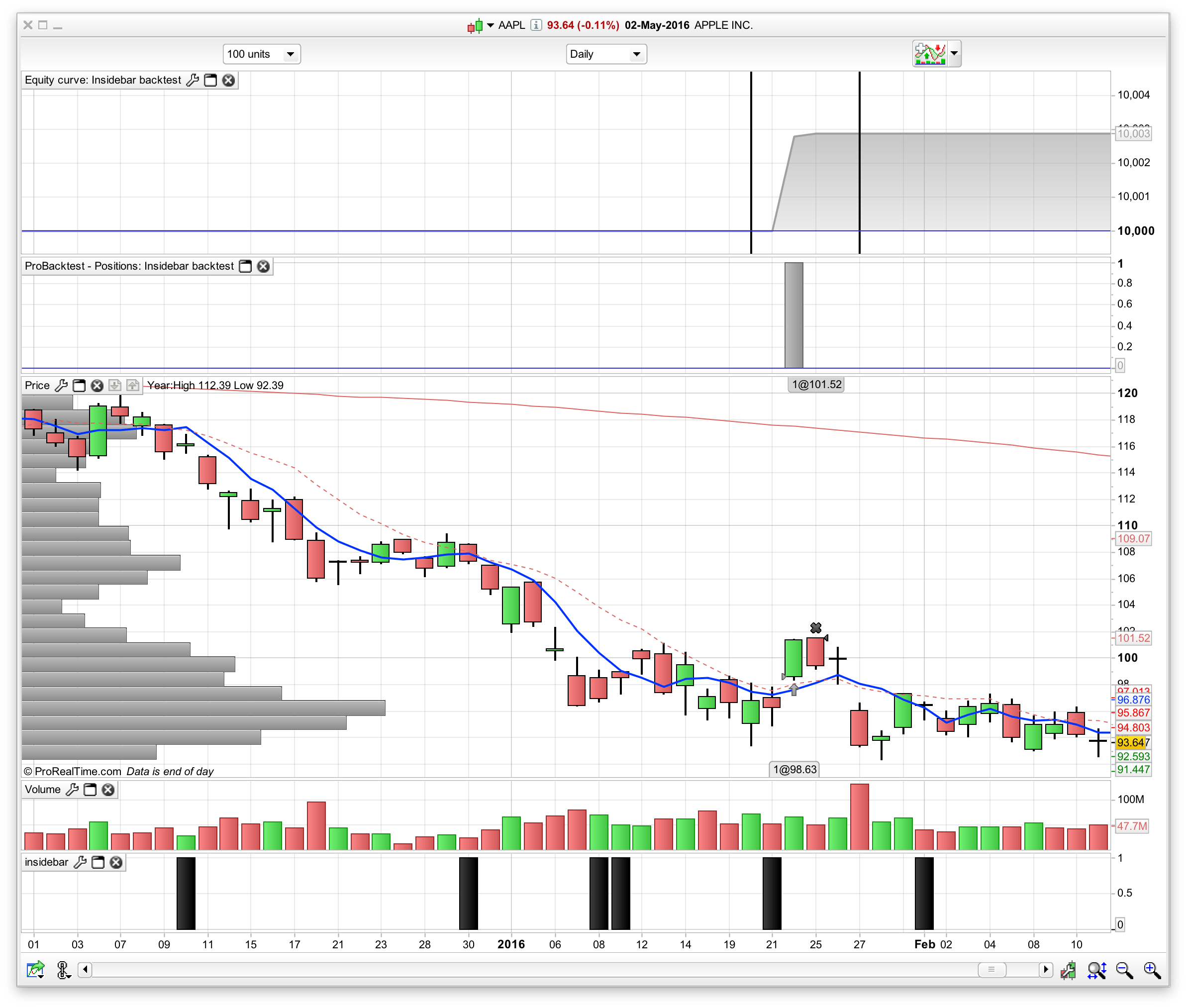
I wrote some basic code to test this, hope you can help me. I wrote an indicator “InsideBar”, which is a bar inside previous bar.
Then I wrote backtest for it. We buy the open of next day after an Insidebar indicator, and only thing I need is the exit of position on same day at 30 min before close.
We can test this on any stock, and below code exits on next day after entry day,
I want the entry and exit on SAME DAY, entry on open of day and exit at 30 min before market close.
Hope you can help me.
//Indicator code ----- START----

REM inside bar

c1= high[0] < high [1]
c2= low[0] > low[1]

insidebar= c1 and c2

return insidebar

//Indicator code ----- END----

//Backtest code ----- START----

// Definition of code parameters
DEFPARAM CumulateOrders = False // Cumulating positions deactivated

// Conditions to enter long positions
indicator1 = CALL insidebar
c1 = (indicator1 > 0)

IF c1 AND NOT LongOnMarket THEN
 BUY 1 SHARES AT MARKET
ENDIF

IF LongOnMarket AND time>153000 THEN
 SELL AT MARKET
ENDIF

//Backtest code ----- END----
Ok, with the whole code it is much clear now 🙂
You should trade the strategy on intraday timeframe and use the daily candlesticks informations with DHIGH and DLOW.
I rewrote the whole code to be more compliant with what you got in mind:
DEFPARAM CumulateOrders = False
DEFPARAM FlatAfter = 153000 //all positions are closed at 15:30:00

//reset a variable to tell the system that we are on a new day and we can start trade again
if intradaybarindex=0 then
 alreadytraded = 0
endif

//inside bar (using Daily candles)
c1= Dhigh(1) < Dhigh(2)
c2= Dlow(1) > Dlow(2)
insidebar= c1 and c2

IF insidebar AND alreadytraded=0 THEN
 BUY 1 SHARES AT MARKET
 alreadytraded = 1
ENDIF
So do your tests on 5 or even 1 minute timeframe for better prices executions.
Hi Nicolas,
Thanks for your help and quick reply. Now I see the exit is happening at 153000 but the entry has issue.
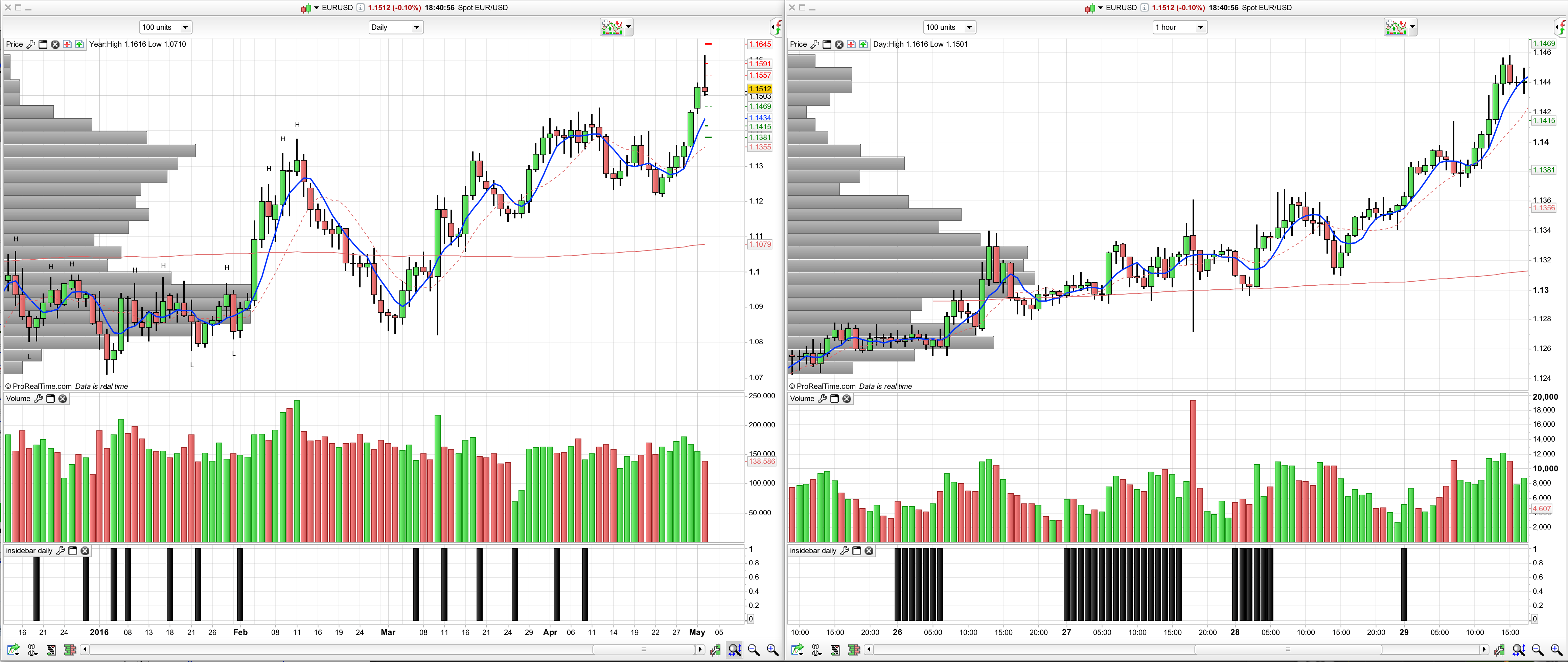
I debugged more and found the inside bar code you gave is behaving different in different time frames. I tested the same code on daily and hourly and see it’s giving false signals in hourly. Attached screenshot.
This is what I have in code:
REM inside bar
c1= Dhigh(0) < Dhigh (1)
c2= Dlow(0) > Dlow(1)
insidebar= c1 and c2
return insidebar