


How to buy at close?

Viewing 6 posts - 1 through 6 (of 6 total)

  • Author
    Posts
  • #87021 quote
    hoggan
    Participant
    New

    Hello!

    I’m new to PRT and having some problems with the code.

    I want to apply this on a daily chart.

    I want to buy at the close in the daily chart. But now it´s buying the next day.

    // Definition of code parameters
    DEFPARAM CumulateOrders = False // Cumulating positions deactivated
    
    // Conditions to enter long positions
    indicator1 = Stochastic[2,1](close)
    c1 = (indicator1 <= 10)
    indicator2 = BollingerBandWidth[20](close)
    c2 = (indicator2 >= 0.10)
    
    IF c1 and c2 THEN
    BUY 1 CONTRACT AT MARKET
    
    ENDIF
    
    
    //Exit
    IF LONGONMARKET AND (BarIndex-TradeIndex) >= 4 THEN
    SELL AT MARKET
    ENDIF
    //Sälj
    IF LONGONMARKET AND CLOSE > 1.001 * TRADEPRICE THEN
    SELL AT MARKET
    ENDIF
    

    Grateful for any help with this issue 🙂

    #87028 quote
    robertogozzi
    Moderator
    Master

    Strategies are always run at each candle close, so any trade AT MARKET is immediately open, which is the day following the setup bar.

    #87060 quote
    hoggan
    Participant
    New

    oops i see i have put this in the French forum maby some moderator can help move it.

    If i want to enter the trade on the day i get my buy signal on close how should i code that ?

    #87067 quote
    robertogozzi
    Moderator
    Master

    There you are, like I said in my previous post:
    <pre class=”lang:probuilder decode:true “>IF MyConditions AND Not OnMarket THEN
    BUY AT MARKET
    ENDIF
    On a daily chart, If your conditions are true when the Monday bar closes, then a trade will be opened as soon as the Tuesday bar opens.

    To open a trade on any bar your conditions must be true the previous bar.

    You cannot open a trade on the same bar where conditions are true, simply because strategies are executed ALWAYS when a bar closes.

    If you are using higher TF’s, you can mitigate the (micro) delay using Multiple Time Frames, a feature introduced a few months ago and still being beta tested on demo accounts only.

    This will allow you to enter a trade on a smaller TF while checking conditions on a higher TF. But… no matter what, trades will be opened when a candle closes.

    If your conditions are true on the DAILY chart you may use a 1-Minute TF to enter the trade the same day, even just 1 minute before the daily chart closes, but still when 1-minute chart closes not while it is being formed.

    https://www.prorealcode.com/blog/learning/approach-multi-timeframe-trading-prorealtime/

    https://www.prorealcode.com/documentation/timeframe-probacktest-proorder/

    https://www.prorealcode.com/topic/betatesting-multitimeframe-support-automatic-trading/

    #87391 quote
    hoggan
    Participant
    New

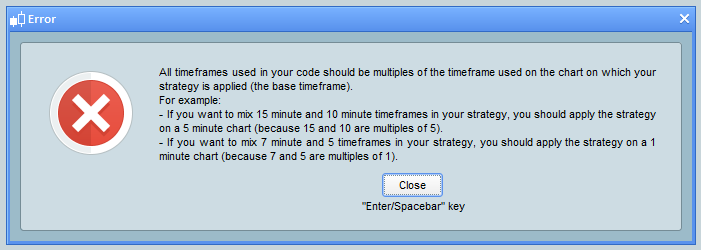
    I´m not getting this to work.  I´m getting this error no mather what i do.(See Attachment)

    I also tried copy/paste of the first code on this link: https://www.prorealcode.com/blog/learning/approach-multi-timeframe-trading-prorealtime/  It´s still the same error message.

    This is my current code:

    // Definition of code parameters
    DEFPARAM CumulateOrders = False // Cumulating positions deactivated
    timeframe(daily)
    // Conditions to enter long positions
    indicator1 = Stochastic[2,1](close)
    c1 = (indicator1 <= 10)
    indicator2 = BollingerBandWidth[20](close)
    c2 = (indicator2 >= 0.10)
    timeframe(1 minute,updateonclose)
    IF c1 and c2 THEN
    BUY 1 CONTRACT AT MARKET
    
    ENDIF
    
    timeframe(daily)
    //Exit on day five
    IF LONGONMARKET AND (BarIndex-TradeIndex) >= 4 THEN
    SELL AT MARKET
    ENDIF
    //Dstat ?
    IF LONGONMARKET AND CLOSE > 1.001 * TRADEPRICE THEN
    SELL AT MARKET
    ENDIF
    
    fel.png fel.png
    #87397 quote
    robertogozzi
    Moderator
    Master

    When using Multiple Time Frames, the main TF (the default one, which is on the chart and from which the strategy is launched) MUST be the lowest TF, in this case 1-minute TF.

    All other TF’s need to be multiple of this main TF.

    You strategy can be launched from 1-minute or lower TF, say 10 seconds or 20 seconds, but NOT 7 seconds because 1-minute, which is 60 seconds, is not a multiple of 7 seconds!

Viewing 6 posts - 1 through 6 (of 6 total)
  • You must be logged in to reply to this topic.

How to buy at close?


ProOrder: Automated Strategies & Backtesting

New Reply
Author
author-avatar
hoggan @hoggan Participant
Summary

This topic contains 5 replies,
has 2 voices, and was last updated by robertogozzi
7 years, 2 months ago.

Topic Details
Forum: ProOrder: Automated Strategies & Backtesting
Language: English
Started: 12/13/2018
Status: Active
Attachments: 1 files
Logo Logo
Loading...
