


How to add text

Viewing 9 posts - 1 through 9 (of 9 total)

  • Author
    Posts
  • #215679 quote
    Owl888
    Participant
    New

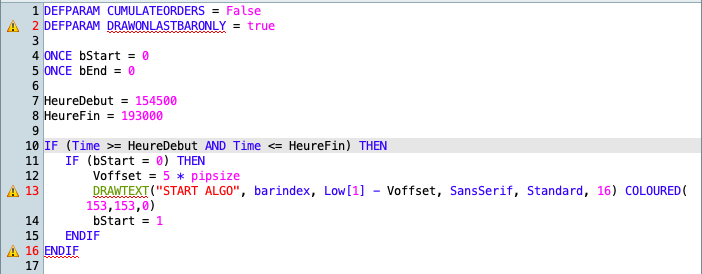
    Hi, I’d like to insert some text above a below the current candle (according to certain conditions). The DRAWTEXT method (https://www.prorealcode.com/<wbr />documentation/drawtext/) doesn’t seem to work. Can someone explain where’s the error in the below code ?

    ONCE bStart = 0
    Voffset = 5 * pipsize
    hd = 154500
    hf = 193000
    
    IF (Time >= hd AND Time <= hf AND bStart = 0)
        DRAWTEXT("START ALGO", barindex, Low[1] - Voffset, SansSerif, Standard, 16) COLOURED(153,153,0)
        bStart = 1
    ENDIF
    

    And btw, it’d be nice to get more insight about syntax error, a hint when mousing over the warning symbol for instance…

    Thanks

    Fred

    PS : sorry I didn’t keep the source code, just a screen shot (attached) and tried to reproduce something meaningful above

    #215683 quote
    robertogozzi
    Moderator
    Master

    Line 1 cannot be used in indicators, it’s reserved for strategies (indicators don’t deal with orderes).

    Line 2 will make ALL graphic objects and text being cancelled and being drawn again each new candle, so once bStart is set, the IF conditions will no more be met, thus DrawText will never be executed again, unless you clear bStart somewhere, and you wll no more seee the text that was previously printed.

    Any line starting with IF must end with THEN (this concerns the code you posted, not the one in the attached pic).

    #215684 quote
    Owl888
    Participant
    New

    The screenshot is from a tradingsystem code.

    OK, let’s assume the code is not going to do what I want (I’d delete line 2 then), still it wouldn’t compile. What’s the problem with line 13 ?

    #215686 quote
    robertogozzi
    Moderator
    Master

    This is the correct code for ProRealTime:

    ONCE bStart = 0
    Voffset = 5 * pipsize
    hd = 154500
    hf = 193000
    IF (Time >= hd AND Time <= hf AND bStart = 0) THEN
       DRAWTEXT("START ALGO", barindex, Low[1] - Voffset, SansSerif, Standard, 16) COLOURED(153,153,0)
       //bStart = 1
    ENDIF
    RETURN

    all indicators must end with the keyword RETURN.

    #215687 quote
    Owl888
    Participant
    New

    I guess the DRAWTEXT function doesn’t work in TradingSystem coding environment (see the little warning icon indicating a syntax / compile error on the screenshot ?).

    Of course, if I put it in an indicator code, everything works fine (no warning icon).

    // Variables contenant le prix d'achat ou de vente (en cas de signal)
    buyLevel = -1
    sellLevel = -1
    
    // Signal LONG lors d'une rupture de tendance descendante par les valeurs max
    // On dessine la flèche de signal, le prix d'achat, le take profit (tp) et le stop loss (sl)
    IF Low[1] < Low[2] AND High[1] < High[2] AND High > High[1] THEN
    buyLevel = High[1] + (dist + spread) * PointSize
    DRAWARROWUP(BarIndex, Low - 2) COLOURED(0,255,0)
    DRAWSEGMENT(BarIndex, buyLevel, BarIndex + 1, buyLevel) COLOURED("Blue") STYLE(LINE,2)
    DRAWSEGMENT(BarIndex, buyLevel + tp, BarIndex + 1, buyLevel + tp) COLOURED("MediumBlue") STYLE(DOTTEDLINE,2)
    DRAWSEGMENT(BarIndex, buyLevel - sl, BarIndex + 1, buyLevel - sl) COLOURED("Crimson") STYLE(DOTTEDLINE,2)
    ENDIF
    
    // Signal SHORT lors d'une rupture de tendance ascendante par les valeurs min
    IF Low[1] > Low[2] AND High[1] > High[2] AND Low < Low[1] THEN
    sellLevel = Low[1] - (dist + spread) * PointSize
    DRAWARROWDOWN(BarIndex, High + 2) COLOURED(255,0,0)
    DRAWSEGMENT(BarIndex, sellLevel, BarIndex + 1, sellLevel) COLOURED("Blue") STYLE(LINE,2)
    DRAWSEGMENT(BarIndex, sellLevel - tp, BarIndex + 1, sellLevel - tp) COLOURED("MediumBlue") STYLE(DOTTEDLINE,2)
    DRAWSEGMENT(BarIndex, sellLevel + sl, BarIndex + 1, sellLevel + sl) COLOURED("Crimson") STYLE(DOTTEDLINE,2)
    ENDIF
    
    DRAWTEXT("START ALGO", barindex, Low[1] - Voffset, SansSerif, Standard, 16) COLOURED(153,153,0)
    
    RETURN buyLevel, sellLevel

    But this is neither what I want nor what I was trying to explain.

    Thanks for your help anyway

    #215689 quote
    robertogozzi
    Moderator
    Master

    Trading systems cannot plot text, or objects. They can only enter and exit trades.

    #215690 quote
    PeterSt
    Participant
    Master

    Of course, if I put it in an indicator code, everything works fine (no warning icon).

    Hi Fred,

    The answer to your “line 13” question is : All of these commands only apply to Indicator code (which end with the Return command).


    The screenshot is from a tradingsystem code.

    In brief, that only allows for Graph and GraphOnPrice.  Nothing of the graphical “nice stuff” works in that part of the platform.
    It is a bit confusing, but you will get used to it.

    Peter

    #215701 quote
    Nicolas
    Keymaster
    Master

    There is also now a new instruction to show variables in trading systems: PRINT

    #215706 quote
    PeterSt
    Participant
    Master

    … with the notice that this now also works with Indicators (assuming that “trading systems” was meant to say just that). I did not really use/test it for Indicators yet but for trading systems it is great.

    But maybe mentioned too early (after all 😉 ) because it is only for V12. At least for me it’s not there in V11.1.

Viewing 9 posts - 1 through 9 (of 9 total)
  • You must be logged in to reply to this topic.

How to add text


ProBuilder: Indicators & Custom Tools

New Reply
Author
author-avatar
Owl888 @owl888 Participant
Summary

This topic contains 8 replies,
has 4 voices, and was last updated by PeterSt

2 years, 8 months ago.

Topic Details
Forum: ProBuilder: Indicators & Custom Tools
Language: English
Started: 06/05/2023
Status: Active
Attachments: 1 files
Logo Logo
Loading...

