


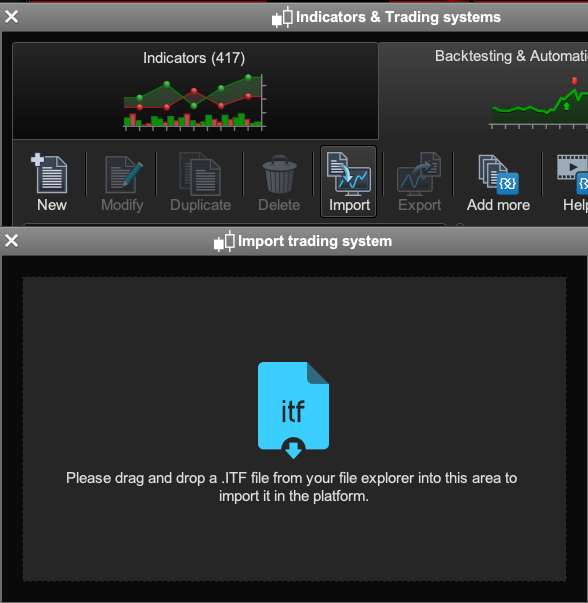
How do I stop this new drag and drop window to import ITF files?

Viewing 3 posts - 1 through 3 (of 3 total)
  • Author
    Posts
  • #121184 quote
    Bard
    Participant
    Master

    Hi there,

    Recently this new drop and drag window apears when I want to import indicator code? How can I get the old window back which allowed me to scan through my downloads folder via the PRT app?

    Cheers,

    drag.png drag.png
    #121205 quote
    Nicolas
    Keymaster
    Master

    This is the new way to import ITF files with a Mac. The old way to import files with a directories browser is no longer possible because of a recent update in Mac file systems. To ensure compatibility between different operating systems, PRT had to create this drag and drop window for Mac users.

    GraHal thanked this post
    #121233 quote
    Bard
    Participant
    Master

    Thanks Nicolas, that’s a pity as I often would see indicators that I’d imported previoulsy but not used yet when I looking through that PRT directory.
    I’m tired of s/ware “developers” at Apple always making things worse!

Viewing 3 posts - 1 through 3 (of 3 total)

  • You must be logged in to reply to this topic.

How do I stop this new drag and drop window to import ITF files?


Platform Support: Charts, Data & Broker Setup

New Reply
Author
author-avatar
Bard @brad Participant
Summary

This topic contains 2 replies,
has 2 voices, and was last updated by Bard

5 years, 11 months ago.

Topic Details
Forum: Platform Support: Charts, Data & Broker Setup
Language: English
Started: 03/04/2020
Status: Active
Attachments: 1 files
Logo Logo
Loading...
