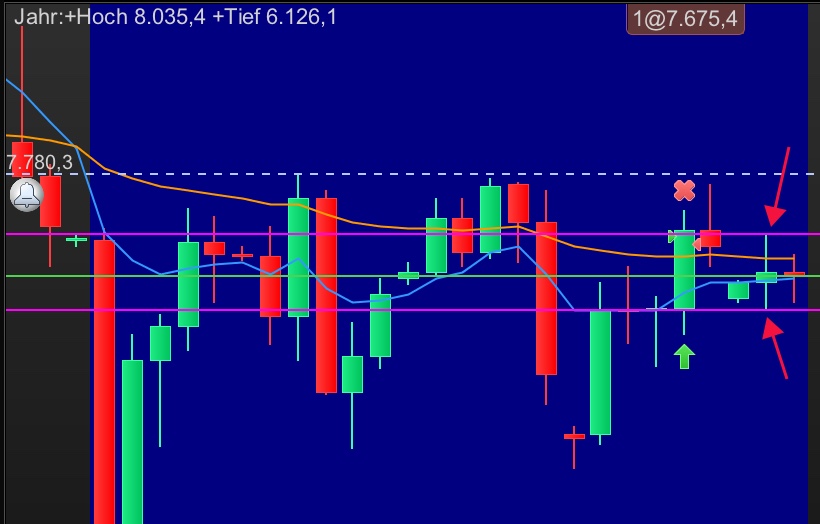
How can I draw the Daily High(1) Daily Low(1) as dotted line?

Viewing 3 posts - 1 through 3 (of 3 total)
  • Author
    Posts
  • #106318 quote
    snow_onar
    Participant
    Senior

    How can I draw the Daily High(1) Daily Low(1) as dotted line? Code is drawing the lines, but not a dotted line! I trying do work with style(dottedline,1), but it seems not possible with DRAWHLINE. Can I store the DRAWHLINE in a variable?

    
    DEFPARAM DrawOnLastBarOnly   = True
    IF OpenDayOfWeek = 1 THEN           //one more day to look back on Monday
    PastBars = 2
    ELSE
    PastBars = 1
    ENDIF
    IF IntraDayBarIndex = 0 THEN
    x = Dhigh(PastBars)
    y = Dlow(PastBars)
    ENDIF
    DRAWHLINE(x) coloured(255,0,255,255)
    DRAWHLINE(y) coloured(255,0,255,255)
    RETURN
    
    #106330 quote
    Nicolas
    Keymaster
    Master

    The DRAWHLINE instruction still don’t have any styling possible (but it should be added soon).

    The only way to deal with styling is by using the values as returned ones, remove the drawhline instructions and replace the RETURN (last line) line with this code:

    RETURN x coloured(255,0,255,255) style(dottedline,1), y  coloured(255,0,255,255) style(dottedline,1)

    You can learn more about styling returned variables in this page: STYLE

    #106338 quote
    snow_onar
    Participant
    Senior

    Thank you a lot for your support, Nicolas 🙂

Viewing 3 posts - 1 through 3 (of 3 total)

  • You must be logged in to reply to this topic.

How can I draw the Daily High(1) Daily Low(1) as dotted line?


ProBuilder Support

New Reply
Author
author-avatar
snow_onar @snow_onar Participant
Summary

This topic contains 2 replies,
has 2 voices, and was last updated by snow_onar
6 years, 5 months ago.

Topic Details
Forum: ProBuilder Support
Language: German
Started: 09/03/2019
Status: Active
Attachments: 1 files
Logo Logo
Loading...