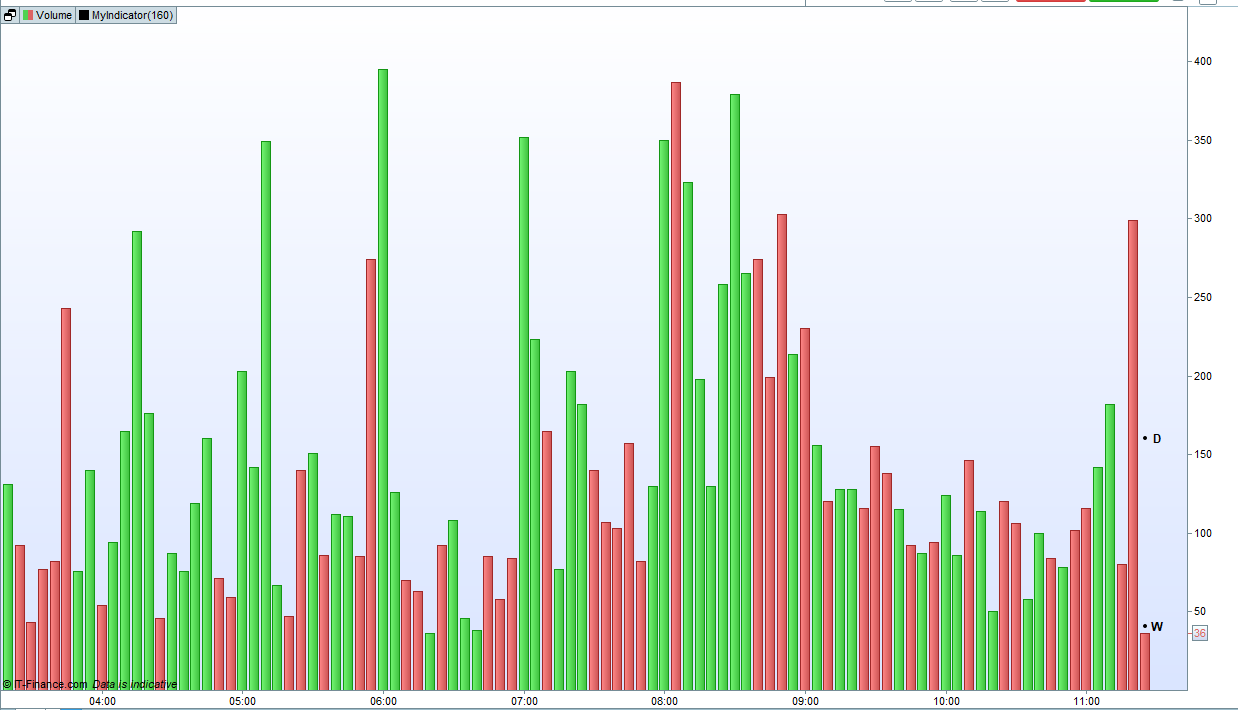
Good morning Roberto and Vonasi, can I ask another question please. On a 30min TF (for example), how can i call the volume for each 30 min bar of the previous day? and the previous week same day (30 min)?
Example: we are 29 Dec. and I would like to plot (1) the current day volume between 9.00 am and 9.30 am, with (2) the 30 min volume of 28 Dec. between 9am and 9.30 am, with the (3) the last week (22 Dec.) volume between 9am and 9.30 am.
Thank you
You can use arrays, 48 elements for the Daily array (24 hours * 2 elements each hour) and 240 for the Weekly array (24 hours * 2 elements * 5 days).
Each 30 minutes you will need to shift all elements 1 place to make room for the new one.
Do not append different questions to exixting topics. Start a new one, instead. Thank you 🙂
I did it.
This returns the volume at the same time the previous day:
$lastvol[opentime] = $vol[opentime]
$vol[opentime] = volume

return $lastvol[opentime]
Sorry but I finally got around to testing that last bit of code and it only works for the first tick at the open of a new volume bar and after that the values update incorrectly.
So I stopped trying to be clever by using arrays and went back to old fashioned loops. It is much slower to load but at least the results are correct. This one includes the volume from this time a week ago too.
for b = 1 to barindex
if opentime[b] = opentime and opendayofweek[b] <> opendayofweek then
lastvol = volume[b]
break
endif
next

for b = 1 to barindex
if opentime[b] = opentime and opendayofweek[b] = opendayofweek then
lastweekvol = volume[b]
break
endif
next

return lastvol as "this time previous day", lastweekvol as "this time last week"
Here is a version that when applied to a volume chart draws points showing the previous days volume for the same candle at this time and the previous weeks volume for the same candle on the same day.
defparam drawonlastbaronly = true

if islastbarupdate then
for b = 1 to barindex
if opentime[b] = opentime and opendayofweek[b] <> opendayofweek then
lastvol = volume[b]
drawpoint(barindex,lastvol,1)coloured(0,0,0)
drawtext("D",barindex+1,lastvol,sansserif,bold,12) coloured(0,0,0)
break
endif
next

for b = 1 to barindex
if opentime[b] = opentime and opendayofweek[b] = opendayofweek then
lastweekvol = volume[b]
drawpoint(barindex,lastweekvol,1)coloured(0,0,0)
drawtext("W",barindex+1,lastweekvol,sansserif,bold,12) coloured(0,0,0)
break
endif
next
else
lastvol = undefined
lastweekvol = undefined
endif

return
Thank you Vonasi. You’re a MASTER! I beleive this can help day traders to detect unusual volume spike during the day or to eliminate noise when price varies without volume.
Again, thank you and happy holiday season!
@Vonasi, @robertogozzi, @Nicolas,
Happy New Year!
Khaled
FYI, intraday relative volume comparison as an indicator can be found here: https://www.prorealcode.com/topic/relative-volume-rvol/#post-125548
Based on this great example, I tried to implement code for a screener that would allow me to calculate “Current cumulative volume up to this time of today / Cumulative volume up to this time of yesterday”. It looks like this:
timeframe (daily)
v=volume
timeframe(default)
vol = volume
for b = 1 to barindex
if opentime[b] = opentime and opendayofweek[b] <> opendayofweek then
lastvol = SUMMATION[b](vol)[b]
break
endif
next
cv = v
RV = round((v/lastvol),2)
return rv
Unfortunately, it did not work properly. When I check and manually count yesterday’s volume to some point in time, I can see that the lastvol is not counted correctly for that period. Could you help me fix a bug that is causing an incorrect calculation of lastvol?
It looks like I finally managed to solve this problem. This code is extremely slow, so it will take a lot of thinking to optimize it (and I would really appreciate tips on improving it – because it’s really VERY slow while using as a screener), but finally I can compare exact volumes!
Defparam DRAWONLASTBARONLY = true
timeframe (daily)
v=volume
timeframe(default)
vol = volume
for b = 1 to barindex
if opentime[b] = opentime and opendayofweek[b] <> opendayofweek then
lastvol = v[b]
break
endif
next
RV = round((v/lastvol),2)
return RV as "Ralative Volume",1