Horizontal Trend Line Indicators

Viewing 5 posts - 1 through 5 (of 5 total)

  • Author
    Posts
  • #33729 quote
    StantonR
    Participant
    Senior

    Hi There

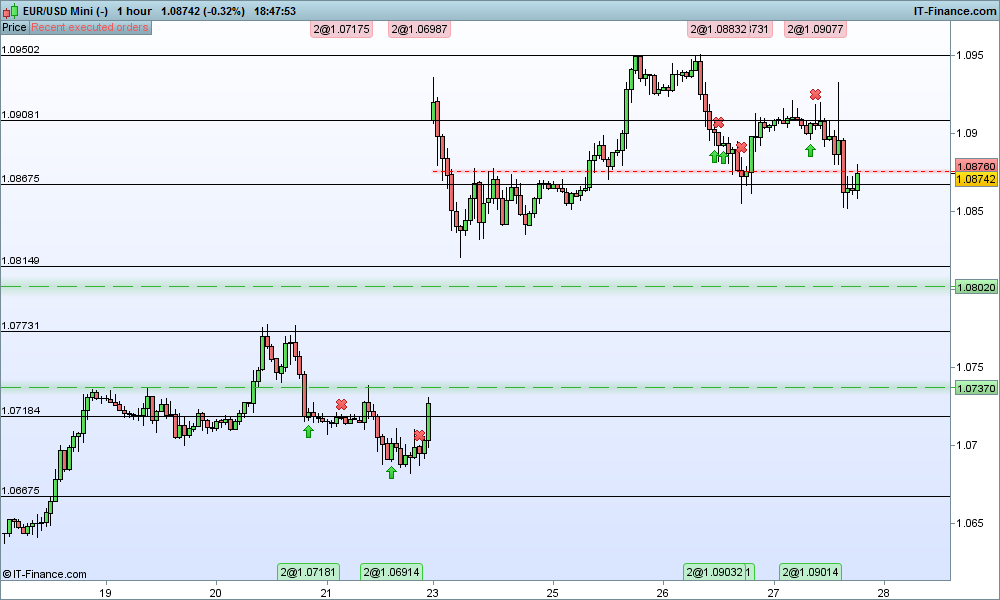
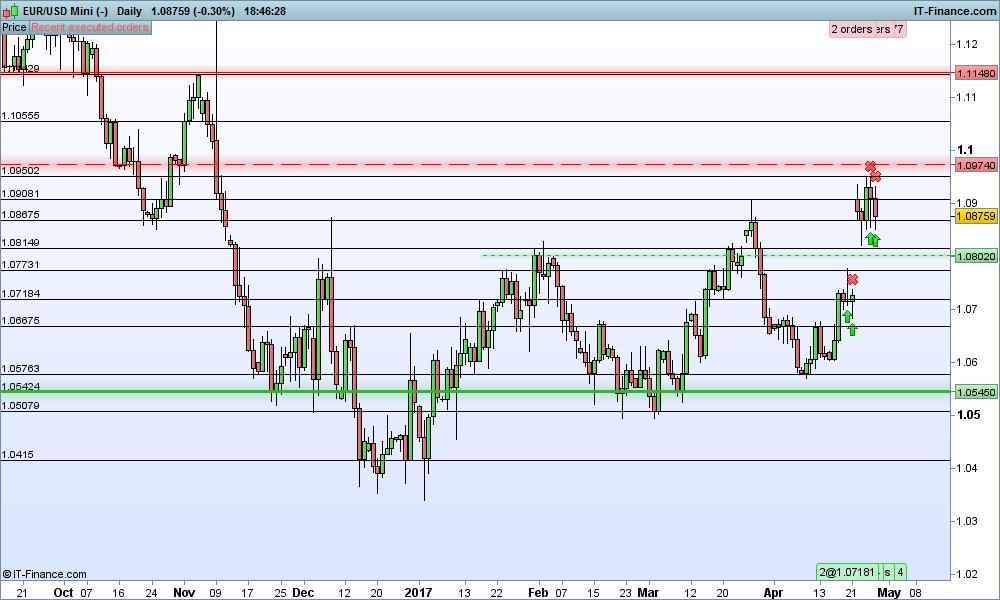
    I am trying to create a horizontal trend line indicator based on my forex trading strategy.
    The idea is to check on the hourly chart the daily closes back for a year.

    1) Loop through daily closes for 1 year.
    2) check if they closed within the same area more than 3 times
    3)Draw a horizontal line at that point.

    I have started the code but not sure if its even possible to do what I want as you can use a daily indicator on a hourly chart.
    Thats why I am looping through the Dhigh() Dlow() DClose() functions.


    margin = 50
    
    FOR i = 1 TO 365 DO
    
    dayclose = DClose(i)
    //dayhigh = DHigh(i)
    //daylow = DLow(i)
    
    resareatop = dayclose + margin*pipsize
    resareabot = dayclose - margin*pipsize
    resistancelines = close > resareabot and close < resareatop
    
    if summation[365](resistancelines) > 3 then
    DRAWHLINE(close)coloured(255,0,0)
    endif
    
    
    NEXT
    return
    

    I dont think you can use summation as that period will be 365 hourly periods.
    I was thinking about using a nested For Loop with a counter if counter is greater than 3 then draw line.
    I have attached images of what I am trying to do.I added the lines to daily chart and when you switch to the hourly chart those lines still act as major support and resistance lines.

    Any guidance would be greatly appreciated.

    Thanks

    #33746 quote
    Nicolas
    Keymaster
    Master

    A nested loop would be the solution, but you may be stuck with the infinite loop bug limit. Repeat after me : ” we NEED arrays !!” 🙂

    #33755 quote
    StantonR
    Participant
    Senior

    Getting slightly better but the results are still not ideal. run in hour timeframe

    margin = 10
    numberofrejections = 4
    FOR i = 1 TO 365 DO
    
    rescounter = 0
    supcounter = 0
    
    dayhigh = DHigh(i)
    daylow = DLow(i)
    
    resareatop = dayhigh + margin*pipsize
    resareabot = dayhigh - margin*pipsize
    
    suptop = daylow + margin*pipsize
    supbot = daylow - margin*pipsize
    
    FOR i = 2 TO 365 DO
    if DHigh(i) > resareabot and DHigh(i) < resareatop then
    rescounter = rescounter + 1
    endif
    if DLow(i) < suptop and DLow(i) > supbot then
    supcounter = supcounter + 1
    endif
    next
    
    if rescounter > numberofrejections then
    DRAWHLINE(dayhigh)coloured(255,0,0)
    endif
    
    if supcounter > numberofrejections then
    DRAWHLINE(daylow)coloured(0, 255, 0)
    endif
    
    NEXT
    return
    
    #33760 quote
    StantonR
    Participant
    Senior

    Is it possible to create dynamic variables.

    IE

    for i=1 to 20 do

    l(i) = i

    next

    And Yes Arrays would be fabulous. PLEASE PLEASE PLEASE.

    #33776 quote
    Nicolas
    Keymaster
    Master

    No that’s what are arrays 🙂

Viewing 5 posts - 1 through 5 (of 5 total)
  • You must be logged in to reply to this topic.

Horizontal Trend Line Indicators


ProBuilder: Indicators & Custom Tools

New Reply
Author
author-avatar
StantonR @stantonr Participant
Summary

This topic contains 4 replies,
has 2 voices, and was last updated by Nicolas

8 years, 9 months ago.

Topic Details
Forum: ProBuilder: Indicators & Custom Tools
Language: English
Started: 04/27/2017
Status: Active
Attachments: 2 files
Logo Logo
Loading...