History of alerts

Viewing 14 posts - 1 through 14 (of 14 total)

  • Author
    Posts
  • #223275 quote
    benkunz
    Participant
    New

    Hi,
    is there a way to see every time an alert was triggered on a given stock ? 2 days ago I could see the icon representing the alert, but now it is gone 🙁
    thanks

    #223276 quote
    GraHal
    Participant
    Master

    There is a setting to show or not show the ‘triggered alert icon’.

    We need to always be stating what version (v11 or V12) we are using as settings are different, so on Main Menu > Help > About what version are you using?

    #223277 quote
    benkunz
    Participant
    New

    sorry, I’ll add the version next time. so V12, with end of day data, and PRT complete.

    #223282 quote
    benkunz
    Participant
    New

    Hi,
    i went through all menus I could find and never saw anything that looks like a triggered alert icon

    #223288 quote
    GraHal
    Participant
    Master

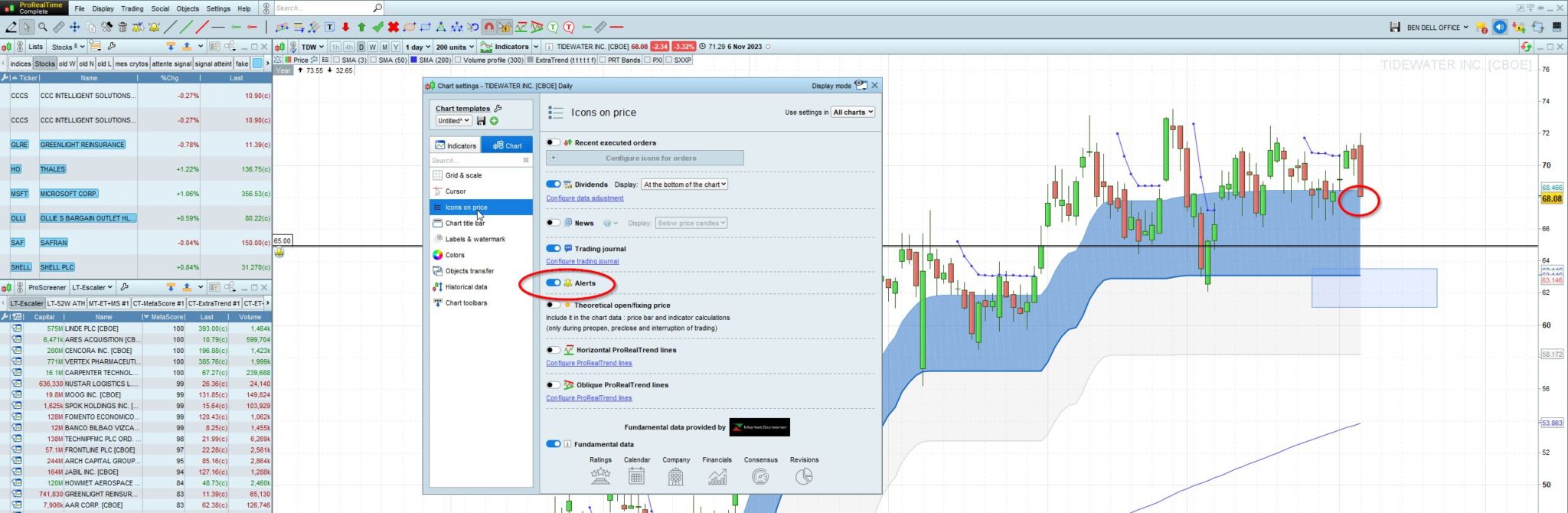
    On V12 … Click on Price > Configure Price > Chart > icons on Price > Alerts

    #223290 quote
    benkunz
    Participant
    New

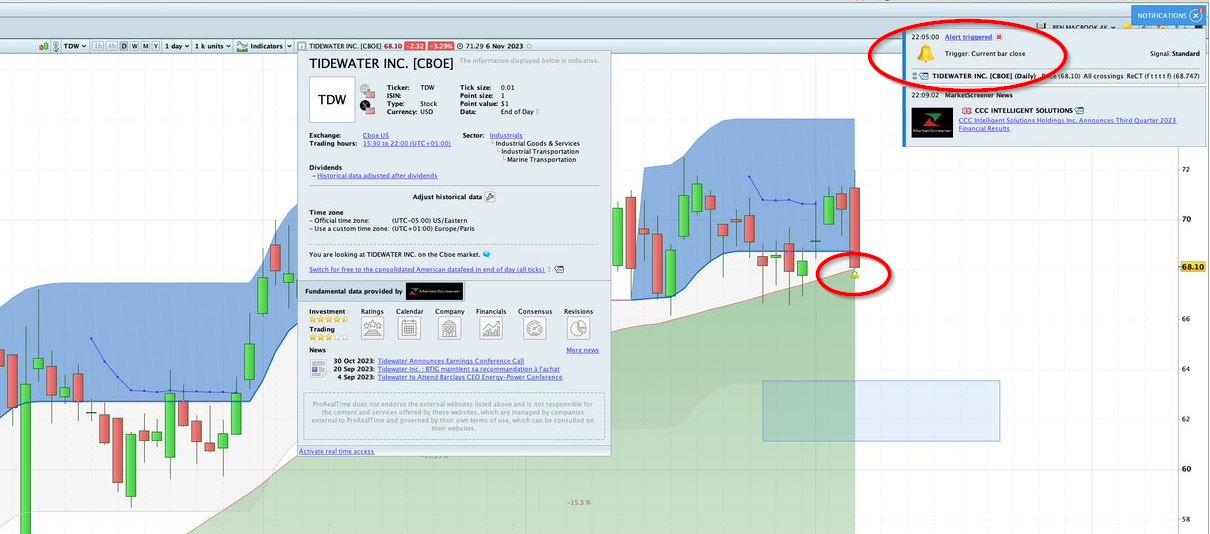
    unfortunately, it doesn’t seem to work. First screenshot of yesterday 22:10 shows the received alert with the icon on graph.
    And on the second screenshot of today, eventhough the checkbox was already checked, the icon is not there anymore

    2023-11-07-09_51_53-Captures-OneDrive.jpg 2023-11-07-09_51_53-Captures-OneDrive.jpg 2023-11-07-09_52_36-TIDEWATER-INC.-CBOE-Daily-68.08-3.32-6-Nov-2023.jpg 2023-11-07-09_52_36-TIDEWATER-INC.-CBOE-Daily-68.08-3.32-6-Nov-2023.jpg
    #223294 quote
    benkunz
    Participant
    New

    my bad, i inverted the captions on the screenshots and i cant change them 🙂

    #223297 quote
    GraHal
    Participant
    Master

    unfortunately, it doesn’t seem to wor

    Has the platform been switched off since the first alert icon showed?

    OR

    Is it maybe to do with the all crossing setting, recall that you only get one Alert with all crossings and then you have to reset the Alert?

    #223301 quote
    benkunz
    Participant
    New

    the screenshot from yesterday was made from home with one computer, and the one from today with another computer from work. So yes the platform was switched off between the 2 screenshots.

    I have no clue about your suggestion, whether all crossing/real time or whatever was checked, I feel that I should be able to somewhere when the alert was triggered, but it is unfortunately not the case. I saw it yesterday, but today it’s gone 🙁

    #223302 quote
    GraHal
    Participant
    Master

    I sugges you set your Alert to Crosses Over or Crosses Under as appropriate (not set to All Crossings) and also set to Real Time (not current bar closes).

    Check on the PC on which you set the Alert (with above settings) and check before the PC is switched off.

    #223311 quote
    benkunz
    Participant
    New

    I changed all my alerts to crosses under or over and to real time (eventhough i only have end of day data).
    I dont remember on which PC i created the alert 🙂
    do you think it could make a difference ?

    #223314 quote
    PeterSt
    Participant
    Master

    You should at least re-check the current setting; what was set on the one PC, is not necessarily set on the other; PRT maintains separate templates for separate PCs (even if the account is the same).
    This probably is not the culprit, but it is always good to check.

    GraHal thanked this post
    #223327 quote
    benkunz
    Participant
    New

    I just checked on the other computer where I’ve had the alert yesterday. Well, today, the alert is gone 🙁

    #223331 quote
    PeterSt
    Participant
    Master

    Assumed you talk about the setting (to begin with) of it :

    I suggested that it could be gone, because there is no single way that I can let stick Notifications in V12. Thus, the checkboxes for those always get randomly deactivated.
    I must have set then On again for 100+ times, but they always get unchecked. In more rare occasions even during a session.
    PRT has formally given up on this one – they just can’t find the culprit or mimic the situation (sent dozens of Technical Reports (Under Help) about it).

    Notifications, to me, look to be a similar mechanism as Alerts.

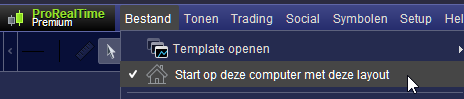
    Something else : you should have two different Templates for the two PCs, plus that you must tell PRT *that* it is about different PCs. You do that at the place you see below.
    To me it is quite vague how that operates, and technically I have blamed many situations to that setting in the first place (have been in the one, in the other something changes). So it is all a bit of speculation.

    image_2023-11-08_043626918.png image_2023-11-08_043626918.png
Viewing 14 posts - 1 through 14 (of 14 total)

  • You must be logged in to reply to this topic.

History of alerts


Platform Support: Charts, Data & Broker Setup

New Reply
Author
author-avatar
benkunz @benkunz Participant
Summary

This topic contains 13 replies,
has 3 voices, and was last updated by PeterSt

2 years, 3 months ago.

Topic Details
Forum: Platform Support: Charts, Data & Broker Setup
Language: English
Started: 11/06/2023
Status: Active
Attachments: 3 files
Logo Logo
Loading...