Historical mode in v11 : How can all 1.000.000 bars be shown in the chart ?

Viewing 15 posts - 1 through 15 (of 23 total)
  • Author
    Posts
  • #152983 quote
    XORANDNOT
    Participant
    Senior

    In the new historical mode of v11, I can’t manage to show all 1.000.000 bars together in the chart window. I only get about 300.000 bars displayed and can display the rest by scrolling the date axis. Is there a way to display all 1.000.000 bars at the same time compressed together on the date axis ? Otherwise it is impossible to see the evolution of profits and losses over the whole 1.000.000 bars, but this is the decisive overview for a trading system !

    Pressing the + and – buttons on the lower right does not change anything as soon as about 300.000 bars are displayed in the window. Only shifting the date axis will show the rest, but never together.

    #152988 quote
    robertogozzi
    Moderator
    Master

    You can try making 4 copies of your chart (with all data you need to check), then manually make each one of them show 250K bars.

    You will not have a common chart, but it could be of some help.

    XORANDNOT thanked this post
    #152995 quote
    XORANDNOT
    Participant
    Senior

    Thanks. Is it possible that this can be changed in the future, so that all 1 million bars can be shown together in 1 chart ? I do not quite understand the sense of this restriction, and it should be very easy to change this from PRT’s side.

    #152998 quote
    robertogozzi
    Moderator
    Master

    I think it’s because of available pixels; compared to the previous maximum of 200K bars, 1M bars need to be squeezed 5 times as much to fit the same screen area.

    If there will be a way to do this in the future we would all welcome it.

    #153036 quote
    PeterSt
    Participant
    Master

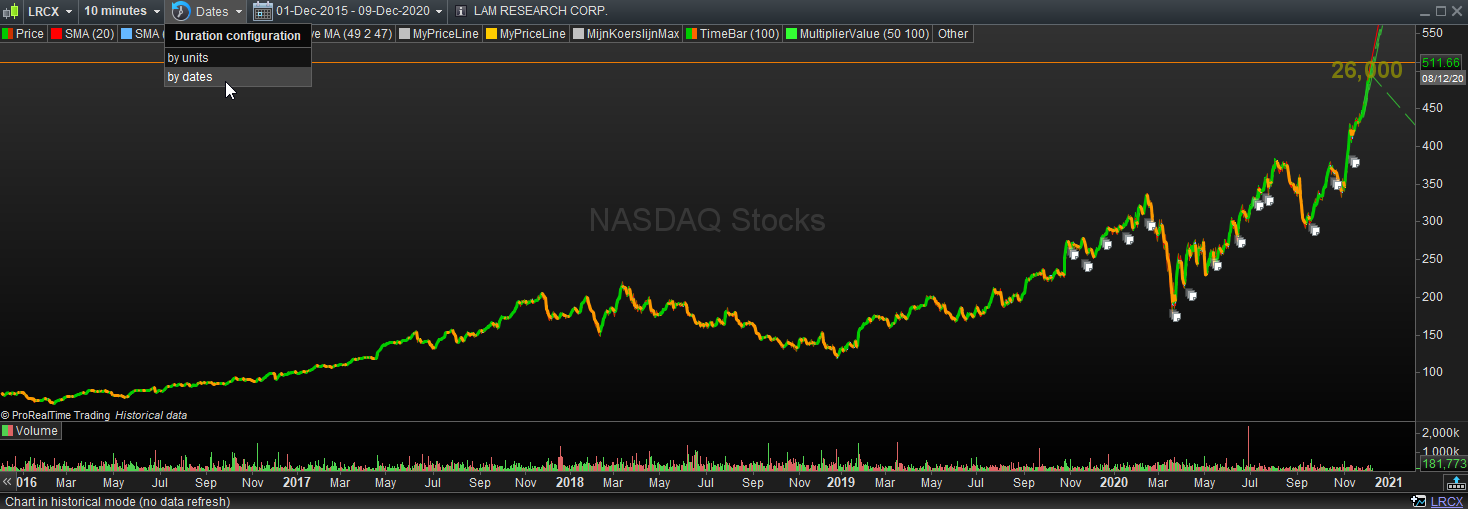
    @XORANDNOT, Won’t it do what you want if you do it like you see in the attachment ?
    In this case I first asked for the 1M historical data and after that for the date period (this could matter for the loading of the historical data – not sure).
    Anyway, there’s no scrollbar now.

    Regards,
    Peter

    PS: I have a Premium account, which may matter. But with the normal “by units” I see the same as you do (always a scroll bar).

    XORANDNOT thanked this post
    Historical01.png Historical01.png Historical01a.png Historical01a.png
    #153039 quote
    PeterSt
    Participant
    Master

    PPS: But please examine carefully whether you have all the data indeed, because if I switch back to “by units” I see no scrollbar (happy) but no matter the bar time (like 10 minutes) the time period remains the same now (unlike as to how it was prior to changing to “by dates”.
    But it would be about the time period you want to have in view, and that seems to work all right.

    #153040 quote
    XORANDNOT
    Participant
    Senior

    @XORANDNOT, Won’t it do what you want if you do it like you see in the attachment ?

    In this case I first asked for the 1M historical data and after that for the date period (this could matter for the loading of the historical data – not sure).

    Anyway, there’s no scrollbar now.


    In your example, you show 5 years in a 10 minute chart, and that’s only about 180.000 bars. That’s why the scroll bar is missing, I guess.

    I would like to show as much as possible in a 10 second chart, all the 1 million bars together in a single window, which is for several months only, depending on the time settings of the chart.

    #153056 quote
    Nicolas
    Keymaster
    Master

    That’s a normal behavior on how the platform display 1M bars on a single chart. As Roberto said earlier, it is just about a limitation on how to show 1 million candlesticks on the chart. I can display also more than 300.000 bars ! :O

    #153065 quote
    Vonasi
    Moderator
    Master

    I have a UK IG spread betting account and I don’t get anywhere near the sort of numbers of candles people are talking about on here. I also don’t see the date options others are showing in images here.

    The maximum number of units I can select is 200K (I had to add this option).

    I added a bar counting indicator that also returned the date of the first candle on the chart and I get the following on the SPTRD (SP500):

    1 second  = 105.6K    2020/12/04

    10 second = 30.8K    2020/12/03

    1 minute = 100K     2020/09/01

    2 minute = 100K    2020/05/26

    5 minute = 105K    2019/07/05

    10 minutes = 52.5K     2019/07/05

    15 minutes = 50K    2018/11/22

    20 minutes = 26.3K    2019/07/05

    30 minutes = 25K    2018/11/22

    1 hour = 26.6K    2016/08/09

    2 hour = 13.4K    2016/08/09

    3 hour = 8.9K    2016/08/09

    4 hour = 6.9K    2016/08/09

    6 hours = 4.5K    2016/08/09

    1 day = 13.5K    1970/01/02

    2 days = 7.8K    1970/01/02

    1 week = 2.6K    1969/12/29

    1 month = 0.6K    1970/01/01


    defparam drawonlastbaronly = true
    
    count = count + 1
    once myyear = openyear
    once mymonth = openmonth
    once myday = openday
    
    DRAWTEXT("#myyear# #mymonth# #myday#",barindex-10,0,SansSerif,Bold,12)coloured(0,0,0)
    return count
    GraHal thanked this post
    #153069 quote
    Nicolas
    Keymaster
    Master

    Only Premium account (IG sponsored account) get 1M bars. IG users have 200k bars, which is twice than with v10.3 for this account type.

    #153074 quote
    Vonasi
    Moderator
    Master

    IG users have 200k bars

    It would appear from my test  that it is 100K in demo and much less if you pick the wrong time frame. Let’s hope we actually get the 200K bars on the live account as I’m certainly not seeing them on demo.

    #153077 quote
    XORANDNOT
    Participant
    Senior

    This is an issue on the live premium v11, which was released yesterday in Germany. I understand that 1M bars consume a lot of pixels, and that this is the underlying rationale. Whatever, I will also post a suggestion to PRT in their suggestion box. Seems not unsolveable to me without eating up all the computer’s memory.

    #153080 quote
    Nicolas
    Keymaster
    Master

    Not an issue, but rather a point of view 🙂

    #153083 quote
    XORANDNOT
    Participant
    Senior

    Oh, “issue” has so many meanings…    The Cambrigde dictionary says :

    issue

    noun [ countable ]


    subject being discussed
    question [feminine]problème [masculine]   😇 
    #153107 quote
    Roger
    Participant
    Veteran

    Hi, concerning the tick by tick restriction (which was 2010-today on v10.3), has it been extended too ? In other words can we backtest in tick by tick before 2010 ?

Viewing 15 posts - 1 through 15 (of 23 total)
  • You must be logged in to reply to this topic.

Historical mode in v11 : How can all 1.000.000 bars be shown in the chart ?


Platform Support: Charts, Data & Broker Setup

New Reply
Author
author-avatar
XORANDNOT @xorandnot Participant
Summary

This topic contains 22 replies,
has 8 voices, and was last updated by Roger

5 years, 2 months ago.

Topic Details
Forum: Platform Support: Charts, Data & Broker Setup
Language: English
Started: 12/08/2020
Status: Active
Attachments: 4 files
Logo Logo
Loading...