


High-Low Charts indicator

Viewing 2 posts - 1 through 2 (of 2 total)
  • Author
    Posts
  • #202224 quote
    robertogozzi
    Moderator
    Master

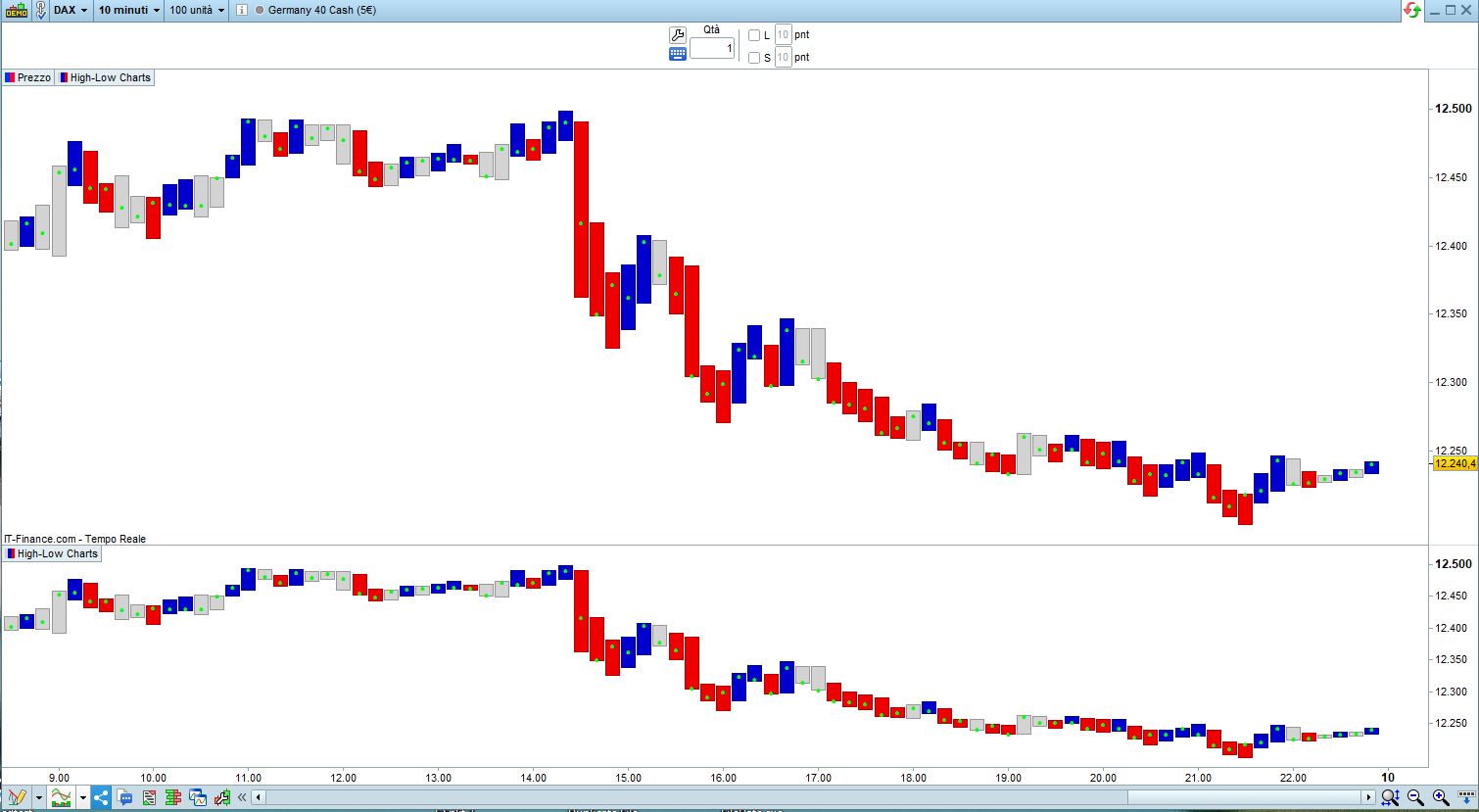
    I ran into a video on YouTube (https://www.youtube.com/watch?v=NfrPZzinYlQ&list=WL&index=1), dealing with High-Low Charts. The idea is quite simple, build candles taking into account just the LOW and the HIGH, no shadows.

    Only 4 patterns may show:

    • Bullish pattern (Blue) is when a candle forms a higher HIGH and a higher LOW
    • Bearish pattern (Red) is when a candle forms a lower HIGH and a lower LOW
    • Engulfing (Grey or Green) is when the range is greater than the previous one; either HIGH or LOW can be equal to the prior candle
    • InsideBAR (Grey or Yellow) is when the range is smaller than the previous one; either HIGH or LOW can be equal to the prior candle

    While the BULLISH and the BEARISH patterns can be used to trade (especially reversals when showing at significant turning points) , the latter two are usually considered as trend continuation patterns.

    The code plots BULLISH candles BLUE, BEARISH candles RED, ENGULFING candles GREY (or GREEN, uncommenting lines 19-21) and INSIDEBAR candles GREY (or YELLOW, uncommenting lines 23-25).

    A light GREEN dot is plotted at the CLOSE, just as a reference. If you don’t like it, comment out line 28.
    Here is the indicator, which can be added ON or BELOW (or both) your chart:

    r         = 211     //Grey
    g         = 211     //Grey
    b         = 211     //Grey
    t         = 255
    Bullish   = (high > high[1]) AND (low > low[1])
    Bearish   = (high < high[1]) AND (low < low[1])
    Engulfing = (high >= high[1]) AND (low <= low[1]) AND (range > range[1])
    InsideBAR = (high <= high[1]) AND (low >= low[1]) AND (range < range[1])
    IF Bullish THEN         //Blue
       r = 0
       g = 0
       b = 205
    ELSIF Bearish THEN      //Red
       r = 238
       g = 0
       b = 0
    ENDIF
    IF Engulfing THEN       //Green
       //r = 193
       //g = 255
       //b = 193
    ELSIF InsideBAR THEN    //Yellow
       //r = 255
       //g = 246
       //b = 143
    ENDIF
    DrawCandle(high,high,low,low) coloured(r,g,b,t)
    Drawtext("●",BarIndex,close,serif,bold,5) coloured(0,255,0,t)   //Green
    RETURN
    PLermite, Louloute, Nicolas and ullle73 thanked this post
    #202227 quote
    robertogozzi
    Moderator
    Master

    This is a simple strategy tested on DAX, Daily chart:

    Bullish   = (high > high[1]) AND (low > low[1])
    Bearish   = (high < high[1]) AND (low < low[1])
    IF Bullish AND (low[1] = lowest[20](low)) AND  Not LongOnMarket THEN
       BUY 1 CONTRACT AT MARKET
    ENDIF
    IF Bearish AND (high[1] = highest[20](high)) AND Not ShortOnMarket THEN
       SELLSHORT 1 CONTRACT AT MARKET
    ENDIF
    SET TARGET pPROFIT 400
    SET STOP   pLOSS   200
Viewing 2 posts - 1 through 2 (of 2 total)
  • You must be logged in to reply to this topic.

High-Low Charts indicator


ProBuilder support

New Reply
Author
Summary

This topic contains 1 reply,
has 1 voice, and was last updated by robertogozzi
3 years, 3 months ago.

Topic Details
Forum: ProBuilder support
Language: English
Started: 10/09/2022
Status: Active
Attachments: 2 files
Logo Logo
Loading...
