Hide currently active candle

Viewing 12 posts - 1 through 12 (of 12 total)

  • Author
    Posts
  • #92745 quote
    Grantx
    Participant
    Average

    Is there a way to hide the currently active candle? I only want to see completed candle formations so for instance on a 30 minute chart I don’t care for where price is at or what the currently forming candle looks like. The most current price is too distracting so I only want to act on the completed structure and not randomly flapping distraction at the end of the chart.

    Thanks.

    #92746 quote
    swapping
    Participant
    Master
    // Body Candle | Indicator
    // 09/02/2019 (Release 1.0)
    // Swapping @ www.forexswap.fr
    // Sharing ProRealTime knowledge (alt+16)
    
    // --- property setting
    //Alpha  = 255 (body transparency)
    // --- end
    
    if open > close then
    DrawCandle(high,open,close,low) coloured(250,0,0,alpha) bordercolor(0,0,0) // Candle Red
    else
    DrawCandle(high,open,close,low) coloured(0,250,0,alpha) bordercolor(0,0,0) // Candle Green
    endif
    
    return


    Hello Grantx

    Yes, here is a code that answers your request

    #92749 quote
    robertogozzi
    Moderator
    Master

    Setting Alpha to 0, the 4th (optional) colour parameter called fade or transparency, will make objects invisible.

    You can use it also for background colours.

    #92750 quote
    robertogozzi
    Moderator
    Master

    You also need to add

    DEFPARAM DrawOnLastBarOnly=true

    to make previous candles visible.

    #223661 quote
    s00071609
    Participant
    Senior

    Hi Roberto

    This code for making current candle completely invisible does not seem to work. I have a dark background. Would you be able to post a full code that can achieve this. Only current candle invisible, rest of the candles show


    thanks

    PJ

    #223667 quote
    robertogozzi
    Moderator
    Master

    This was intended for the current candle only.

    To apply it to the whole chart, simply remove the line DEFPARAM DrawOnLastBarOnly=true.

    #223673 quote
    s00071609
    Participant
    Senior

    removing the line DEFPARAM DrawOnLastBarOnly=true. fades the entire chart – border colour still. But I want the current candle to be invisible and to show all closed candles.

    When i hide price, everything is gone. When i dont, nothing happens. Could you please try in your end. Just the current bar needs to go rest can remain

    #223679 quote
    JS
    Participant
    Senior

    Try this one…

    DefParam DrawOnLastBarOnly=True
    
    If Open>=Close or Open<=Close then
    DrawCandle(Open,High,Low,Close) Coloured(0,0,0,255) BorderColor(0,0,0,255)
    EndIf
     
    Return
    #223682 quote
    s00071609
    Participant
    Senior

    thanks. it does work however, the background is not totally black so it does not hide the current candle but makes it black which is totally visible.

    #223683 quote
    JS
    Participant
    Senior

    I know the problem; it works perfectly with a white background but with a black background it is more difficult. The background and the candle must be exactly the same color, you can adjust this a little bit in the “setup”…

    #223688 quote
    s00071609
    Participant
    Senior
    Yes, its very difficult to achieve same background colour and candle colour. Not sure if there is any solution. Even if its shows a faint candle, its does not achieve the purpose.
    #223740 quote
    robertogozzi
    Moderator
    Master
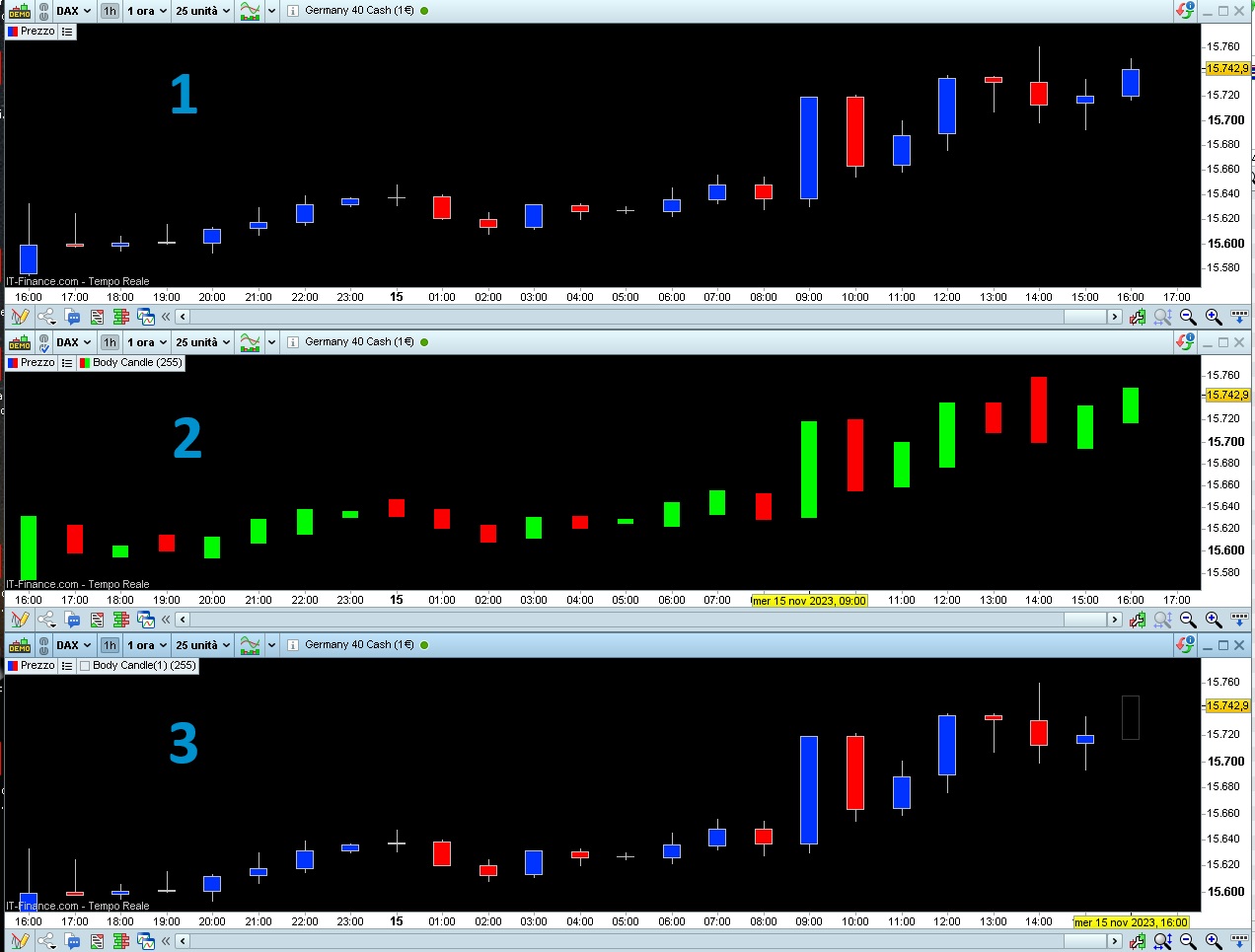
    This code:
    DEFPARAM DrawOnLastBarOnly = true
    DrawCandle(high,high,low,low) coloured(0,0,0,255)
    return
    will make your chart as #3 (in my pic).
Viewing 12 posts - 1 through 12 (of 12 total)

  • You must be logged in to reply to this topic.

Hide currently active candle


ProBuilder: Indicators & Custom Tools

New Reply
Author
author-avatar
Grantx @grantx Participant
Summary

This topic contains 11 replies,
has 3 voices, and was last updated by robertogozzi
2 years, 2 months ago.

Topic Details
Forum: ProBuilder: Indicators & Custom Tools
Language: English
Started: 03/03/2019
Status: Active
Attachments: 2 files
Logo Logo
Loading...