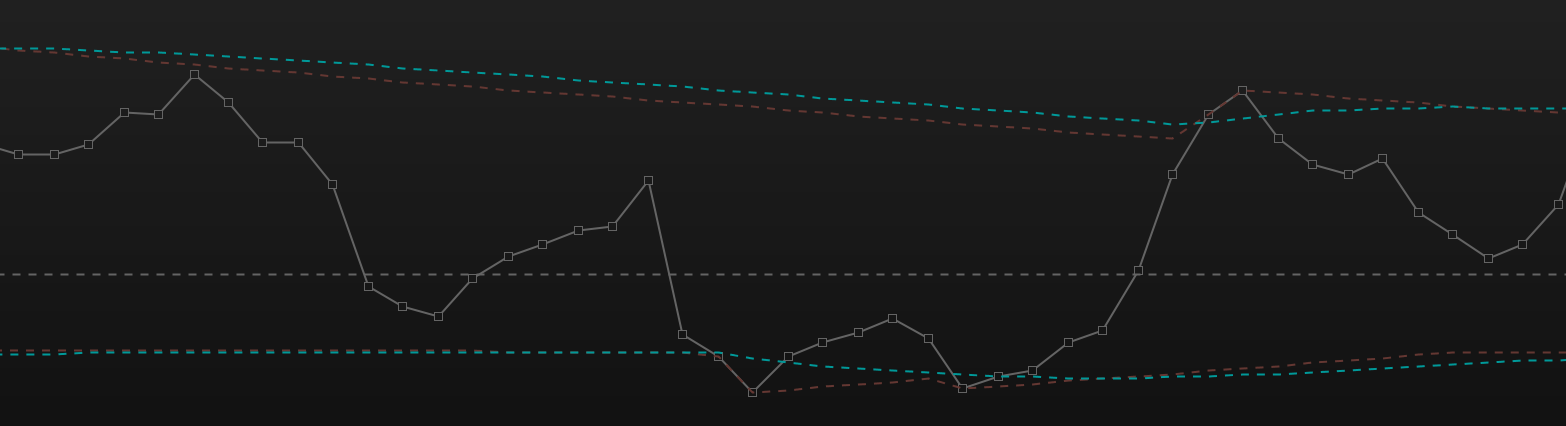
Hi all,
I’m hoping to get some help with a small problem.
In the attached .itf file I have been trying to code in Upper and Lower boundaries (like dynamic reference points). I would like to apply a EMA to the upper and lower boundary plots, but when I try to do this it always ends up changing the original boundary, and all I want is a new EMA plot of the boundary.
Can anyone please tell me where I’m going wrong?
All I want to do is use the EMA to smooth out the boundaries.
So in the picture attached are two EMA’s that I have applied to the two boundaries. I just used the ‘add indicator’ button on the indicator settings tap. I just want to hardwire the EMA’s into the .itf attached…….
Hoping you can help
Thanks
Ross
Please post your code into your next message, better for people to answer directly into your code than to import file and then get back here.. Thank you.
Thanks for that Nicolas, good point.
Here is the code:
if PeriodsBefore>0 then
a = (ExponentialAverage[iFirstMaPeriod](ExponentialAverage[iSecondMaPeriod](ROC[1](close[PeriodsBefore]))))
b = (ExponentialAverage[iFirstMaPeriod](ExponentialAverage[iSecondMaPeriod](ABS(ROC[1](close[PeriodsBefore])))))

MyMacd = 100 * (a/b)
else
a = (ExponentialAverage[iFirstMaPeriod](ExponentialAverage[iSecondMaPeriod](ROC[1](close))))
b = (ExponentialAverage[iFirstMaPeriod](ExponentialAverage[iSecondMaPeriod](ABS(ROC[1](close)))))

MyMacd = 100 * (a/b)
endif
//NormMidpointValue = 0//(NormUpperboundary+NormLowerBoundary)/2
//MidpointValue =0

if NormUpperboundary < MyMacd+ShieldValue then
NormUpperboundary = MyMacd+ShieldValue
else
if (NormUpperboundary-ABS(NormUpperboundary-NormLowerBoundary)* Percentage/100)>= MyMacd then
NormUpperboundary = NormUpperboundary-(ABS(NormUpperboundary-NormLowerBoundary)* Percentage/100)
endif
endif

if NormLowerBoundary > MyMacd-ShieldValue Then
NormLowerBoundary = MyMacd-ShieldValue
else

if (NormLowerBoundary + ABS(NormUpperboundary-NormLowerBoundary)* Percentage/100) <= MyMaCD then
NormLowerBoundary = (NormLowerBoundary + (ABS((NormUpperboundary-NormLowerBoundary))* Percentage/100))
endif
endif

Indicator = 0

Indicator = ((MyMacd - NormLowerBoundary) *200/(NormUpperboundary-NormLowerBoundary) -100)
//NormMidpointValue = ((NormMidpointValue - NormLowerBoundary) *200/(NormUpperboundary-NormLowerBoundary) -100)> 100

If TypeOfRange >0 then
if UpperBoundary <= TypeOfRange then
UpperBoundary = TypeOfRange
endif
endif

if Upperboundary < Indicator+RangeShieldValue then
UpperBoundary = Indicator+RangeShieldValue
else
if (UpperBoundary-ABS(UpperBoundary-LowerBoundary)* RangePercentage/100)>= Indicator then
UpperBoundary = UpperBoundary-(ABS(UpperBoundary-LowerBoundary)* RangePercentage/100)
endif
endif
UpperBoundary = Average[1](UpperBoundary)
If TypeOfRange >0 then
if LowerBoundary >= 0-TypeOfRange then
LowerBoundary = 0-TypeOfRange
endif
endif
if LowerBoundary > Indicator-RangeShieldValue Then
LowerBoundary = Indicator-RangeShieldValue
else
if (LowerBoundary + ABS(UpperBoundary-LowerBoundary)* RangePercentage/100) <= Indicator then
LowerBoundary = (LowerBoundary + (ABS((UpperBoundary-LowerBoundary))* RangePercentage/100))
endif
endif
LowerBoundary = Average[1](LowerBoundary)

return Indicator*Multiplier COLOURED(100, 100, 100) as "MACD", UpperBoundary COLOURED(0,0, 255) as "Upper Boundary", 0 COLOURED(255, 0, 0) as "midline", LowerBoundary COLOURED( 0,255, 0) as "Lower Boundary", (UpperBoundary+LowerBoundary)/2 as "range midline"
VPT PRT – please use the ‘Insert PRT Code’ button when posting code. It makes it far easier for others to read. I have tidied up your post for you 🙂
Create a new variable to be used as your displayed value this way you don’t mess up your calculations.
UB = ExponentialAverage[10](UpperBoundary)
LB = ExponentialAverage[10](LowerBoundary)

return Indicator*Multiplier COLOURED(100, 100, 100) as "MACD", UB COLOURED(0,0, 255) as "Upper Boundary", 0 COLOURED(255, 0, 0) as "midline", LB COLOURED( 0,255, 0) as "Lower Boundary", (UB+LB)/2 as "range midline"
Thank you very much for that Vonasi, thats sorted my problem.
Cheers
Ross