Help with loop code: bollinger bands touch down then up
Forums › ProRealTime English forum › ProOrder support › Help with loop code: bollinger bands touch down then up
- This topic has 10 replies, 3 voices, and was last updated 5 years ago by
Monochrome.
-
-
08/30/2020 at 6:09 PM #142984
Im a complete novice and am learn from the videos. Even bought and watched the advanced videos. Im having diffuculty excuting a loop code.
Im trying to have the code that detects when the prices closes below the bollinger and then closes above the bollinger – in just this two part sequence.
Can someone help me with the template of the code and if it is even a loop code or not?
Thank you in advance
08/30/2020 at 6:56 PM #142989There you go:
12345678910111213141516171819Found = -1BollUP = BollingerUp[20](close)For j = BarIndex downto 0i = BarIndex - jIf close[i+1] < BollUP and close[i] > BollUP ThenFound = iBreakEndifNext// orFound = -1BollUP = BollingerUp[20](close)For j = BarIndex downto 0i = BarIndex - jIf close[i] Crosses Over BollUP ThenFound = iBreakEndifNextThe variable FOUND, if <> -1 retains the bar ID where the event most recently occurred.
1 user thanked author for this post.
08/30/2020 at 10:08 PM #143001Thank you for your reply.
It is my fault, i meant to say when prices closes below the lower bollinger and then (any amount of periods later) closes above the upper bollinger – buy.
I will try to use the IF NEXT structure you provided to try to make it work.
08/30/2020 at 11:12 PM #143003There you go:
12345678910111213141516DEFPARAM CumulateOrders = falseONCE Trigger = 0BollUP = BollingerUp[20](close)BollDOWN = BollingerDown[20](close)IF close < BollDOWN ThenTrigger = 1ENDIFIF close > BollUP AND Trigger = 1 THENTrigger = 2ENDIFIF Trigger = 2 AND Not OnMarket THENBUY 1 Contract AT MarketSET TARGET pPROFIT 100SET STOP pLOSS 50Trigger = 0ENDIF2 users thanked author for this post.
08/30/2020 at 11:13 PM #143004There’s no need to use LOOPS, just wait close < BollDOWN then start triggering, as soon as it closes above BollUP you can enter Long.
1 user thanked author for this post.
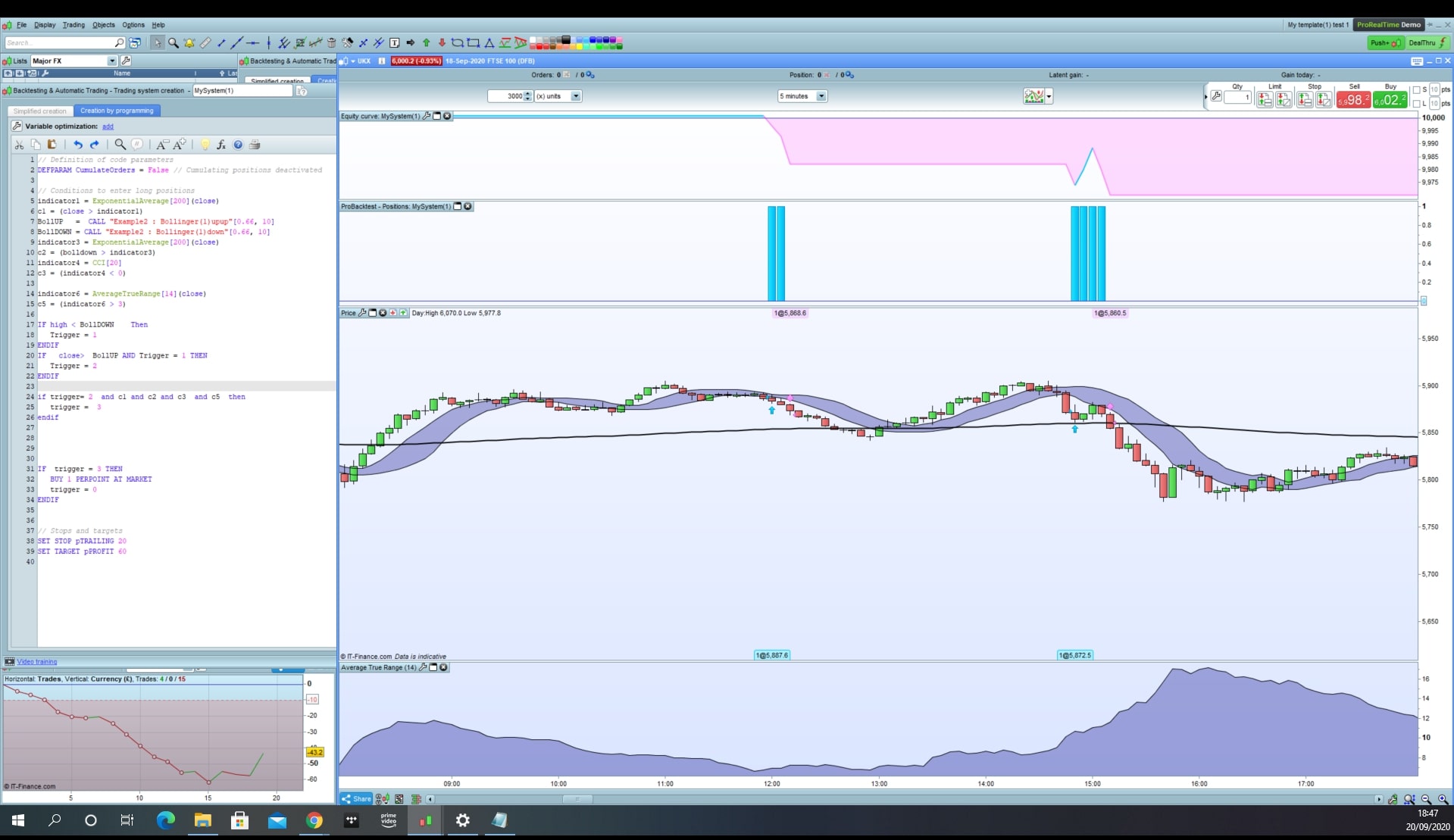
09/20/2020 at 6:56 PM #144829Hi again, i cant seem to get the code working perfectly. Most of the trades are working then some odd trades happens that goes against my code. It makes trades below the bollinger.
Im trying to make it work by the code you have given me plus – bollinger above 200ema as core. (Experimenting with the other indicators.)
This is my code:
123456789101112131415161718192021222324252627282930313233// Definition of code parametersDEFPARAM CumulateOrders = False // Cumulating positions deactivated// Conditions to enter long positionsindicator1 = ExponentialAverage[200](close)c1 = (close > indicator1)BollUP = CALL “Example2 : Bollinger(1)upup”[0.66, 10]BollDOWN = CALL “Example2 : Bollinger(1)down”[0.66, 10]indicator3 = ExponentialAverage[200](close)c2 = (bolldown > indicator3)indicator4 = CCI[20]c3 = (indicator4 < 0)indicator6 = AverageTrueRange[14](close)c5 = (indicator6 > 3)IF high < BollDOWN ThenTrigger = 1ENDIFIF close> BollUP AND Trigger = 1 THENTrigger = 2ENDIFif trigger= 2 and c1 and c2 and c3 and c5 thentrigger = 3endifIF trigger = 3 THENBUY 1 PERPOINT AT MARKETtrigger = 0ENDIF// Stops and targetsSET STOP pTRAILING 30SET TARGET pPROFIT 60Any advice of what im doing wrong? Much appreciated.
thank you
09/20/2020 at 7:04 PM #144830Always use the ‘Insert PRT Code’ button when putting code in your posts to make it easier for others to read.
Thank you 🙂
09/20/2020 at 7:10 PM #144831To be able to replicate your trades you should post the complete code, not just the strategy.
Moreover we need to know:
- instrument traded
- TF used
- date and time of at leasr one bar where a traded was entered incorrectly.
09/20/2020 at 7:19 PM #144832Sorry i thought i had attached a screenshot before. ill try again now
5min tf
eur/usd
Examples in the screenshot
09/21/2020 at 8:20 AM #144852You are never resetting the triggers variables, so they last forever in their actual states until “trigger3”, then the order is executed at next bar open.
1 user thanked author for this post.
09/21/2020 at 11:39 PM #144927How do i reset the variables?
-
AuthorPosts
Find exclusive trading pro-tools on