


Help with coding candlesticks color please!

Viewing 9 posts - 1 through 9 (of 9 total)

  • Author
    Posts
  • #18213 quote
    211211
    Participant
    Senior
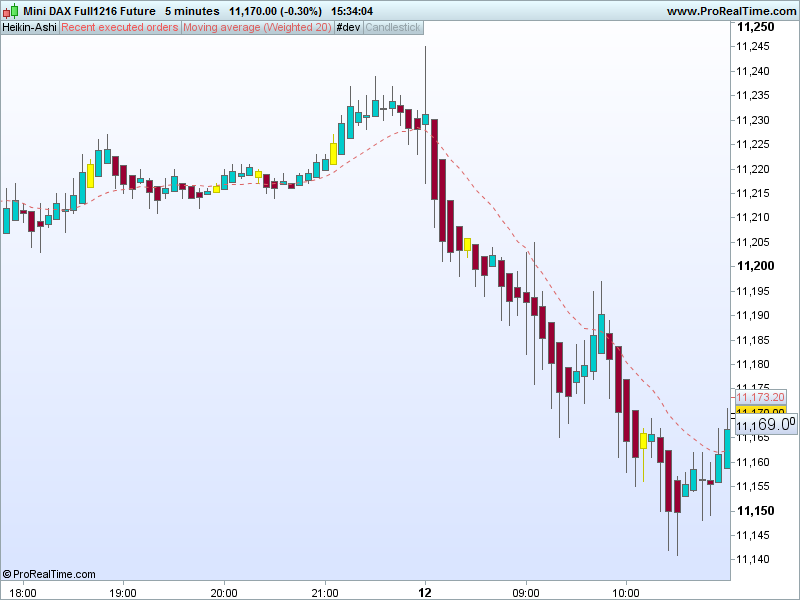
    Hello dear PRT forum, Can somebody help me with some coding? I tried to it myself, but I have no clue what to do and how to make it work. I have 20 Weighted Moving Average, and when the 5th candle (in a uptrend) is above the 20 WMA, the candle changes in a different colour. The same goes the vice versa, when the 5th candle (in a downtrend) is under the 20 WMA, the candle changes in a different colour. Extra info:  I use Heikin-Ashi candlecharts and a 25 tick chart. Attached a pdf file visually explained I hope somebody can help me with this. Many thanks! Fabius
    PRT-coding.pdf
    #18281 quote
    NicolasNicolas
    Keymaster
    Legend
    This is a nice colored chart, well done. Your request is possible, but drawing custom candlesticks and with different colors is only possible with v10.3. So if you are still using the 10.2 (IG users mainly), you’ll not be able to use the code.. You’ll have to wait for the 10.3 release for all users.
    #18309 quote
    211211
    Participant
    Senior
    Hi Nicolas, Thanks for the reply. Can you do the coding please. I know this is not for free. Fabius
    #18312 quote
    NicolasNicolas
    Keymaster
    Legend
    Coding for what version? Everything here on forums is free, unless you need private personal assistance? In this case, please use the programming services form: http://www.prorealcode.com/trading-programming-services/
    #18313 quote
    211211
    Participant
    Senior

    O, coding for PRT 10.3

    #18333 quote
    NicolasNicolas
    Keymaster
    Legend
    So you only need to colour one candlestick? The 5th above or below the 20WMA? All over candlesticks remain of the default colour?
    #18334 quote
    211211
    Participant
    Senior
    Yes, exactly!
    #18346 quote
    NicolasNicolas
    Keymaster
    Legend
    Here is the code corresponding to your request, I’m colouring candlesticks in yellow, you can change this colour with RGB format at lines 18 and 21. Please consider that only close are tested above and below the 20 WMA (for the 5th candle count), not if the candlesticks are bearish or bullish.
    if barindex>1 then
     haclose=(open+close+low+high)/4
     haopen=(haopen[1]+haclose[1])/2
     xHigh = Max(haOpen, haClose)
     xLow = Min(haOpen, haClose)
     hahigh = Max(High,xHigh)
     halow = Min(Low,xLow)
    endif
    avg = weightedaverage[20](close)
    
    if haclose crosses over avg then
     trend = 1
    elsif haclose crosses under avg then
     trend = -1
    endif
    
    if trend = 1 and summation[5](haclose>avg)=5 then
     drawcandle(haopen,hahigh,halow,haclose)coloured(255,255,0)
     trend = 0
    elsif trend = -1 and summation[5](haclose<avg)=5 then
     drawcandle(haopen,hahigh,halow,haclose)coloured(255,255,0)
     trend = 0
    endif
    
    return 
    color-candlesticks-prorealtime.png color-candlesticks-prorealtime.png
    #18350 quote
    211211
    Participant
    Senior
    Hi Nicolas, Thank you so much for the coding, it works perfectly!! Again many thanks, Fabius
Viewing 9 posts - 1 through 9 (of 9 total)
  • You must be logged in to reply to this topic.

ProRealAI ProRealAI New

Stuck on this ProBuilder code?

Describe what this topic is trying to build, in plain English, and ProRealAI writes the ProRealTime™ indicator, screener or system for you.

Available in 7 languages
Try ProRealAI

Help with coding candlesticks color please!


ProBuilder: Indicators & Custom Tools

New Reply
Author
author-avatar
211 @211 Participant
Summary

This topic contains 8 replies,
has 2 voices, and was last updated by 211211
9 years, 9 months ago.

Topic Details
Forum: ProBuilder: Indicators & Custom Tools
Language: English
Started: 12/10/2016
Status: Active
Attachments: No files
ProRealCode ProRealCode
Loading...

