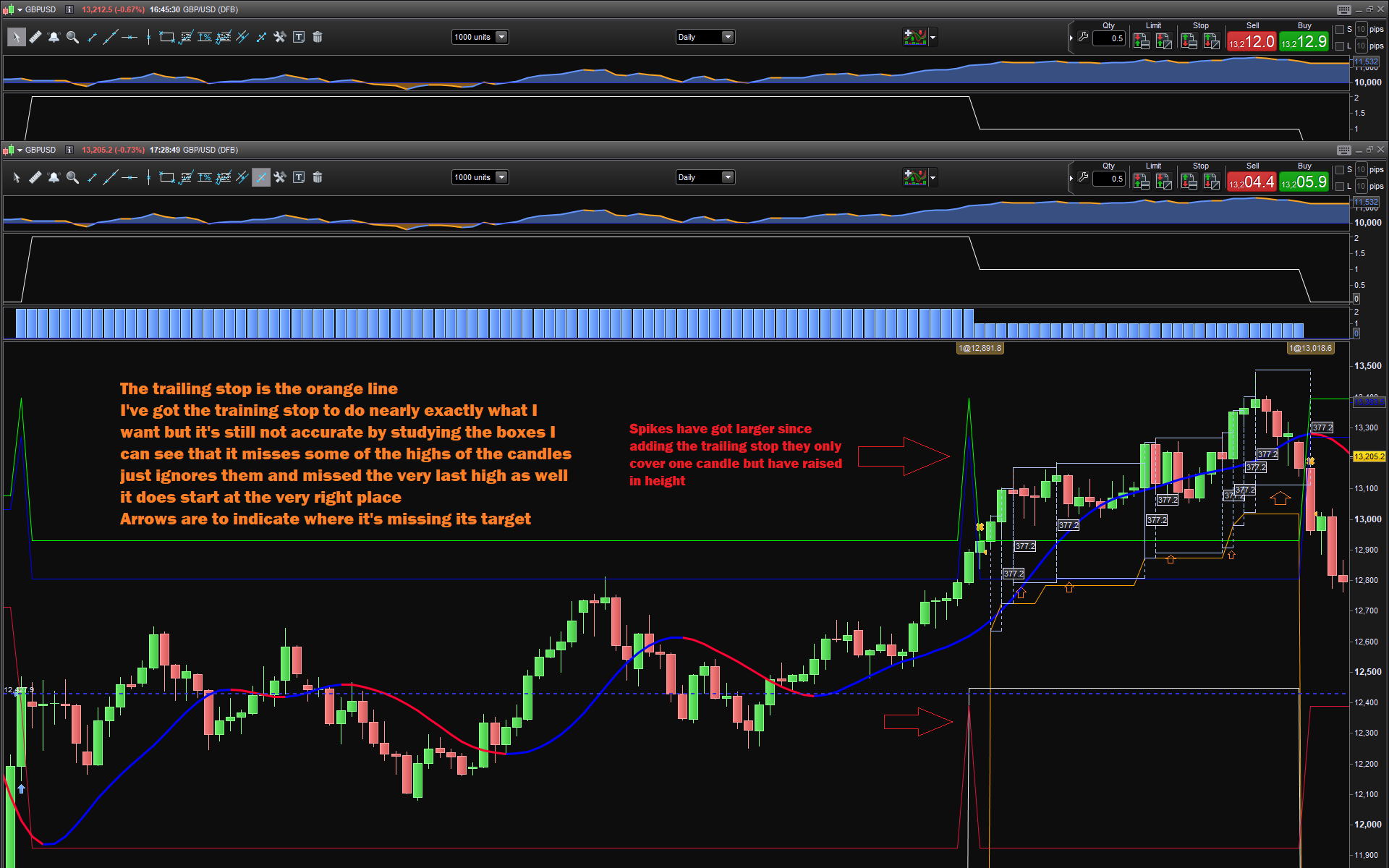
I mean the Red Arrows sorry not the blue ones forget the blue ones
There was an issue with AVERAGETRUERANGE, since it returns a very small value (such as 0.00963), it is always rounded to 0.
There’s no need to ROUND() the value returned by ATR; TP & SL can retain decimal values.
I also had to add PIPSIZE when setting STOP LOSS.
There you go:
// Conditions to enter long positions
defparam cumulateorders = false


PointsToKeep = 2 //how much pips/points to keep in profit above of below our entry price when the breakeven is activated (beware of spread)

// Conditions to enter long positions
indicator2, indicator1, ignored = CALL "PRC_QQE indicator"//[11, 20, 4.236]
A1 = (indicator1 CROSSES OVER indicator2)
indicator3 = Williams[8](close)
A2 = (indicator3 >= -20)

IF A1 AND A2 AND Not OnMarket THEN
// Stops and targets :
St = AverageTrueRange[14](CLOSE)*2
Tp = AverageTrueRange[14](CLOSE)*1.5
startBreakeven = TP //how much pips/points in gain to activate the breakeven function?
BUY 2 PERPOINT AT MARKET
SET STOP PLOSS St * pipsize //first stoploss
endif

//reset the breakevenLevel when no trade are on market
IF NOT ONMARKET THEN
breakevenLevel=0
ENDIF

// --- BUY SIDE ---
//test if the price have moved favourably of "startBreakeven" points already
IF LONGONMARKET AND close-tradeprice(1)>=startBreakeven*pipsize THEN
//calculate the breakevenLevel
breakevenLevel = tradeprice(1)+PointsToKeep*pipsize
ENDIF

IF LONGONMARKET AND Close >= (TradePrice + Tp) AND abs(CountOfPosition) = 2 THEN
SELL 1 PERPOINT AT MARKET
ENDIF

//place the new stop orders on market at breakevenLevel
IF breakevenLevel>0 THEN
SELL AT breakevenLevel STOP
ENDIF

// Conditions to exit long positions
indicator5, indicator4, ignored = CALL "PRC_QQE indicator"//[11, 20, 4.236]
B1 = (indicator4 CROSSES UNDER indicator5)

IF B1 THEN
SELL AT MARKET
ENDIF


// Conditions to enter short positions
// Conditions to enter short positions
indicator7, indicator6, ignored = CALL "PRC_QQE indicator"//[11, 20, 4.236]
C1 = (indicator6 CROSSES UNDER indicator7)
indicator8 = Williams[8](close)
C2 = (indicator8 <= -80)

IF C1 AND C2 AND Not OnMarket THEN
// Stops and targets :
St = AverageTrueRange[14](CLOSE)*2
Tp = AverageTrueRange[14](CLOSE)*1.5
startBreakeven = TP //how much pips/points in gain to activate the breakeven function?
SELLSHORT 2 PERPOINT AT MARKET
SET STOP PLOSS St * pipsize //first stoploss
endif

//reset the breakevenLevel when no trade are on market
IF NOT ONMARKET THEN
breakevenLevel=0
ENDIF

// --- Sell SIDE ---
//test if the price have moved favourably of "startBreakeven" points already
IF SHORTONMARKET AND close-tradeprice(1)>=startBreakeven*pipsize THEN
//calculate the breakevenLevel
breakevenLevel = tradeprice(1)+PointsToKeep*pipsize
ENDIF

IF SHORTONMARKET AND Close <= (TradePrice - Tp) AND abs(CountOfPosition) = 2 THEN
EXITSHORT 1 PERPOINT AT MARKET
ENDIF

//place the new stop orders on market at breakevenLevel
IF breakevenLevel>0 THEN
EXITSHORT AT breakevenLevel STOP
ENDIF

// Conditions to exit short positions
indicator10, indicator9, ignored = CALL "PRC_QQE indicator"//[11, 20, 4.236]
D1 = (indicator9 CROSSES OVER indicator10)

IF D1 THEN
EXITSHORT AT MARKET
ENDIF


Graph        B1
graph        TP                   coloured(0,0,255,255)
Graph        abs(CountOfPosition)
GraphOnPrice (TradePrice + Tp)    coloured(0,255,0,255) AS "Long  EXIT 1"
GraphOnPrice (TradePrice - Tp)    coloured(0,0,255,255) AS "Short EXIT 1"
graph AverageTrueRange[14](CLOSE)
I left some GRAPH and GRAPHONPRICE instructions at the end to help you debug your code.
Hello Roberto the break-even doing what it’s meant to do I added count of position to line 29.
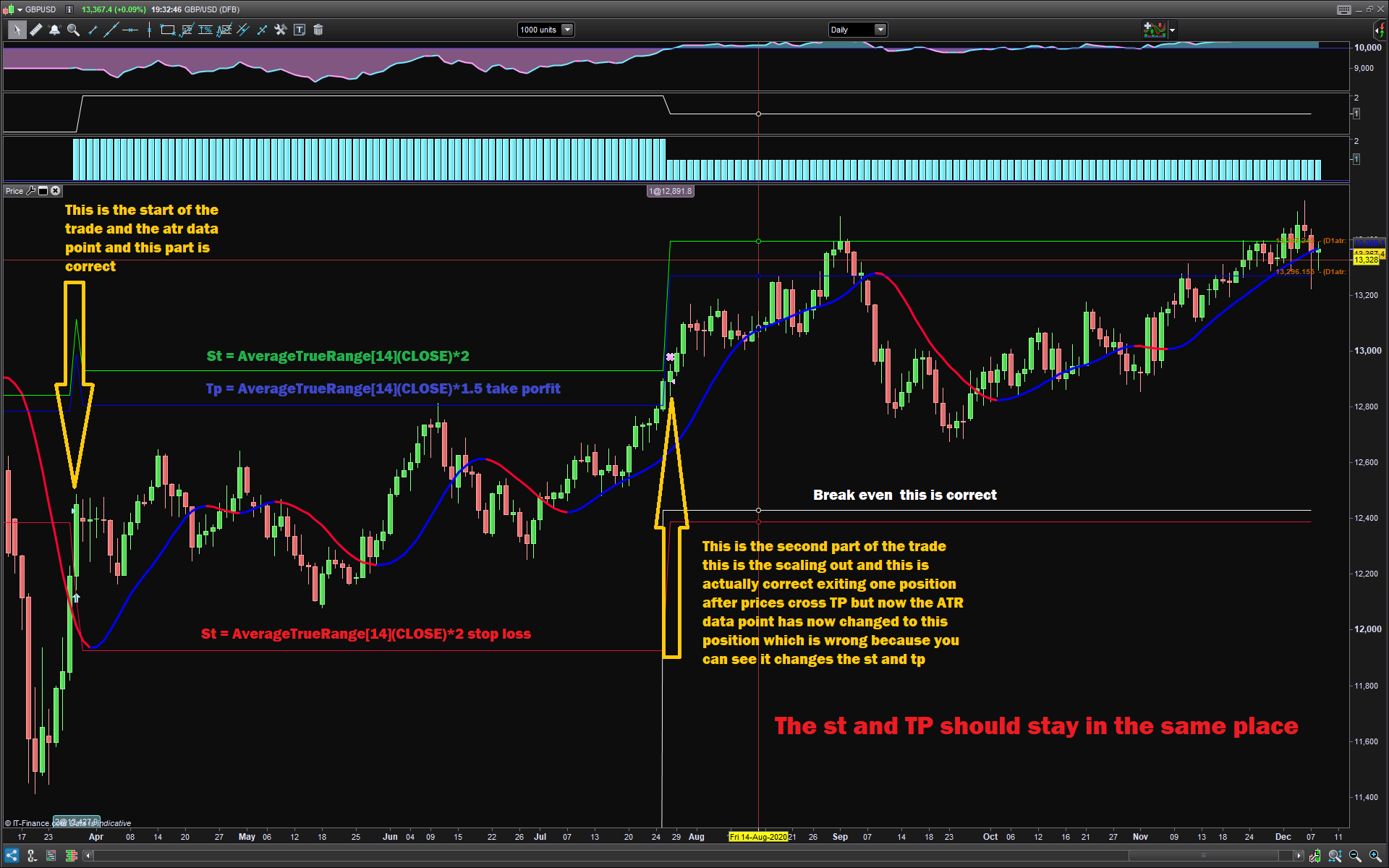
The major problem I am having is the data from the average true range at the beginning of the trade. it takes the right data point from the buy trade price(tradeprice) but the problem comes from the scaling out because that becomes a new (tradeprice) line 34, so that’s a new data point from the ATR which then changes my stop loss my take profit and (St)
I just want to focus on how to keep the data point the same throughout the trade, is there a way of numbering the trade prices first trade price second trade price would that be the same as tradeindex.
I’ve added the code is just the long side of it just to keep it simple and I’ve also added a picture that should explain this even clearer thank you very much
// Conditions to enter long positions
defparam cumulateorders = false

PointsToKeep = 2 //how much pips/points to keep in profit above of below our entry price when the breakeven is activated (beware of spread)

// Conditions to enter long positions
// Conditions to enter long positions
indicator2, indicator1, ignored = CALL "PRC_QQE indicator"[11, 20, 4.236]
A1 = (indicator1 CROSSES OVER indicator2)
indicator3 = Williams[8](close)
A2 = (indicator3 >= -20)

IF A1 AND A2 AND Not OnMarket THEN
// Stops and targets :
St = AverageTrueRange[14](CLOSE)*2
Tp = AverageTrueRange[14](CLOSE)*1.5
startBreakeven = TP //how much pips/points in gain to activate the breakeven function?
BUY 2 PERPOINT AT MARKET
SET STOP PLOSS St * pipsize //first stoploss
endif

//reset the breakevenLevel when no trade are on market
IF NOT ONMARKET THEN
breakevenLevel=0
ENDIF

// --- BUY SIDE ---
//test if the price have moved favourably of "startBreakeven" points already
IF LONGONMARKET AND abs(CountOfPosition) = 2 and close-tradeprice(1)>=startBreakeven*pipsize THEN
//calculate the breakevenLevel
breakevenLevel = tradeprice(1)+PointsToKeep*pipsize
ENDIF

IF LONGONMARKET AND Close >= (TradePrice + Tp) AND abs(CountOfPosition) = 2 THEN
SELL 1 PERPOINT AT MARKET
ENDIF

//place the new stop orders on market at breakevenLevel
IF breakevenLevel>0 THEN
SELL AT breakevenLevel STOP
ENDIF


GraphOnPrice (breakevenlevel)     coloured(0,100,0,150) AS "breakeven1"
Graph        abs(CountOfPosition)
GraphOnPrice (TradePrice + Tp)    coloured(0,0,255,255) AS "Long  EXIT 1"
GraphOnPrice (TradePrice + St)    coloured(0,255,0,255) AS "Long  EXIT 2"
GraphOnPrice (TradePrice - St)    coloured(220,20,60) AS "Short EXIT 1"
Hello Roberto I’ve made a mistake in the statement above
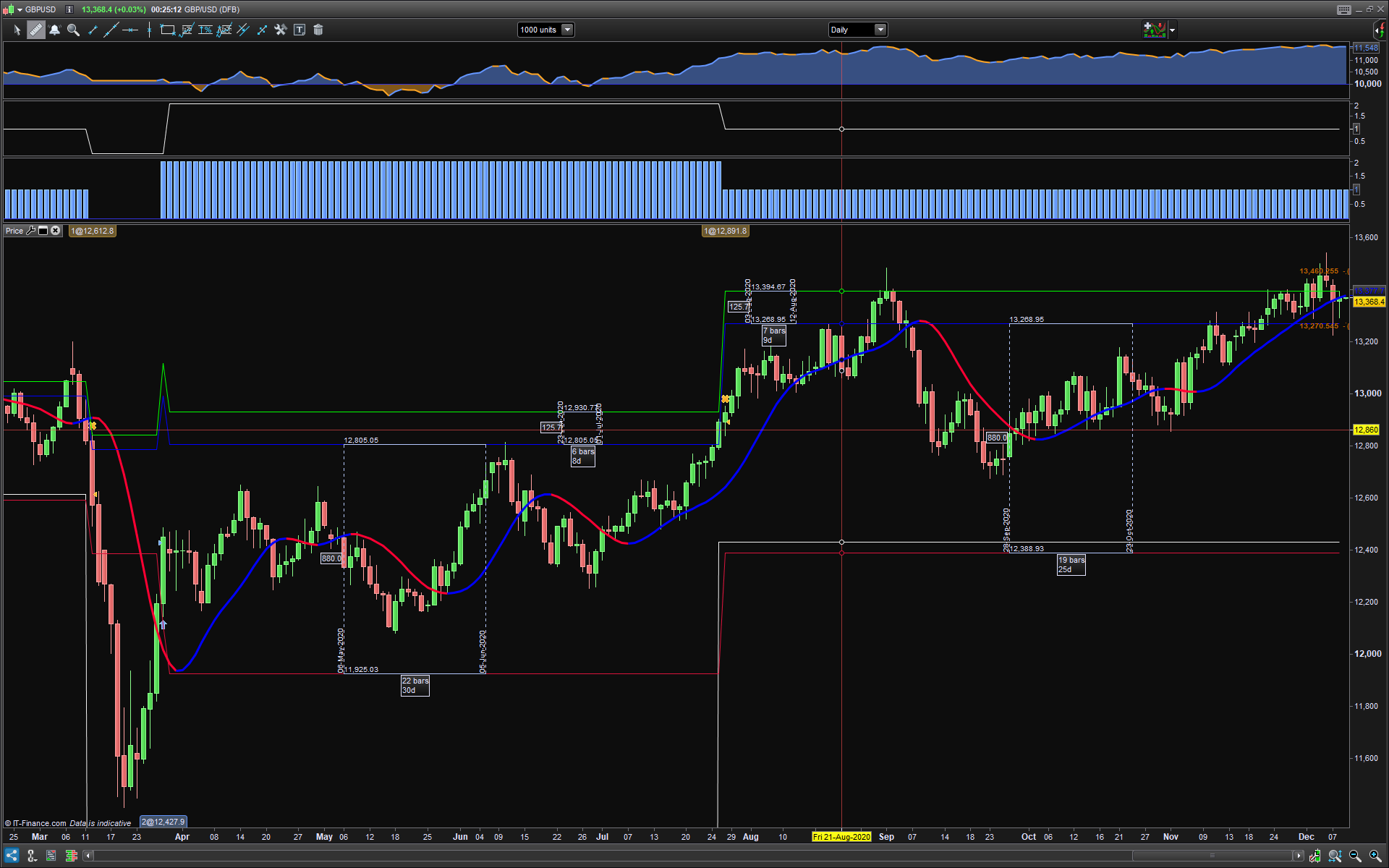
the data point from the ATR is not actually changing it’s doing what it’s meant to do, and what I want it to do but where it’s anchored from the trade price that’s changing I need to somehow anchor it to the first trade price the buying of the two contracts when I scale-out half that becomes the new trade price the new image below I put rulers on it to take measurements on the left side of the trade when there are two contracts and on the right side when there’s one contract,
And you can see the measurements are the same but they’ve moved because the Anchor point is the trade price and the scaling out add new trade prices
Replace any occurrence of TRADEPRICE(1) with:
TRADEPRICE(N)
Add this at line 3:
ONCE N = 1
add this line between lines 19 and 20:
N = 1
and add this line between lines 35 and 36:
N = 2
All these changes will allow your code to refer TRADEPRICE(1) when 2 positions are bought, then TRADEPRICE(2) after half is sold, because at that time the EXIT price becomes the new TRADEPRICE(1) so you’ll have to refer to the previous one which has become TRADEPRICE(2).
Hello Roberto
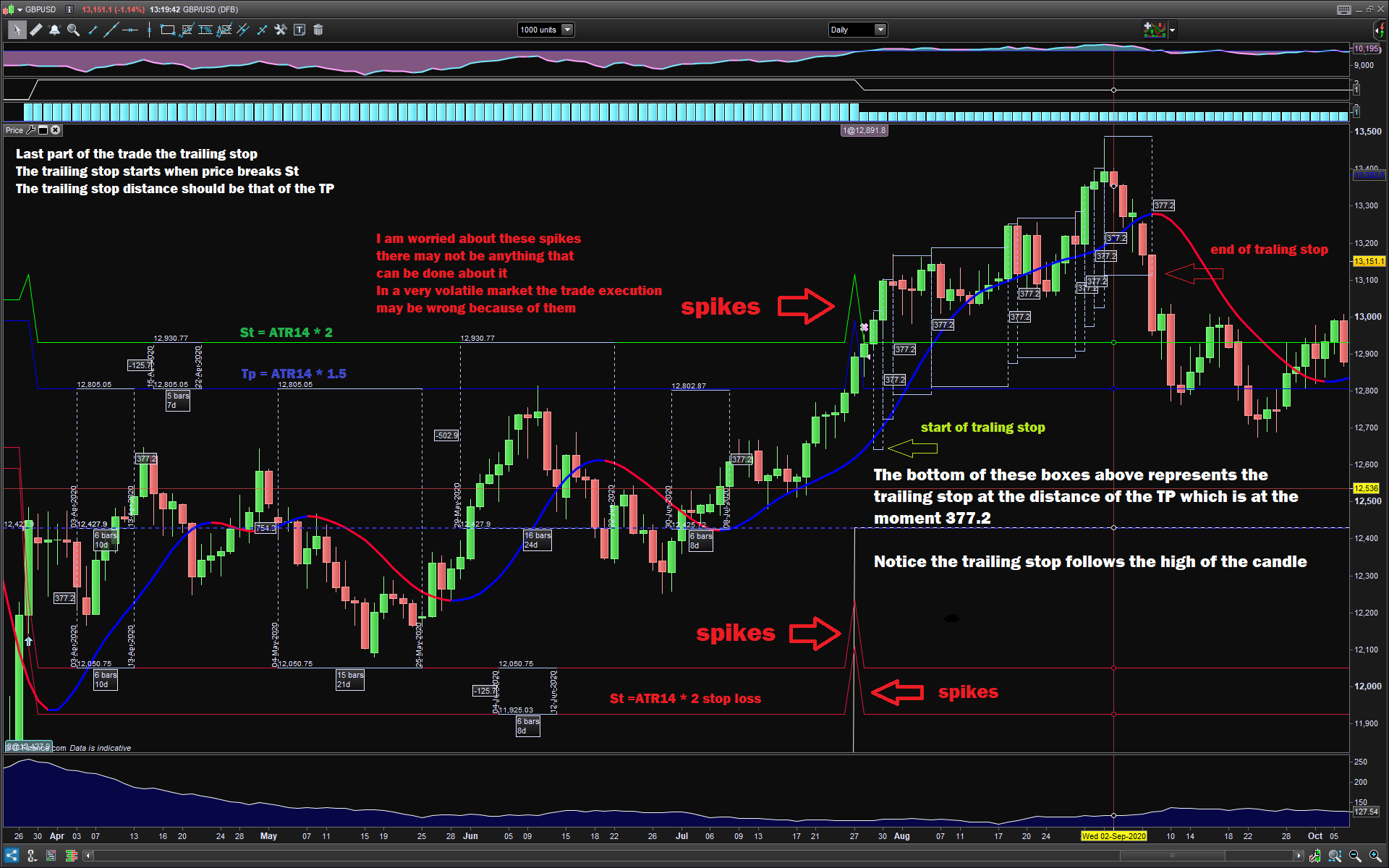
I’ve added a trailing stop to the code it seems to be working alright 90% I’ve added some pictures down below to help explain but the TS and TP there’s some spikes on the chart that worry me a little you might be able to iron them out not sure. The trailing stop is nearly close to perfect but you might be able to make it actually perfect, again I’m not sure so I’ve added 2 pictures and if you take a look it should explain it, The trailing stop is just missing its target or missing a candle altogether
// Conditions to enter long positions
defparam cumulateorders = false
ONCE N = 1

PointsToKeep = 20 //how much pips/points to keep in profit above of below our entry price when the breakeven is activated (beware of spread)

// Conditions to enter long positions
// Conditions to enter long positions
indicator2, indicator1, ignored = CALL "PRC_QQE indicator"[11, 20, 4.236]
A1 = (indicator1 CROSSES OVER indicator2)
indicator3 = Williams[8](close)
A2 = (indicator3 >= -20)

IF A1 AND A2 AND Not OnMarket THEN
// Stops and targets :
St = AverageTrueRange[14](CLOSE)*2
Tp = AverageTrueRange[14](CLOSE)*1.5
startBreakeven = TP //how much pips/points in gain to activate the breakeven function?
trailingstart = St //trailing will start @trailinstart points profit
trailingstep = Tp* pipsize //trailing step to move the "stoploss"
BUY 2 PERPOINT AT MARKET
SET STOP PLOSS St *pipsize  //first stoploss
N = 1
endif

//reset the breakevenLevel when no trade are on market
IF NOT ONMARKET THEN
breakevenLevel=0
ENDIF

//reset the stoploss value
IF NOT ONMARKET THEN
newSL=0
ENDIF

// --- BUY SIDE ---
//test if the price have moved favourably of "startBreakeven" points already
IF LONGONMARKET AND abs(CountOfPosition) = 2 and close-TRADEPRICE(N)>=startBreakeven*pipsize THEN
//calculate the breakevenLevel
breakevenLevel = TRADEPRICE(N)+PointsToKeep*pipsize
ENDIF

IF LONGONMARKET AND Close >= (TRADEPRICE(N) + Tp) AND abs(CountOfPosition) = 2 THEN
SELL 1 PERPOINT AT MARKET
N = 2
ENDIF

IF LONGONMARKET THEN
//first move (breakeven)
IF newSL=0 AND close-TRADEPRICE(N)>=trailingstart*pipsize THEN
newSL = high-trailingstep*pipsize
ENDIF
//next moves
IF newSL>0 AND close-newSL>=trailingstep*pipsize THEN
newSL = high-trailingstep*pipsize
ENDIF
ENDIF

//place the new stop orders on market at breakevenLevel
IF breakevenLevel>0 THEN
SELL AT breakevenLevel STOP
ENDIF

IF newSL>0 THEN
SELL AT newSL STOP
ENDIF

GraphOnPrice (newSL)                 coloured(255,165,0) AS "Trallingstop"
GraphOnPrice (breakevenlevel)        coloured(0,100,0,150) AS "breakeven1"
Graph        abs(CountOfPosition)
GraphOnPrice (TradePrice(N) + Tp)    coloured(0,0,255,255) AS "Long  EXIT 1"
GraphOnPrice (TradePrice(N) + St)    coloured(0,255,0,255) AS "Long  EXIT 2"
GraphOnPrice (TradePrice(N) - St)    coloured(220,20,60) AS "Short EXIT 1"
//GraphOnPrice (TradePrice(N) - tp)    coloured(220,20,60) AS "Short EXIT 2"
Thank you
good evening i just arrived on this topic..cannot find: PRC_QQE indicator
Your trailing stop code follows HIGH, what’s wrong with it?
As to spikes, you can mitigate ATR by applying an average to it (I used 20 periods):
average[20,0](AverageTrueRange[14](CLOSE))