Have a question about how to code so that position is taken faster than the next candle (if possible).
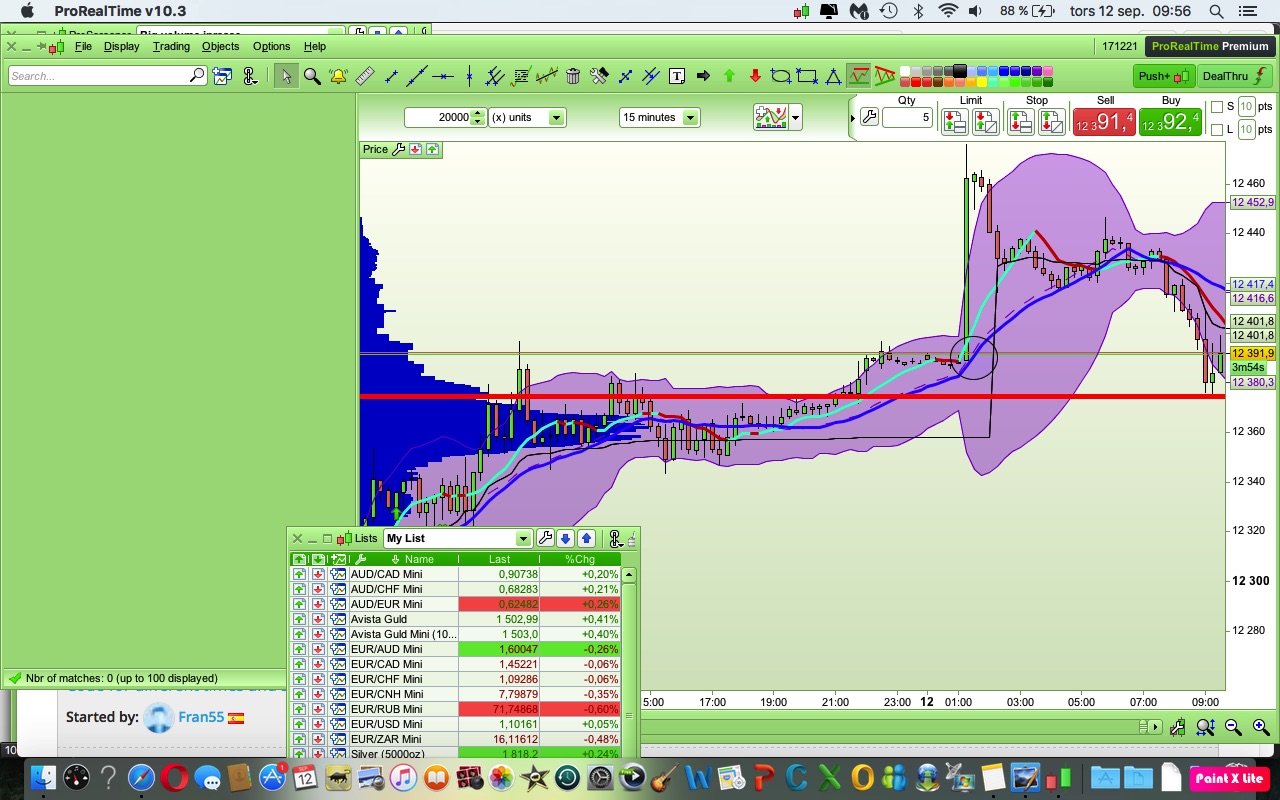
According to the ring in the chart.
The price breaks above the blue MA10.
Right there I want algo take position for buy.
If it takes position at the next candle it is too late as the course has increased 70 points since.
Is this possible?
Use a pending STOP order. You have to place it every bar you want it on the market as they only last one bar. x is whatever price (worse price than the current one) that you want it to be.
Buy 1 contract at x stop
STOP (pending)
Simple answer is both yes and no:
No its not possible, because you would need to anticipate that move. You need to buy before that big candle happens.
Yes it is possible, if you go down to a smaller timeframe and start trading it as its breaking out upwards.
Edit: Price breaks over the MA 10 line, but it dosnt actually break above it until the candle finishes, right?
You dont know if price will close above or below, until the candle finishes.
You need to use Multi Time Frame support and launch your strategy from a very short TF, say 1 minute or even less, to be able to detect such occurrences almost as soon as they happen.
The drawback is that your lowest TF becomes the default TF, the one on the chart, thus reducing the number of data history available for backtests.
if not onmarket and close < average[10](close) then
buy 1 contract at average[10] stop
endif
Something like the above achieves what you are saying you want to do.
|
|
if not onmarket and close < average[10](close) then
buy 1 contract at average[10] stop
endif
|
Something like the above achieves what you are saying you want to do.
How can he know when there will be a crossover and at what price?
You and Jebus 89 are correct Roberto – I was forgetting that we do not know what the MA[10] level will be in the next candle when we place the pending order at the end of the current candle. MTF is the only way then by checking the time frame we want the MA[10] in using DEFAULT and then for the trade to be opened in a faster time frame such as 1 second. more coffee needed!
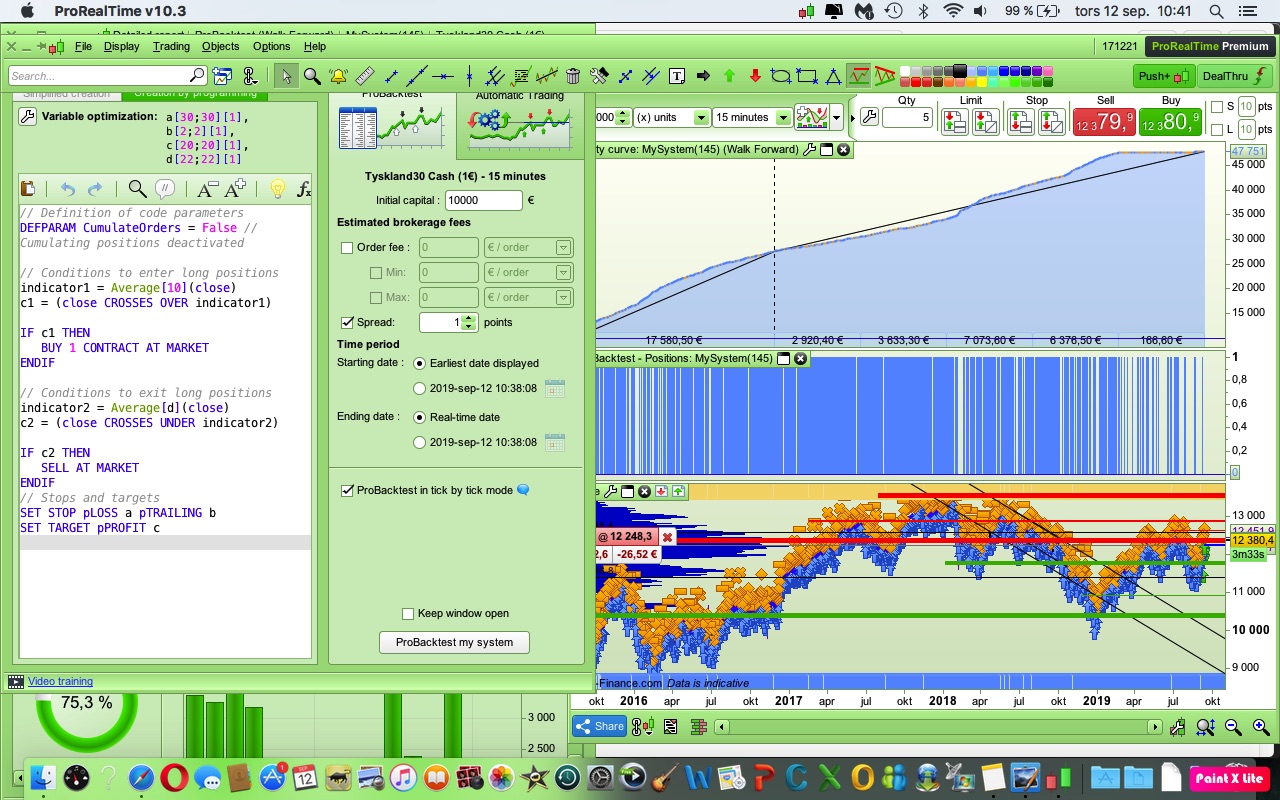
The code look like this.
Tick by tick.
Spread=1
Timeframe 15 min
I am just started with the code and run a WF just for fun..
Optimized only om 2019 data.
The result?
// Definition of code parameters
DEFPARAM CumulateOrders = False // Cumulating positions deactivated

// Conditions to enter long positions
indicator1 = Average[10](close)
c1 = (close CROSSES OVER indicator1)

IF c1 THEN
BUY 1 CONTRACT AT MARKET
ENDIF

// Conditions to exit long positions
indicator2 = Average[d](close)
c2 = (close CROSSES UNDER indicator2)

IF c2 THEN
SELL AT MARKET
ENDIF
// Stops and targets
SET STOP pLOSS a pTRAILING b
SET TARGET pPROFIT c
Thanks for all the answers 🙂
I think that you will find that the 2 pip trailing stop level will not be allowed by any broker. Check the minimum stop distances for the market you are trading.
This is the MTF version, try launching it from a 1-minute or 10-second TF:
// Definition of code parameters
DEFPARAM CumulateOrders = False // Cumulating positions deactivated
//
TIMEFRAME (15 minute, default)
// Conditions to enter long positions
indicator1 = Average[10](close)
c1 = (close CROSSES OVER indicator1)
// Conditions to exit long positions
indicator2 = Average[d](close)
c2 = (close CROSSES UNDER indicator2)
//
TIMEFRAME (default)
IF c1 AND Not OnMarket THEN
   BUY 1 CONTRACT AT MARKET
ENDIF
IF c2 AND LongOnMarket THEN
   SELL AT MARKET
ENDIF
// Stops and targets
// --- NOT ALLOWED --->  SET STOP pLOSS a pTRAILING b
//uncomment one of the following lines
//SET STOP pLOSS a
//SET STOP pTRAILING b
@Vonasi
True, my mistake..
@Robert
Thanks for the code 🙂
See that you have removed SL and TP.
Don’t you think it’s a good idea to bring them or..
Saw in my backtest that tickmode was over 500 resulting in an incorrect result.
It might not work with TP and SL in that code?
@robert
saw your comment in the code now.
Be a little quick there