Help for the translation from trading view

Viewing 9 posts - 1 through 9 (of 9 total)
  • Author
    Posts
  • #231868 quote
    Annchow8052014
    Participant
    New

    Hi All,

    I would like to ask for help to translate a script from tradingview as below with thanks in advance

    AI Trend Navigator by Zeiierma
    #231882 quote
    GraHal
    Participant
    Master

    You need to post the script on here so as to tempt one of our wizard coders to help you.

    Click on Insert PRT Code buttom (at left hand end of the top row of tools above) before inserting the code for AI Trend Navigator.

    #231885 quote
    Annchow8052014
    Participant
    New
    // This work is licensed under a Attribution-NonCommercial-ShareAlike 4.0 International (CC BY-NC-SA 4.0) https://creativecommons.org/licenses/by-nc-sa/4.0/
    // © Zeiierman {
    
    //@version=5
    indicator('AI Trend Navigator', overlay=true)
    
    // ~~ Tooltips {
    t1 ="PriceValue selects the method of price computation. \n\nSets the smoothing period for the PriceValue. \n\nAdjusting these settings will change the input values for the K-Nearest Neighbors algorithm, influencing how the trend is calculated."
    t2 = "TargetValue specifies the target to evaluate. \n\nSets the smoothing period for the TargetValue."
    t3 ="numberOfClosestValues sets the number of closest values that are considered when calculating the KNN Moving Average. Adjusting this number will affect the sensitivity of the trend line, with a higher value leading to a smoother line and a lower value resulting in a line that is more responsive to recent price changes."
    t4 ="smoothingPeriod sets the period for the moving average applied to the KNN classifier. Adjusting the smoothing period will affect how rapidly the trend line responds to price changes, with a larger smoothing period leading to a smoother line that may lag recent price movements, and a smaller smoothing period resulting in a line that more closely tracks recent changes."
    t5 ="This option controls the background color for the trend prediction. Enabling it will change the background color based on the prediction, providing visual cues on the direction of the trend. A green color indicates a positive prediction, while red indicates a negative prediction."
    //~~~~~~~~~~~~~~~~~~~~~~~~~~~~~~~~~~~~~~~~~~~~~~~~~~~~~~~~~~~~~~~~~~~~~~~~~~~~~~~~~~~~~~~~~~~~~~~~~~~~~~~~~~~~~~~~~~~~~}
    
    // ~~ Inputs {
    PriceValue   = input.string("hl2", options = ["hl2","VWAP", "sma", "wma", "ema", "hma"], group="", inline="Value")
    maLen        = input.int(5, minval=2, maxval=200, title="", group="", inline="Value", tooltip=t1)
    TargetValue  = input.string("Price Action", options = ["Price Action","VWAP", "Volatility", "sma", "wma", "ema", "hma"], group="", inline="Target")
    maLen_       = input.int(5, minval=2, maxval=200, title="", group="", inline="Target", tooltip=t2)
    // Input parameters for the KNN Moving Average
    numberOfClosestValues = input.int(3, "Number of Closest Values", 2, 200, tooltip=t3) 
    smoothingPeriod       = input.int(50, "Smoothing Period", 2, 500, tooltip=t4) 
    windowSize            = math.max(numberOfClosestValues, 30) 
    
    // knn Color
    Upknn_col   = input.color(color.lime, title="", group="KNN Color", inline="knn col")
    Dnknn_col   = input.color(color.red, title="", group="KNN Color", inline="knn col")
    Neuknn_col  = input.color(color.orange, title="", group="KNN Color", inline="knn col")
    // MA knn Color
    Maknn_col   = input.color(color.teal, title="", group="MA KNN Color", inline="MA knn col")
    // BG Color
    bgcolor = input.bool(false, title="Trend Prediction Color", group="BG Color", inline="bg", tooltip=t5)
    Up_col  = input.color(color.lime, title="", group="BG Color", inline="bg")
    Dn_col  = input.color(color.red, title="", group="BG Color", inline="bg")
    //~~~~~~~~~~~~~~~~~~~~~~~~~~~~~~~~~~~~~~~~~~~~~~~~~~~~~~~~~~~~~~~~~~~~~~~~~~~~~~~~~~~~~~~~~~~~~~~~~~~~~~~~~~~~~~~~~~~~~}
    
    // ~~ kNN Classifier {
    value_in = switch PriceValue
        "hl2"  => ta.sma(hl2,maLen)
        "VWAP" => ta.vwap(close[maLen])
        "sma" => ta.sma(close,maLen)
        "wma" => ta.wma(close,maLen)
        "ema" => ta.ema(close,maLen)
        "hma" => ta.hma(close,maLen)
    
    meanOfKClosest(value_,target_) => 
        closestDistances = array.new_float(numberOfClosestValues, 1e10) 
        closestValues    = array.new_float(numberOfClosestValues, 0.0) 
        for i = 1 to windowSize 
            value = value_[i] 
            distance = math.abs(target_ - value) 
            maxDistIndex = 0 
            maxDistValue = closestDistances.get(0) 
            for j = 1 to numberOfClosestValues - 1 
                if closestDistances.get(j) > maxDistValue
                    maxDistIndex := j
                    maxDistValue := closestDistances.get(j)
            if distance < maxDistValue 
                closestDistances.set(maxDistIndex, distance)
                closestValues.set(maxDistIndex, value)
        closestValues.sum() / numberOfClosestValues 
    
    // Choose the target input based on user selection
    target_in = switch TargetValue
        "Price Action"  => ta.rma(close,maLen_) 
        "VWAP"          => ta.vwap(close[maLen_])
        "Volatility"    => ta.atr(14)
        "sma" => ta.sma(close,maLen_)
        "wma" => ta.wma(close,maLen_)
        "ema" => ta.ema(close,maLen_)
        "hma" => ta.hma(close,maLen_)
    
    knnMA = meanOfKClosest(value_in,target_in)
    //~~~~~~~~~~~~~~~~~~~~~~~~~~~~~~~~~~~~~~~~~~~~~~~~~~~~~~~~~~~~~~~~~~~~~~~~~~~~~~~~~~~~~~~~~~~~~~~~~~~~~~~~~~~~~~~~~~~~~}
    
    // ~~ kNN Prediction {
    // Function to calculate KNN Classifier
    price = math.avg(knnMA, close)
    c     = ta.rma(knnMA[1], smoothingPeriod) 
    o     = ta.rma(knnMA, smoothingPeriod)
    
    // Defines KNN function to perform classification
    knn(price) => 
        Pos_count = 0 
        Neg_count = 0 
        min_distance = 10e10 
        nearest_index = 0 
        for j = 1 to 10 
            distance = math.sqrt(math.pow(price[j] - price, 2)) 
            if distance < min_distance 
                min_distance := distance
                nearest_index := j
                Neg = c[nearest_index] > o[nearest_index] 
                Pos = c[nearest_index] < o[nearest_index] 
                if Pos 
                    Pos_count += 1
                if Neg 
                    Neg_count += 1
        output = Pos_count>Neg_count?1:-1 
    
    // Calls KNN function and smooths the prediction
    knn_prediction_raw = knn(price) 
    knn_prediction     = ta.wma(knn_prediction_raw, 3)
    //~~~~~~~~~~~~~~~~~~~~~~~~~~~~~~~~~~~~~~~~~~~~~~~~~~~~~~~~~~~~~~~~~~~~~~~~~~~~~~~~~~~~~~~~~~~~~~~~~~~~~~~~~~~~~~~~~~~~~}
    
    // ~~ Plots {
    // Plots for display on the chart
    knnMA_          = ta.wma(knnMA,5)
    knnMA_col       = knnMA_>knnMA_[1]?Upknn_col:knnMA_<knnMA_[1]?Dnknn_col:Neuknn_col
    Classifier_Line = plot(knnMA_,"Knn Classifier Line", knnMA_col)
    MAknn_          = ta.rma(knnMA, smoothingPeriod)
    plot(MAknn_,"Average Knn Classifier Line" ,Maknn_col) 
    green = knn_prediction < 0.5
    red   = knn_prediction > -0.5 
    bgcolor( green and bgcolor? color.new(Dn_col,80) : 
     red and bgcolor ? color.new(Up_col,80) : na) 
    //~~~~~~~~~~~~~~~~~~~~~~~~~~~~~~~~~~~~~~~~~~~~~~~~~~~~~~~~~~~~~~~~~~~~~~~~~~~~~~~~~~~~~~~~~~~~~~~~~~~~~~~~~~~~~~~~~~~~~}
    
    // ~~ Alerts {
    knnMA_cross_Over_Ma      = ta.crossover(knnMA_,MAknn_)
    knnMA_cross_Under_Ma     = ta.crossunder(knnMA_,MAknn_)
    knnMA_cross_Over_Close   = ta.crossover(knnMA_,close)
    knnMA_cross_Under_Close  = ta.crossunder(knnMA_,close)
    knnMA_Switch_Up          = knnMA_[1]<knnMA_ and knnMA_[1]<=knnMA_[2]
    knnMA_Switch_Dn          = knnMA_[1]>knnMA_ and knnMA_[1]>=knnMA_[2]
    knnMA_Neutral            = knnMA_col==Neuknn_col and knnMA_col[1]!=Neuknn_col
    greenBG                  = green and not green[1]
    redBG                    = red and not red[1]
    
    alertcondition(knnMA_cross_Over_Ma,  title = "Knn Crossover Average Knn",  message = "Knn Crossover Average Knn")
    alertcondition(knnMA_cross_Under_Ma, title = "Knn Crossunder Average Knn", message = "Knn Crossunder Average Knn")
    alertcondition(knnMA_cross_Over_Close,  title = "Knn Crossover Close",  message = "Knn Crossover Close")
    alertcondition(knnMA_cross_Under_Close, title = "Knn Crossunder Close", message = "Knn Crossunder Close")
    alertcondition(knnMA_Switch_Up,  title = "Knn Switch Up",  message = "Knn Switch Up")
    alertcondition(knnMA_Switch_Dn, title = "Knn Switch Dn", message = "Knn Switch Dn")
    alertcondition(knnMA_Neutral, title = "Knn is Neutral", message = "Knn is Neutral")
    alertcondition(greenBG, title = "Positive Prediction", message = "Positive Prediction")
    alertcondition(redBG, title = "Negative Prediction", message = "Negative Prediction")
    //~~~~~~~~~~~~~~~~~~~~~~~~~~~~~~~~~~~~~~~~~~~~~~~~~~~~~~~~~~~~~~~~~~~~~~~~~~~~~~~~~~~~~~~~~~~~~~~~~~~~~~~~~~~~~~~~~~~~~}

    Hi GraHal,

    Noted with thanks for your reminding.

    Here above is the code, please help me for the translation in your convenience with thanks.

    #232290 quote
    Annchow8052014
    Participant
    New

    Hi All,

    Can anyone help me to convert the above indicator with thanks.

    #232925 quote
    Iván González
    Moderator
    Master

    Hi
    Here you have the indicator:

    //-----------------------------------------------------------//
    //PRC_AI Trend Navigator
    //version = 0
    //24.04.24
    //Iván González @ www.prorealcode.com
    //Sharing ProRealTime knowledge
    //-----------------------------------------------------------//
    //-----Inputs------------------------------------------------//
    PriceValue=0//0=hl2,1=vwap,2=sma,3=wma,4=ema,5=hma
    maLen=5
    TargetValue=0//0=Price Action, 1=vwap,2=volatility,3=sma,4=wma,5=ema,6=hma
    maLen1=5
    //---Input parameters for the KNN Moving Average
    numberOfClosestValues=3//Number of Closest Values
    smoothingPeriod=50
    windowSize=max(numberOfClosestValues,30)
    //---Background Colour
    bgcolour=0//Boolean//Backgroundcolor
    //-----------------------------------------------------------//
    //-----PriceValue calculation--------------------------------//
    if PriceValue=0 then
    ValueIn=average[maLen]((high+low)/2)
    elsif PriceValue=1 then
    ValueIn=VolumeAdjustedAverage[maLen](close)
    elsif PriceValue=2 then
    ValueIn=average[maLen](close)
    elsif PriceValue=3 then
    ValueIn=weightedaverage[maLen](close)
    elsif PriceValue=4 then
    ValueIn=exponentialaverage[maLen](close)
    elsif PriceValue=5 then
    ValueIn=hullaverage[maLen](close)
    endif
    //-----------------------------------------------------------//
    //-----Target input calculation------------------------------//
    if TargetValue=0 then
    alpha = 1/maLen1
    if barindex <= maLen1 then
    TargetIn=close
    else
    if barindex = maLen1 then
    TargetIn = average[maLen1](close)
    else
    TargetIn = alpha*close + (1-alpha)*TargetIn[1]
    endif
    endif
    elsif TargetValue=1 then
    TargetIn=VolumeAdjustedAverage[maLen1](close)
    elsif TargetValue=2 then
    TargetIn=averagetruerange[14](close)
    elsif TargetValue=3 then
    TargetIn=average[maLen1](close)
    elsif TargetValue=4 then
    TargetIn=weightedaverage[maLen1](close)
    elsif TargetValue=5 then
    TargetIn=exponentialaverage[maLen1](close)
    elsif TargetValue=6 then
    TargetIn=hullaverage[maLen1](close)
    endif
    //-----------------------------------------------------------//
    //-----KNN Classifier----------------------------------------//
    //knnMA = meanOfKClosest(value_in,target_in)
    $closestDistances[0]=exp(10)
    $closestValues[0]=0
    for i=1 to windowSize do
    myvalue=valueIn[i]
    distance=abs(targetIn-myvalue)
    maxDistIndex=0
    maxDistValue=$closestDistances[0]
    for j=0 to numberOfClosestValues-1 do
    if $closestDistances[j] > maxDistValue then
    maxDistIndex=j
    maxDistValue=$closestDistances[j]
    endif
    next
    if distance < maxDistValue then
    $closestDistances[maxDistIndex]=distance
    $closestValues[maxDistIndex]=myvalue
    endif
    next
    
    sumclosestValues=summation[numberOfClosestValues]($closestValues[lastset($closestValues)])
    
    knnMA = sumclosestValues/numberOfClosestValues
    //-----------------------------------------------------------//
    price1=(KnnMA+close)/2
    
    alpha1 = 1/smoothingPeriod
    alpha2 = 1/smoothingPeriod
    
    if barindex <= smoothingPeriod then
    c = knnMA[1]
    o = knnMA
    else
    if barindex = smoothingPeriod then
    c = average[smoothingPeriod](knnMA[1])
    else
    c = alpha1*knnMA[1] + (1-alpha1)*c[1]
    endif
    
    if barindex = smoothingPeriod then
    o = average[smoothingPeriod](knnMA)
    else
    o = alpha2*knnMA + (1-alpha2)*o[1]
    endif
    endif
    //-----------------------------------------------------------//
    poscount=0
    negcount=0
    mindistance=10*exp(10)
    nearestindex=0
    for j=1 to 10 do
    distance1=sqrt(pow(price1[j]-price1,2))
    if distance1 < mindistance then
    mindistance=distance1
    nearestindex=j
    neg=c[nearestindex]>o[nearestindex]
    pos=c[nearestindex]<o[nearestindex]
    if pos then
    poscount=1+poscount
    elsif neg then
    negcount=1+negcount
    endif
    endif
    next
    if poscount>negcount then
    knnPredictionRaw=1
    else
    knnPredictionRaw=-1
    endif
    knnPrediction=weightedaverage[3](knnPredictionRaw)
    //-----------------------------------------------------------//
    KnnMA1 = weightedaverage[5](KnnMA)
    
    if KnnMA1>KnnMA1[1] then
    r=0
    g=230
    b=118
    elsif KnnMA1<KnnMA1[1] then
    r=255
    g=82
    b=82
    else
    r=255
    g=152
    b=0
    endif
    //-----------------------------------------------------------//
    alpha2 = 1/smoothingPeriod
    if barindex <= smoothingPeriod then
    MAknn=knnMA
    else
    if barindex = smoothingPeriod then
    MAknn = average[smoothingPeriod](knnMA)
    else
    MAknn = alpha2*knnMA + (1-alpha2)*MAknn[1]
    endif
    endif
    //-----------------------------------------------------------//
    
    if bgcolour then
    if knnPrediction > -0.5 then
    rbars=0
    gbars=230
    bbars=118
    elsif knnPrediction < 0.5 then
    rbars=255
    gbars=82
    bbars=82
    endif
    backgroundcolor(rbars,gbars,bbars,35)
    endif
    //-----------------------------------------------------------//
    return knnMA1 as "Knn Classifier Line"coloured(r,g,b)style(line,2), MAknn as "Average Knn Classifier Line"coloured(1,137,123)
    
    Annchow8052014 thanked this post
    #232928 quote
    GraHal
    Participant
    Master

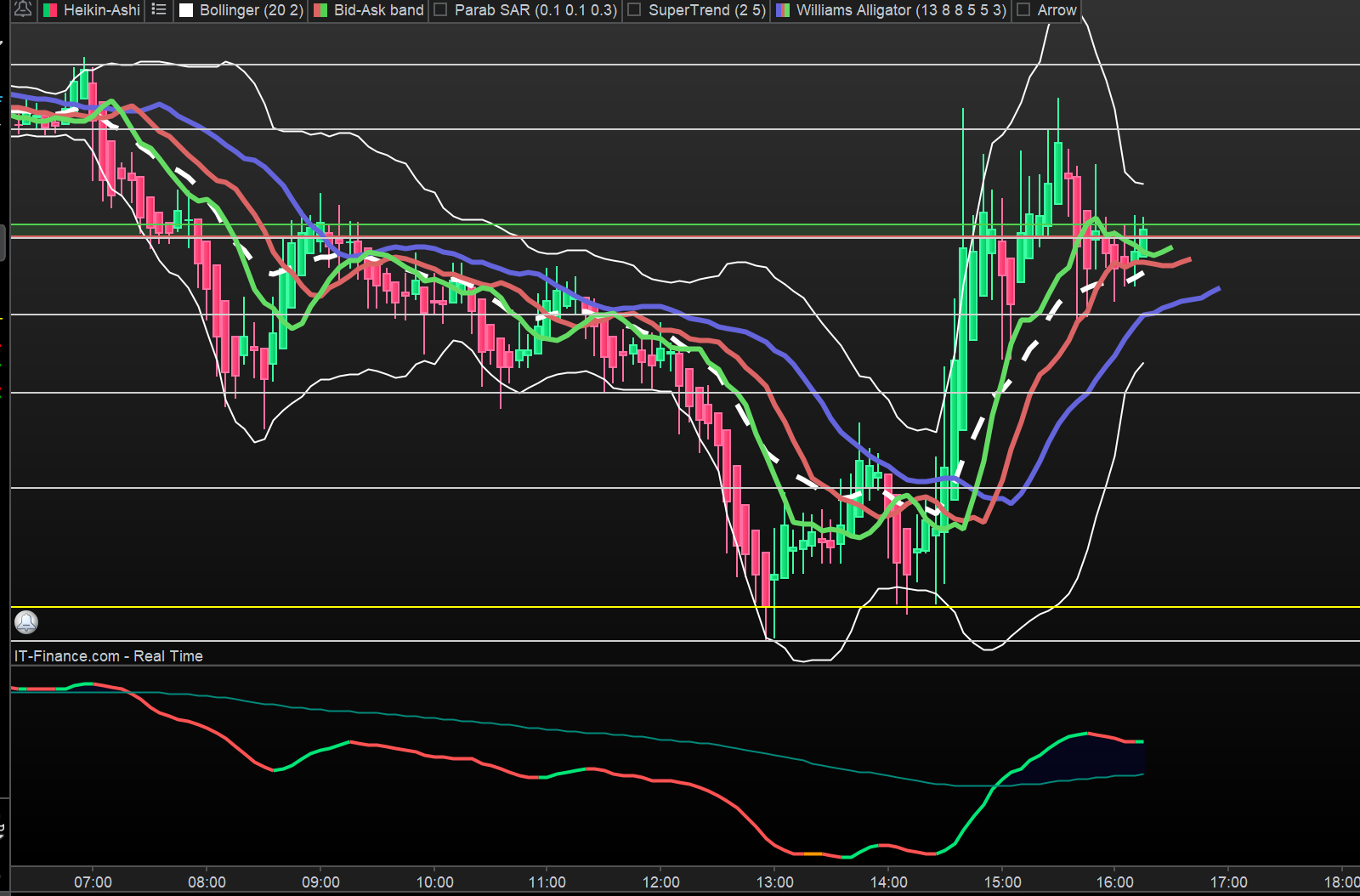
    I copy and pasted the above code and the Indicator appears to work fine.

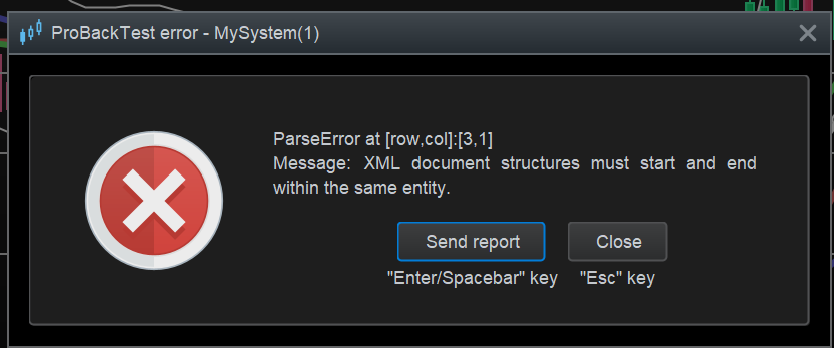
    I then used the Algo Simplified Creation tool on the Indicator, but I get the attached error message when I try to run the Algo … any ideas why?

    Screenshot-2024-05-22-151336.png Screenshot-2024-05-22-151336.png
    #232932 quote
    GraHal
    Participant
    Master

    I get exact same error message as I posted above when I make an Algo using the full Indicator code in the Algo (i.e. NOT using Simplified Creation).

    Indicator works fine … see attached

    Screenshot-2024-05-22-161547.png Screenshot-2024-05-22-161547.png
    #240960 quote
    Annchow8052014
    Participant
    New

    Hi Ivan,

    Thanks for your help.  I also find some error, please check and update for us. Thanks in advance.

    #240961 quote
    Annchow8052014
    Participant
    New

    Hi Ivan,

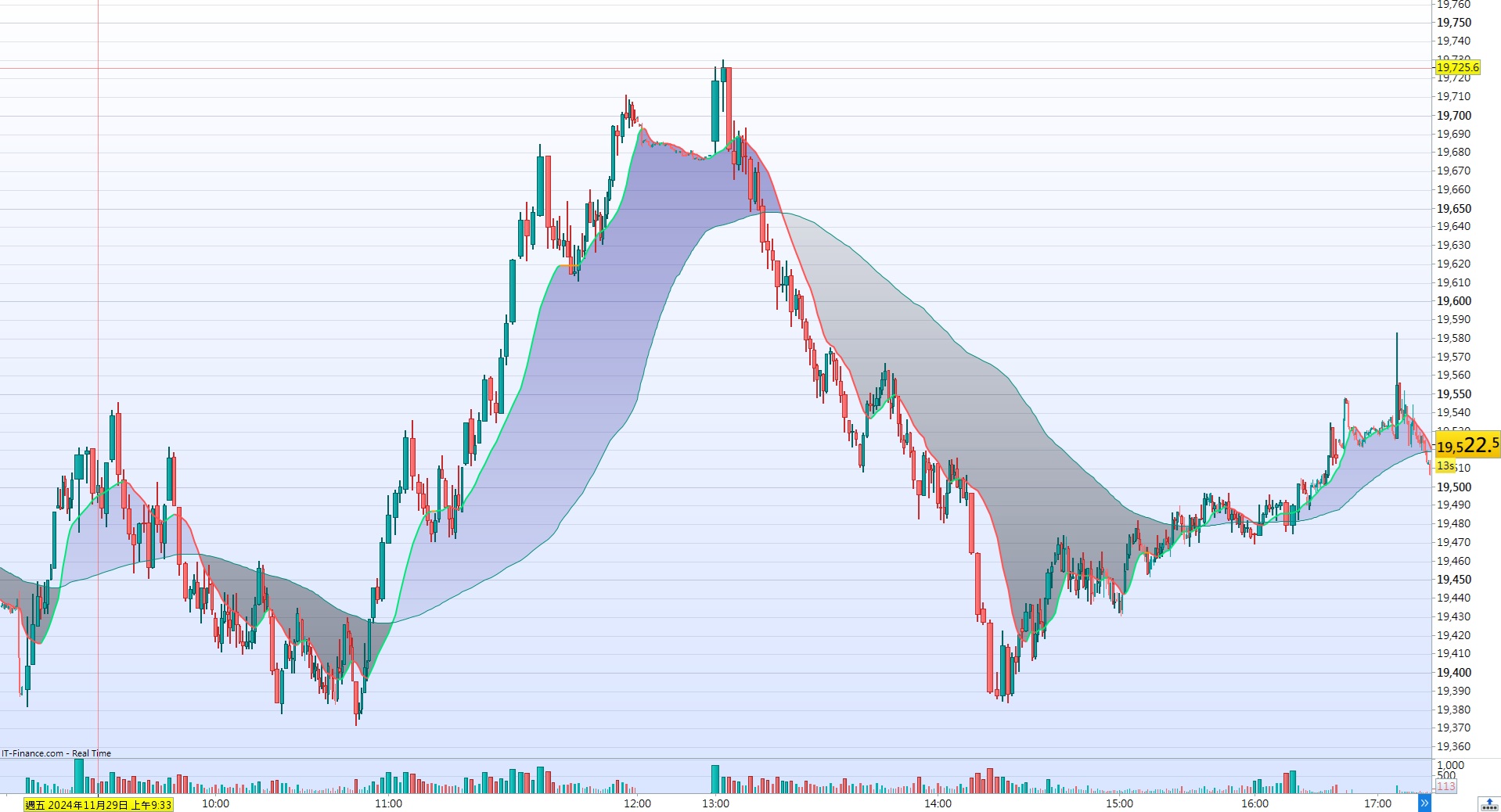
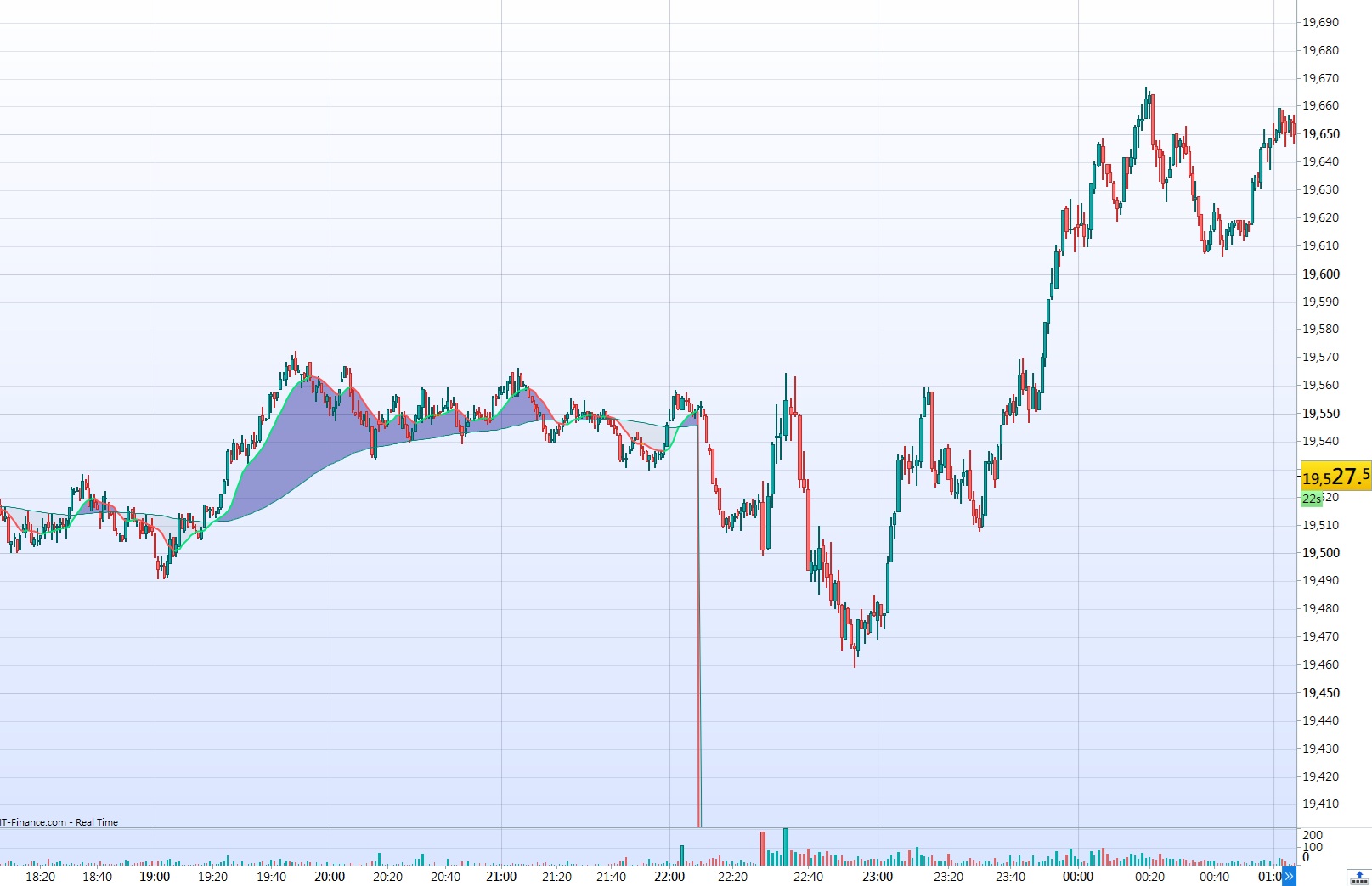
    Further to my study, the indicator is in good condition (picture 1), but on last Friday, the Knn line go to “0” after around 22:10 (picture 2)  , can you check and update for us with thanks.

    Knn-picture-1.jpg Knn-picture-1.jpg Knn-picture-2.jpg Knn-picture-2.jpg
Viewing 9 posts - 1 through 9 (of 9 total)
  • You must be logged in to reply to this topic.

Help for the translation from trading view


Platform Support: Charts, Data & Broker Setup

New Reply
Author
Summary

This topic contains 8 replies,
has 3 voices, and was last updated by Annchow8052014
1 year, 2 months ago.

Topic Details
Forum: Platform Support: Charts, Data & Broker Setup
Language: English
Started: 04/24/2024
Status: Active
Attachments: 4 files
Logo Logo
Loading...