Heikin-Ashi candle smoothed TOPIC

Viewing 10 posts - 1 through 10 (of 10 total)

  • Author
    Posts
  • #75608 quote
    ALE
    Moderator
    Master

    Hello

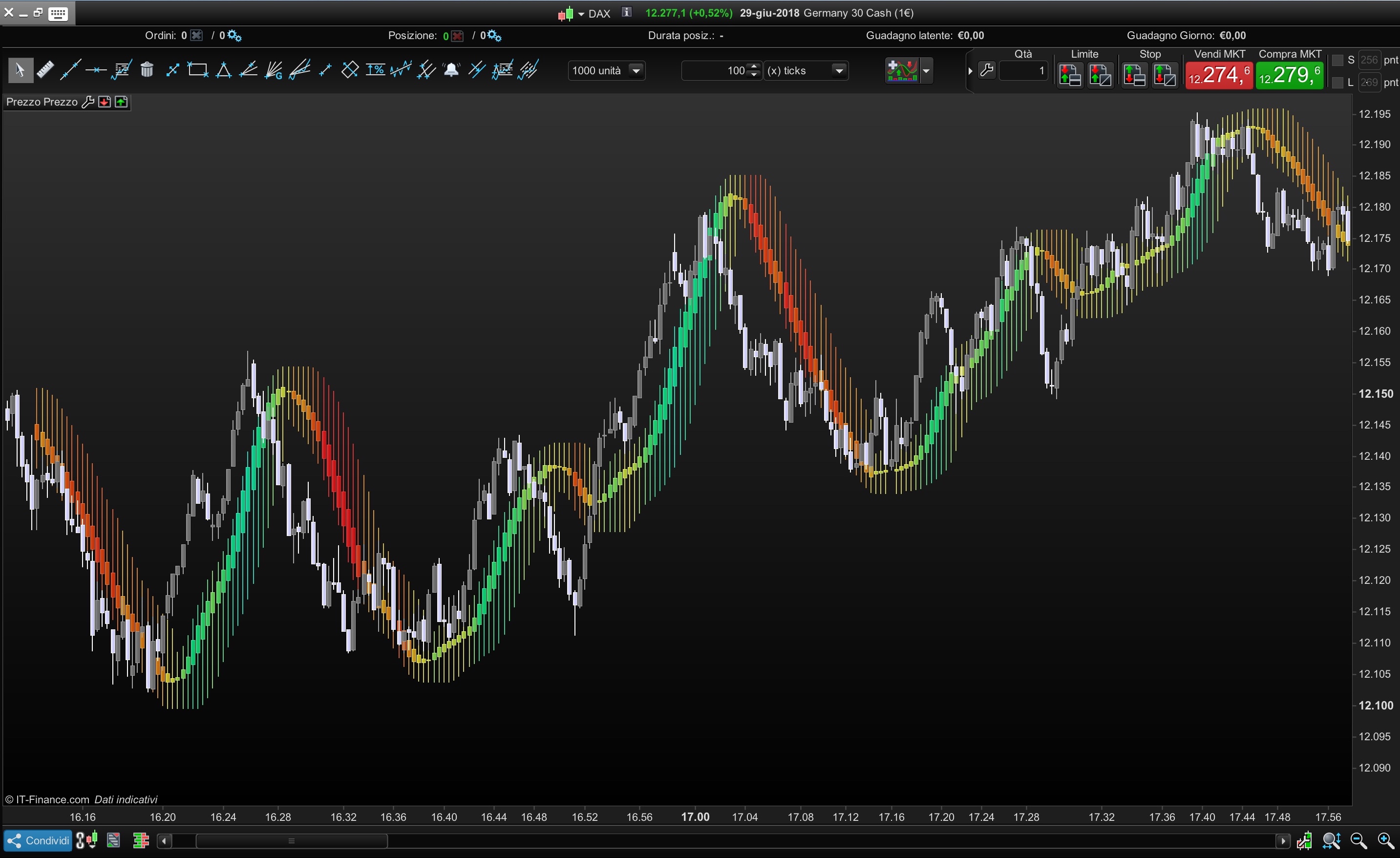
    this Topic is to ask more informations about Heikin-Ashi candle smoothed

    You can use this indicators in different ways

    • Moving Average
    • Range area
    • Filtered area of market movement

    You can set :

    • Average period of candle=HeikinPeriod
    • Average Type (simple,exponential,triangular, etc) = AverageType
    • Average period of impression channel (Highest/Lowest) = ChannelPeriod
    • Transparency of the candle =Transparency
    //ALE - 28.06.2018
    //@PROREALCODE
    /////////
    //HeikinPeriod =40
    //AverageType  =5
    //ChannelPeriod=10
    //TransParency =15
    /////////
    IF BarIndex=0 THEN
    xClose = (open+high+low+close)/4
    xOpen = open
    xHigh = high
    xLow = low
    ELSE
    xClose = (open+high+low+close)/4
    xOpen = (xOpen[1]+xClose[1])/2
    xHigh = Max(max(high, xOpen), xClose)
    xLow = Min(min(Low, xOpen), xClose)
    endif
    //Smoothed Heikin-Ashi
    xxclose=Average[max (1,HeikinPeriod),AverageType](xclose)
    xxOpen = Average[max (1,HeikinPeriod),AverageType](xOpen)
    xxHigh = Average[max (1,HeikinPeriod),AverageType](xHigh)
    xxLow  = Average[max (1,HeikinPeriod),AverageType](xLow)
     
     
    //Colour Setting
    MyDi = xxclose-xxclose[1]
    r=50+(200-MyDi*100)
    g=50+(200+MyDi*100)
    b=50+(0+MyDi*30)
    //Build channel with Highest and Lowest of Heikin-Ashi smoothed candle
    DRAWCANDLE(xxOpen, highest[max(1, ChannelPeriod)](xxHigh), lowest[max(1, ChannelPeriod)](xxlow), xxClose) Coloured (R,G,b,MAX(50,Transparency*10))
     
     
    Return
    #75683 quote
    T-rader
    Participant
    Average

    Hey Ale,

    I can´t get it to change colors, it only shows one color. What am I missing?

    #75688 quote
    ALE
    Moderator
    Master

    Which market and time frame is it?
    Thanks

    #123918 quote
    ALE
    Moderator
    Master

    Hello
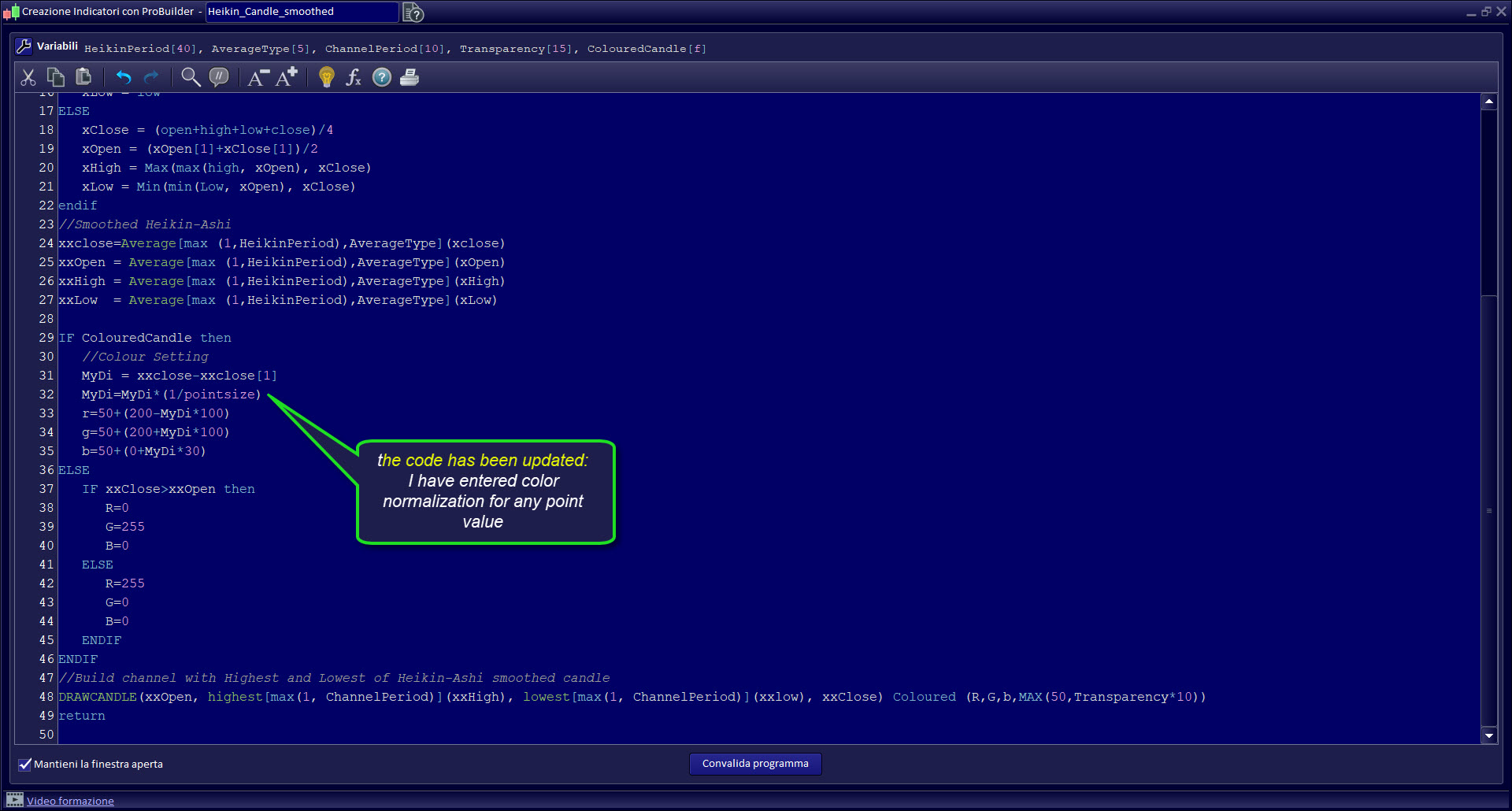
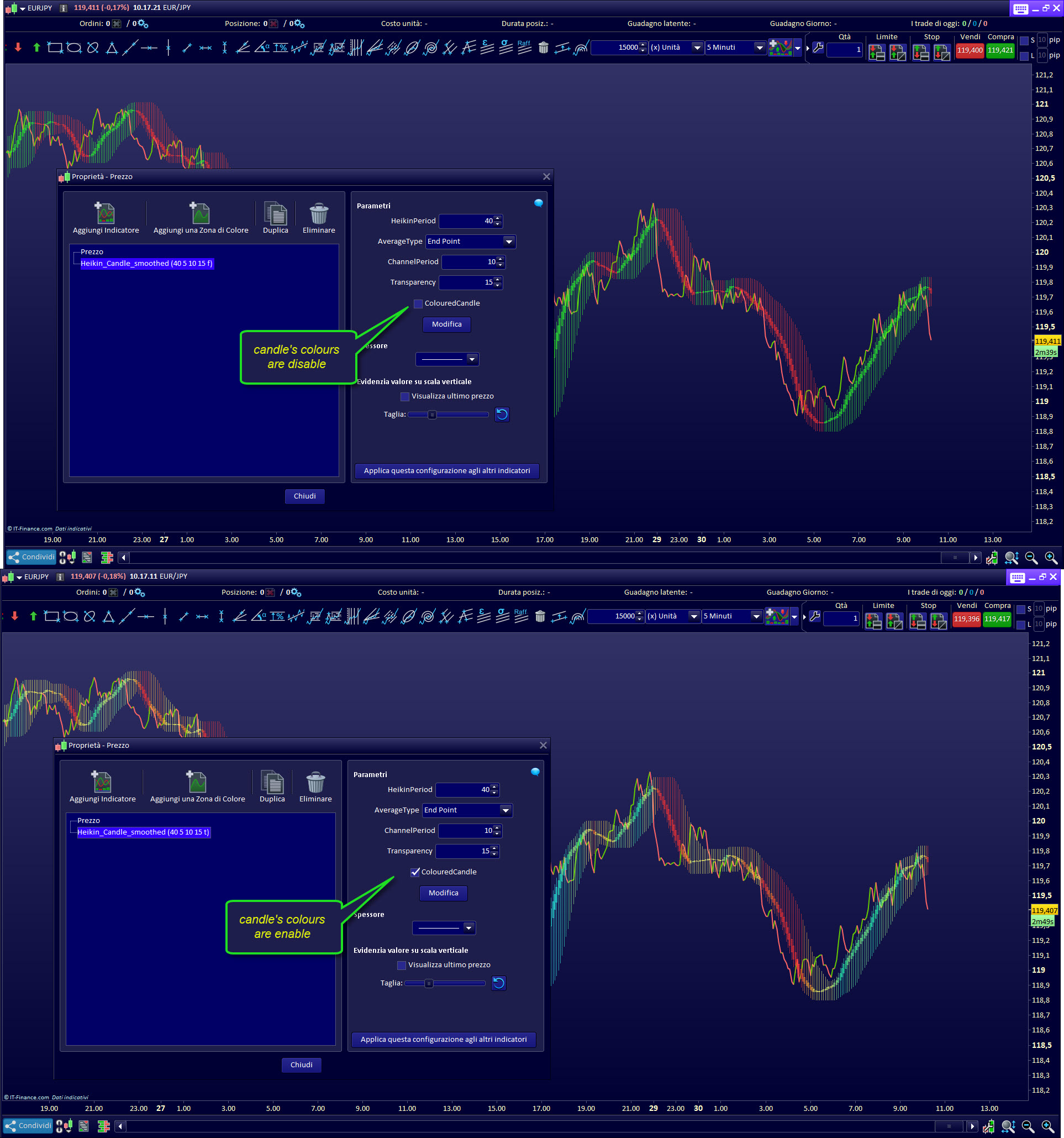
    I have updated the code .
    Now it will be possible to choose whether the candles will have a variable color, or a fixed color: green and red.
    I also fixed the variable color problem, so now it works on any market and time frame.

    In the attached files you will find:
    – Infographics
    – Heikin-Ashi candle smoothed “CODE” to import in your platform

    Regards
    Ale

    #127052 quote
    ALAIn
    Participant
    Junior

    Hi,

    Thank for this code. I’m very fan of it.

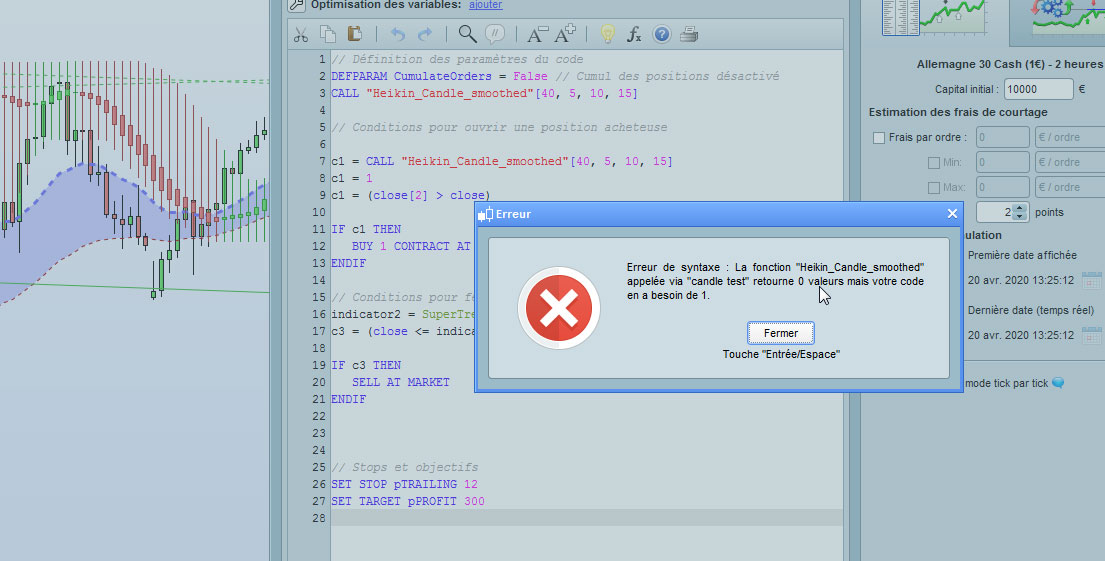
    I’m trying to use it building a probacktest but it’s not accepted by Prorealtime.  The error displayed is that the is ‘NO value’.

    When I try to add it on the same graph as the price or calling it on the code, I’ve also an error asking to : declare a value for it. Any idea how to fix that?

    Regards,

    Alain

    #127075 quote
    robertogozzi
    Moderator
    Master

    The indicator returns nothing, while at line 7 you expect a value to be assigned to C1.

    ALE thanked this post
    #127083 quote
    ALE
    Moderator
    Master

    Hello Alain,

    The code has no values, a candle is drawn only.
    In the code below you will find the values you are looking for:

    //ALE - 28.06.2018
    //update -30.03.2020
    //@PROREALCODE
    /////////
    //HeikinPeriod =40
    //AverageType  =5
    //ChannelPeriod=10
    //TransParency =15
    //ColouredCandle= 0-1  on/off
    /////////
    
    IF BarIndex=0 THEN
    xClose = (open+high+low+close)/4
    xOpen = open
    xHigh = high
    xLow = low
    ELSE
    xClose = (open+high+low+close)/4
    xOpen = (xOpen[1]+xClose[1])/2
    xHigh = Max(max(high, xOpen), xClose)
    xLow = Min(min(Low, xOpen), xClose)
    endif
    //Smoothed Heikin-Ashi
    xxclose=Average[max (1,HeikinPeriod),AverageType](xclose)
    xxOpen = Average[max (1,HeikinPeriod),AverageType](xOpen)
    xxHigh = Average[max (1,HeikinPeriod),AverageType](xHigh)
    xxLow  = Average[max (1,HeikinPeriod),AverageType](xLow)
     
    IF ColouredCandle then
    //Colour Setting
    MyDi = xxclose-xxclose[1]
    MyDi=MyDi*(1/pointsize)
    r=50+(200-MyDi*100)
    g=50+(200+MyDi*100)
    b=50+(0+MyDi*30)
    ELSE
    IF xxClose>xxOpen then
    R=0
    G=255
    B=0
    ELSE
    R=255
    G=0
    B=0
    ENDIF
    ENDIF
    if range>0 then
    AVGr=Average[channelperiod](range)
    endif
    
    //Build channel with Highest and Lowest of Heikin-Ashi smoothed candle
    DRAWCANDLE(xxOpen, (xxHigh+(xxHigh-xxlow)/2)+avgr, (xxlow-(xxHigh-xxlow)/2)-avgr, xxClose) Coloured (R,G,b,MAX(50,Transparency*10))
    
    return xxOpen coloured (255,255,255,0) as "open",(xxHigh+(xxHigh-xxlow)/2)+avgr coloured (255,255,255,0) as "high",(xxlow-(xxHigh-xxlow)/2)-avgr coloured (255,255,255,0) as "low",xxClose coloured (255,255,255,0) as "close"
    
    ignored, HHigh, ignored, ignored = CALL "Heikin_Candle_smoothed"[40, 5, 10, 15, 0]
    c1 = (HHigh> close)
    
    ignored, ignored, LLow, ignored = CALL "Heikin_Candle_smoothed"[40, 5, 10, 15, 0]
    c2 = (LLow< close)


    Thanks
    Ale

    ALAIn thanked this post
    #239133 quote
    D.trading
    Participant
    New

    Loving the smoothed Heikin-Ashi indicator Ale.

    I’m trying a variant of the same indicator where the Heikin-Ashi is ‘smoothed’ using an EMA before & after calculating the Heikin-Ashi.

    Here is my code:

    /* Variables (defined as Indicator Variables)
    len = 20
    len2 = 20
    */
    
    // First smoothing using EMA
    open1 = ExponentialAverage[len](open)
    close1 = ExponentialAverage[len](close)
    high1 = ExponentialAverage[len](high)
    low1 = ExponentialAverage[len](low)
    
    // Generating the Heikin Ashi candles
    haClose = (open1 + high1 + low1 + close1)/4
    IF BarIndex = 0 THEN
    haOpen = ROUND((open1 + close1) / 2, 2)
    ELSE
    haOpen = ROUND((haOpen[1] + haClose[1]) / 2, 2)
    ENDIF
    haHigh = Max(Max(high1, haOpen), close1)
    haLow = Min(Min(low1, haOpen), close1)
    
    // Second smoothing using EMA
    open2 = ExponentialAverage[len2](haOpen)
    close2 = ExponentialAverage[len2](haClose)
    high2 = ExponentialAverage[len2](haHigh)
    low2 = ExponentialAverage[len2](haLow)
    
    RETURN close2 AS "Close", open2 AS "Open", high2 As "High", low2 AS "Low
    

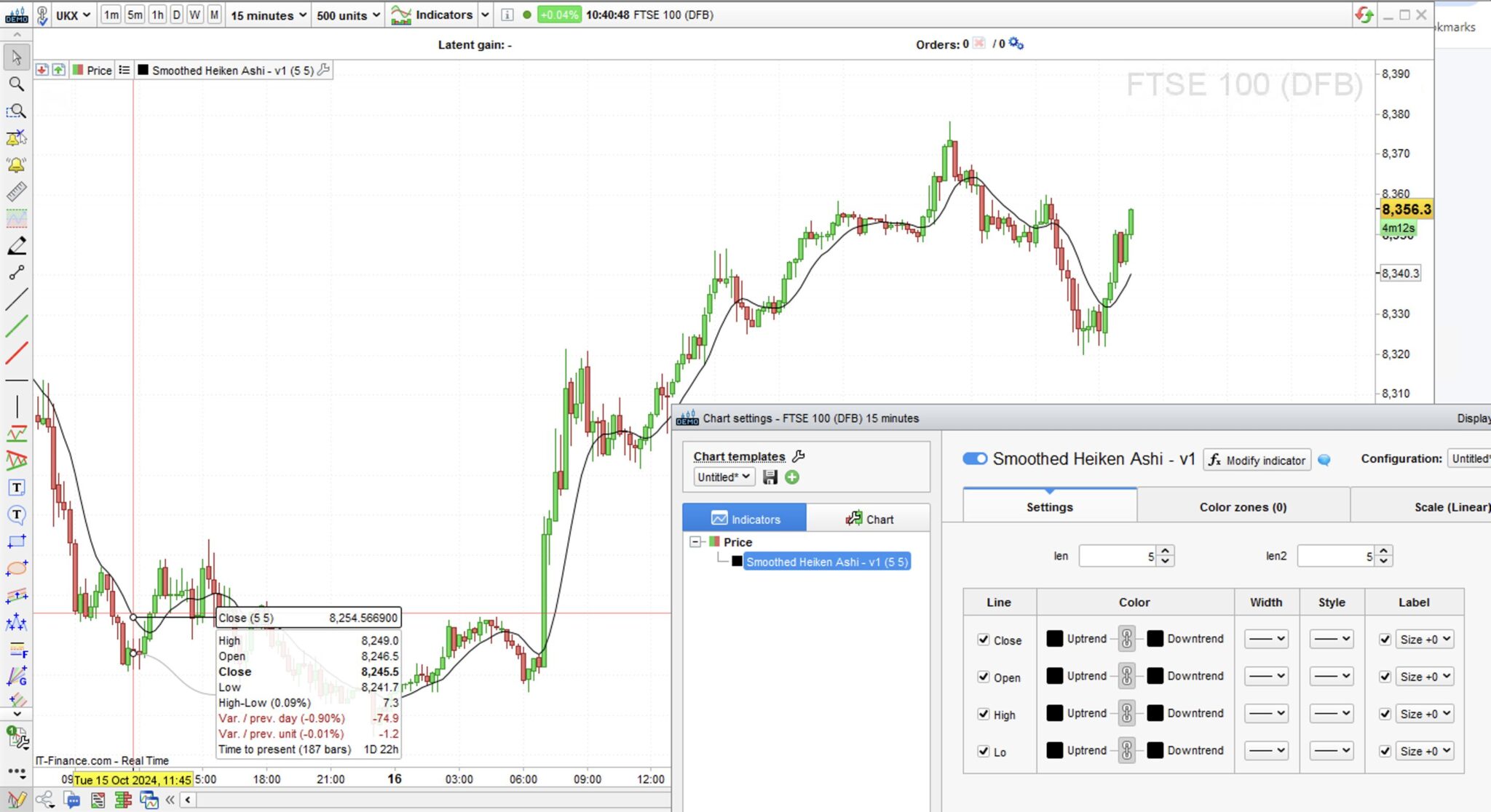
    To start with, I’m just trying to plot the OHLC from the 2nd EMA.

    The issue I’m having is that open2, high2, and low2 don’t seem to have a value, as shown in the screenshot.

    I’ve tried debugging but can’t find the issue.

    If anyone knows where I’m going wrong, I’d really appreciate your help!

    #239146 quote
    robertogozzi
    Moderator
    Master

    Some code has to be executed only after the lookback period has elapsed:

    // Variables (defined as Indicator Variables)
    len  = 20
    len2 = 20
    
     
    // First smoothing using EMA
    open1  = ExponentialAverage[len](open)
    close1 = ExponentialAverage[len](close)
    high1  = ExponentialAverage[len](high)
    low1   = ExponentialAverage[len](low)
    
    IF BarIndex > max(len,len2) THEN
       // Generating the Heikin Ashi candles
       haClose = (open1 + high1 + low1 + close1)/4
       IF BarIndex = 0 THEN
          haOpen = ROUND((open1 + close1) / 2, 2)
       ELSE
          haOpen = ROUND((haOpen[1] + haClose[1]) / 2, 2)
       ENDIF
       haHigh = Max(Max(high1, haOpen), close1)
       haLow  = Min(Min(low1, haOpen), close1)
       // Second smoothing using EMA
       open2  = ExponentialAverage[len2](haOpen)
       close2 = ExponentialAverage[len2](haClose)
       high2  = ExponentialAverage[len2](haHigh)
       low2   = ExponentialAverage[len2](haLow)
    endif
    RETURN close2 AS "Close", open2 AS "Open", high2 As "High", low2 AS "Low"
    D.trading thanked this post
    #239147 quote
    D.trading
    Participant
    New

    Thank you so much Roberto. That makes sense!

    I did try the PRELOADBARS function because I thought it may have had something to do with the lookback period, but it doesn’t allow it as part of an indicator.

    Your solution is neat.

    Thanks!

Viewing 10 posts - 1 through 10 (of 10 total)
  • You must be logged in to reply to this topic.

Heikin-Ashi candle smoothed TOPIC


ProBuilder: Indicators & Custom Tools

New Reply
Author
author-avatar
ALE @aleale Moderator
Summary

This topic contains 9 replies,
has 2 voices, and was last updated by D.trading

1 year, 3 months ago.

Topic Details
Forum: ProBuilder: Indicators & Custom Tools
Language: English
Started: 07/08/2018
Status: Active
Attachments: 8 files
Logo Logo
Loading...