Hi.
Does anybody know the code for automated system based only on Heikin ashi changing collors buy and sell.
I want to automate my heikin ashi strategi.
It might have allready been discussed here on the forums, but i cant seem to find it.
Thank you
There you go:
// Heikin Ashi setup
once xOpen = open
xClose     = (open + close + high + low) / 4
if barindex > 0 then
    xOpen  = (xOpen + xClose[1]) / 2
endif
xLow       = min(low,min(xClose,xOpen))
xHigh      = max(high,max(xClose,xOpen))
//
Bullish = xClose > xOpen
Bearish = xClose < xOpen
// LONG  trades when switching from bearish to bullish
IF Bullish AND Bearish[1] THEN
   BUY 1 CONTRACT AT MARKET
ENDIF
// SHORT trades when switching from bullish to bearish
IF Bearish AND Bullish[1] THEN
   SELLSHORT 1 CONTRACT AT MARKET
ENDIF
Thank you alot robertogozzi.
Is it possible to create this code from prorealtime simplified creation?
No, it’s not possible. The set up for the Heikin Ashi candlesticks cannot be dealt with automatically.
No, it’s not possible. The set up for the Heikin Ashi candlesticks cannot be dealt with automatically.
Ok thanks. I still cant get my head arround that code you shared. i tried to prompt it in as whole and promt it in as bullish by deleting som of the code, but still it does not work.
I would be very gratefull if you can do one separate bullish. with conditions when heikin is positiv go long 1 contract next bar open and exit that contract on heiking going negative, exit next bar open.
and then do the same one separate to bearish if you know what i mean.
Thank you alot mr.
The last line (line 19) was to be read ENDIF.
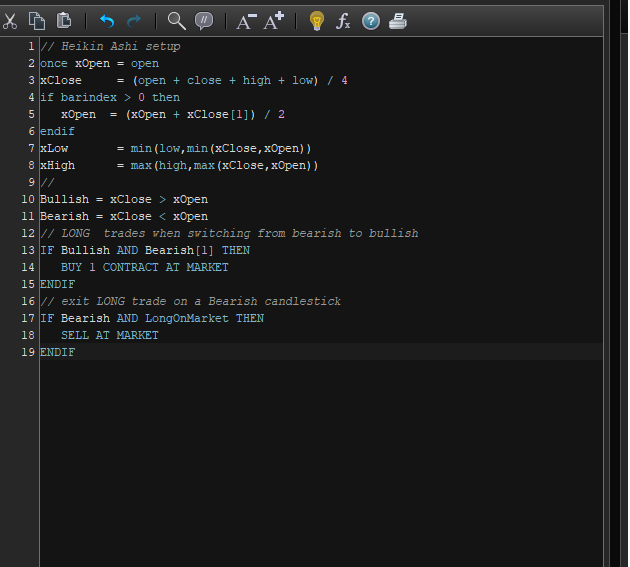
Bullish version:
// Heikin Ashi setup
once xOpen = open
xClose     = (open + close + high + low) / 4
if barindex > 0 then
    xOpen  = (xOpen + xClose[1]) / 2
endif
xLow       = min(low,min(xClose,xOpen))
xHigh      = max(high,max(xClose,xOpen))
//
Bullish = xClose > xOpen
Bearish = xClose < xOpen
// LONG  trades when switching from bearish to bullish
IF Bullish AND Bearish[1] THEN
   BUY 1 CONTRACT AT MARKET
ENDIF
// exit LONG trade on a Bearish candlestick
IF Bearish AND LongOnMarket THEN
   SELL AT MARKET
ENDIF
Bearish version:
// Heikin Ashi setup
once xOpen = open
xClose     = (open + close + high + low) / 4
if barindex > 0 then
    xOpen  = (xOpen + xClose[1]) / 2
endif
xLow       = min(low,min(xClose,xOpen))
xHigh      = max(high,max(xClose,xOpen))
//
Bullish = xClose > xOpen
Bearish = xClose < xOpen
// SHORT trades when switching from bullish to bearish
IF Bearish AND Bullish[1] THEN
   SELLSHORT 1 CONTRACT AT MARKET
ENDIF
// exit SHORT trade on a Bullish candlestick
IF Bullish AND ShortOnMarket THEN
   EXITSHORT AT MARKET
ENDIF
classick – Welcome to the forums. 🙂
You have posted the same reply three times. I have deleted two of the posts. Please try not to post the same thing multiple times!
Also it is not necessary to quote the person that you are replying to in every reply – especially when only two people are discussing a subject! Please only quote if you want to highlight a certain bit of text or if you need to make it clear who you are replying to.
It still says code is invalid when i prompt in one of those above.
So confused :/
classick – please stop quoting Roberto’s replies – especially if they include code! I have edited your last reply to remove the unnecessary quote.
Compare your code and mine to spot differences.
yeah sorry, my last qoute to roberto was before i saw your first warning:)
Not a warning! Just a friendly suggestion to keep the forums a little bit tidier! 🙂
thank you Robertogozzi for helping me out
i compared the codes and they are identical.
I just ctrl+c and then paste on to my prorealtime. Then go thrue visually on any spaces that differ. everything looks fine. but still not valid.
i must be doing something wrong. Damn i need those learning courses in coding
Please post the error message you have been reported.
This is how it looks when i copy paste. I even tried to modify that third = sign so it does not ofshoot to the right as much.