Having Trouble Adding Volatility Stop Bands to Price Chart?

Viewing 7 posts - 1 through 7 (of 7 total)
  • Author
    Posts
  • #102555 quote
    Bard
    Participant
    Master

    Hi there,

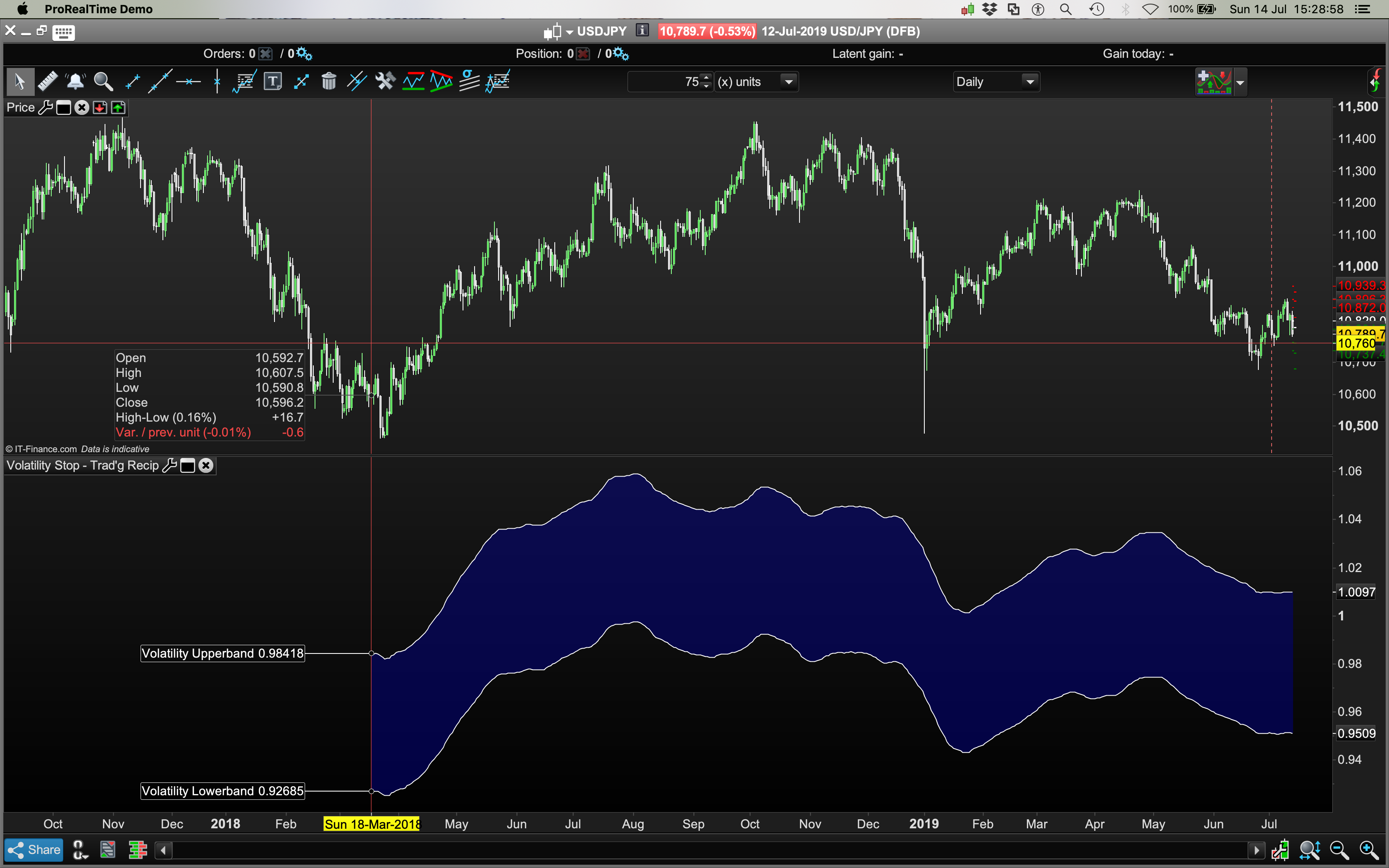
    I coded some Volatility Stop Bands and it shows up as an indicator in the lower pane (pls see image) but not on the main price chart?

    I think the coding’s correct, the idea grabbed from an article called “Maximising Risk-Adjusted gains with Trade Management – Trading Recipes” was:

    “Each day divide the close by its 144-day simple moving average. The result is a relative strength indicator we can call R. Take a 21-day simple moving average of R. Plot bands at intervals 3% above and below the 21-day smoothing. If R drops below the lower band, exit the trade on tomorrow’s open.”

    Any ideas?

    Cheers
    Bard

    //R is a Relative Strength Volatility Stop Indicator
    
    //---Settings
    
    CloseMAPeriod = 144
    RMAPeriod = 21
    
    UpperValue = 3.0 //"Upperbands %"
    LowerValue = 3.0 //"Lowerbands %"
    
    //---end of settings
    
    
    R=Close/Average[CloseMAPeriod]
    
    RAve = Average[RMAPeriod](R)
     
    VolStop = Rave
    
    UpperBand = VolStop * UpperValue / 100
    LowerBand = VolStop * LowerValue / 100
    
    RETURN VolStop+UpperBand as "Volatility Upperband",VolStop-LowerBand as "Volatility Lowerband"
    
    Vop-Stop.png Vop-Stop.png
    #102559 quote
    Vonasi
    Moderator
    Master

    From your description in your post the indicator does not appear to be one that you apply to a price chart. It is meant to be a separate relative strength indicator. Just add R to your returned values to complete the indicator.

    //R is a Relative Strength Volatility Stop Indicator
    
    //---Settings
    
    CloseMAPeriod = 144
    RMAPeriod = 21
    
    UpperValue = 3.0 //"Upperbands %"
    LowerValue = 3.0 //"Lowerbands %"
    
    //---end of settings
    
    
    R=Close/Average[CloseMAPeriod]
    
    RAve = Average[RMAPeriod](R)
     
    VolStop = Rave
    
    UpperBand = VolStop * UpperValue / 100
    LowerBand = VolStop * LowerValue / 100
    
    RETURN VolStop+UpperBand as "Volatility Upperband",VolStop-LowerBand as "Volatility Lowerband", R as "R"
    #102563 quote
    Bard
    Participant
    Master

    Cheers @Vonasi, I guess I kind of pictured it being overlaid on price to be able to see how price interacts within the indicator but take your point: “If R drops below the lower band, exit the trade on tomorrow’s open.” If they’re typical volatility bands they could be added to price, right?

    #102572 quote
    Nicolas
    Keymaster
    Master

    The code is a ratio of price and normalized. It does not apply on the price chart.

    Bard thanked this post
    #102594 quote
    Vonasi
    Moderator
    Master

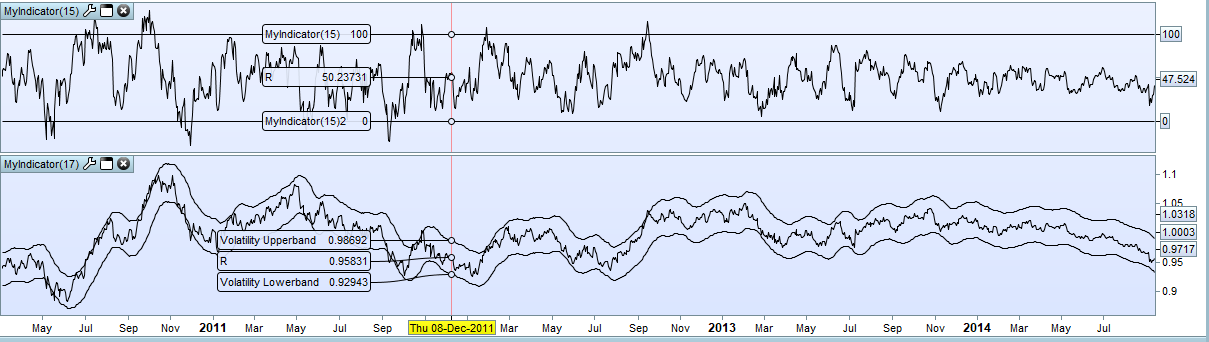
    I have created an easier to read version by normalising the upper band as 100 and the lower as 0. Top indicator in the image is this new version with the original at the bottom.

    //R is a Relative Strength Volatility Stop Indicator
    
    //---Settings
    CloseMAPeriod = 144
    RMAPeriod = 21
    
    UpperValue = 3.0 //"Upperbands %"
    LowerValue = 3.0 //"Lowerbands %"
    //---end of settings
    
    R=Close/Average[CloseMAPeriod]
    
    RAve = Average[RMAPeriod](R)
    
    UpperBand = RAve * (1 + (UpperValue / 100))
    LowerBand = RAve * (1 - (LowerValue / 100))
    
    RValue = ((R - lowerband) / (upperband - lowerband)) * 100
    
    RETURN 100, 0, RValue as "R"
    
    Bard thanked this post
    Screenshot_1-1.png Screenshot_1-1.png
    #102598 quote
    GraHal
    Participant
    Master

    Link to above code added to here

    Snippet Link Library

    Bard thanked this post
    #102664 quote
    Bard
    Participant
    Master

    Nice job, thanks @Vonasi.

Viewing 7 posts - 1 through 7 (of 7 total)

  • You must be logged in to reply to this topic.

Having Trouble Adding Volatility Stop Bands to Price Chart?


ProBuilder: Indicators & Custom Tools

New Reply
Author
author-avatar
Bard @brad Participant
Summary

This topic contains 6 replies,
has 4 voices, and was last updated by Bard

6 years, 7 months ago.

Topic Details
Forum: ProBuilder: Indicators & Custom Tools
Language: English
Started: 07/14/2019
Status: Active
Attachments: 2 files
Logo Logo
Loading...