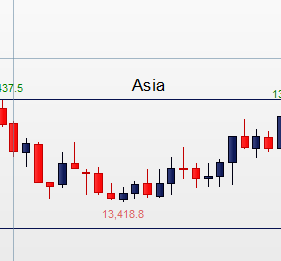
Hi All thanks for your time as always. So, reading through the posts I’ve been trying to code how to place text above a rectangle. The rectangle I already have and I’ve figured how to place the text but it’s not sitting above the rectangle to the centre how I’d like…it’s sitting to the side…this is the piece of code I already have…
DRAWTEXT("Asia", barindex, high[0], SansSerif, Standard, 10) COLOURED(153,153,0)
Please can someone show me where I’m going wrong. I’d like it to sit above my rectangle to the centre and not to the side. I’ve also tried the Voffset command but that doesn’t seem to work.
I’ve attached an example screenshot.
Here is the code for the rectangle…
if intradaybarindex=0 then
maxvalue=0
minvalue=Dclose(0)*5
MyBar=0
endif
timerange = time>=020000 and time<=050000
if timerange then
maxvalue = max(maxvalue , high)
minvalue = min(minvalue , low)
if MyBar=0 then
x1=barindex
MyBar=1
endif
if time=050000 then
x2=barindex
DRAWRECTANGLE(x1,maxvalue,x2,minvalue) coloured(06,17,79)
endif
endif
Return
Thanks so much!
Hi,
Here it is:
if intradaybarindex=0 then
maxvalue=0
minvalue=Dclose(0)*5
MyBar=0
endif
timerange = time>=020000 and time<=050000
if timerange then
maxvalue = max(maxvalue , high)
minvalue = min(minvalue , low)
if MyBar=0 then
x1=barindex
MyBar=1
endif
if time=050000 then
x2=barindex
DRAWRECTANGLE(x1,maxvalue,x2,minvalue) coloured(06,17,79)
DRAWTEXT("Asia", (x1+x2)/2, maxvalue+0.30*tr, SansSerif, Standard, 10) COLOURED(153,153,0)
endif
endif
Return
A thousand prayer hands to you sir! Thank you! Enjoy!