Guaranteed stoploss, possible in ProOrder

Forums ProRealTime English forum ProOrder support Guaranteed stoploss, possible in ProOrder

Viewing 12 posts - 1 through 12 (of 12 total)
  • #151150

    Hi, I’d like to know if it’s possible to use a guaranteed stoploss in the code.

    Thank you.

    #151151

    No, you can only choose guaranteed stop loss when starting autotrading (tick that box when it shows).


    #151152

    So will autotrading  go on without stopping?

    #151158

    Hey @danistuta, I think that roberto meant that you cannot use guaranteed stop losses in the code but that it is an option that you may select when you start your algorithm by ticking a box.

    So if you tick that box, all the stop losses in your code will be guaranteed stop losses. If you don’t tick that box, all the stop losses will be regular stop losses (meaning they could potentially be subject to slippage –> to check bc I’m not sure)

    For instance, with my IG account I can only use guaranteed stop losses.


    1 user thanked author for this post.
    #151165

    Hi, thank you for your answer. I’ve got IG too, but I use ProOrder with autotrading…do you know if there’s an option in Prorealtime to have always guaranteed stop losses?

    Thank you.

    #151181

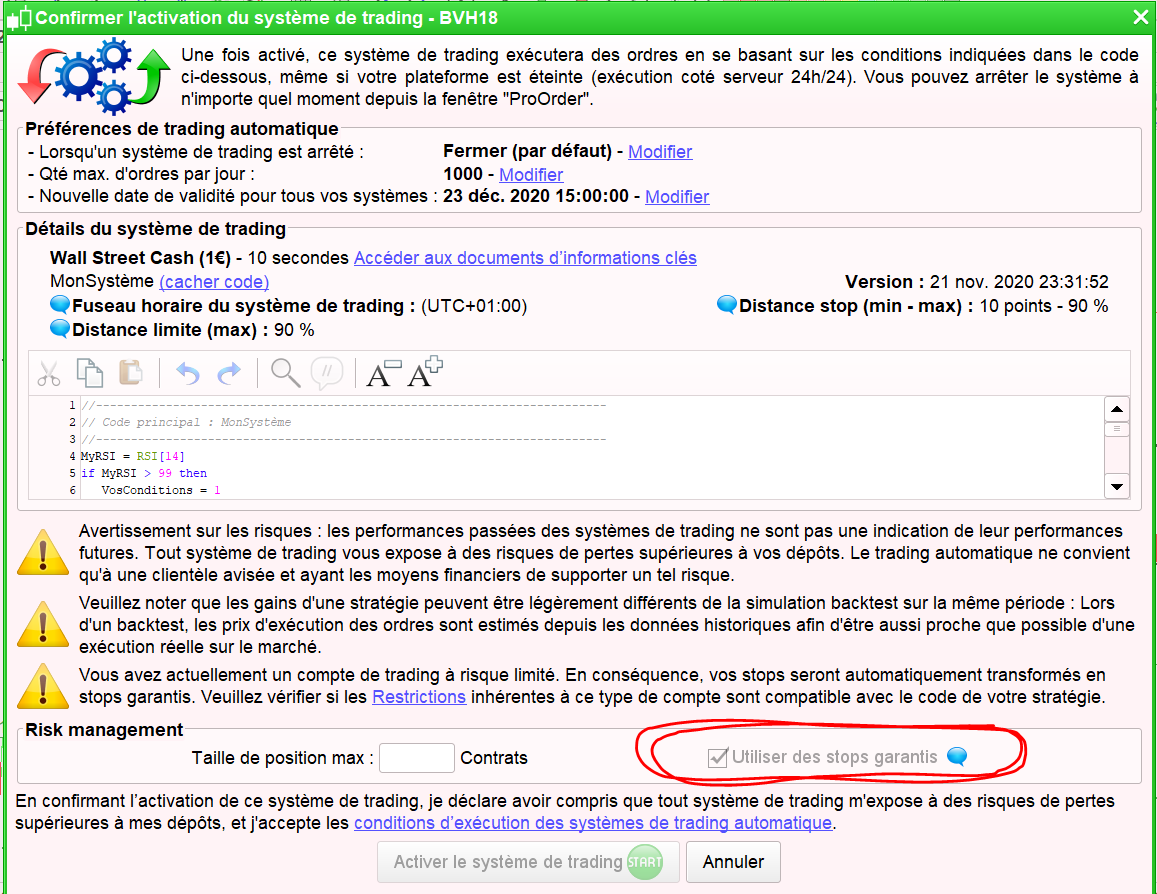
    When you “prepare the algorithm for autotrading” and then go to the ProOrder Autotrading tab, click on the green Start button and a window should open (see picture). The box in the bottom right corner must be ticked in order for the stop losses to be guaranteed. If it’s already ticked then you don’t need to change anything.

    The picture is in French but it should be the same for you, just with a different language.


    2 users thanked author for this post.
    #151190

    Beware that if you choose Guaranteed Stops that does not mean that the stop prices / values you specify in your code will be adhered to!

    In the small print of your broker T&C’s  related to Guaranteed Stops is states that the broker has power to vary the  stop settings to comply with minimum stop distances set by your broker!

    I know, I know it sounds contra-intuitive doesn’t it??

    I would rather have my trade Rejected than have my coded 50 point stop loss moved out (by broker) to 500 point stop loss??

    Read up and come back and prove me wrong??

    #151192

    Thank you! So..on DJ do you suggest to use normal stops?

    #151193

    Read up and make sure what I am saying is true and consider / imagine which scenario you prefer?

    I like to be in control and so giving my broker license to change my stops does not sit well with me.

    Maybe somebody can pose a scenario where allowing the broker to widen our stop settings is better for us?

    Mmmm talked myself into it … 🙂

    Broker widening stops may mean you stay in the trade (if price never reaches the stop) and then your trade goes on to make profit.

    Whereas using fixed stops (no widening by broker) means you exit the trade with a loss.

    #151216

    Mmmm talked myself into it … 🙂 Broker widening stops may mean you stay in the trade (if price never reaches the stop) and then your trade goes on to make profit. Whereas using fixed stops (no widening by broker) means you exit the trade with a loss.

    This was my assumption. The recent massive spikes in volatility would have caused a lot of stops to get hit. During this volatility IG are quite happy to change their minimum stop distance (causing ProOrder stop orders to be rejected) so why not go with the flow and let your current stops be expanded to save your trade from being spiked out. The downside as you say is that you no longer have control of your stops so could find yourself losing more money than you expected.

    1 user thanked author for this post.
    #151217

    I can’t help thinking this scenario …

    Broker  judges that, for example, a down spike is over and price is now rising again … so the broker raises minimum stop levels faster than price is rising and so takes out our Long trade at a bigger loss than if we’d stuck to our original coded stop!?


    #151220

    …and you ticked a box so it is all your own fault and the broker is not liable. I’m not sure I like the idea of that. In my mind a stop that can be moved is not a guaranteed stop! The whole point of guaranteed stops is that you know exactly what your risk is even if knowing that does make the cost of each trade slightly higher. Once you start letting the broker move a stop then you no longer know your risk and so nothing is guaranteed.

    1 user thanked author for this post.
Viewing 12 posts - 1 through 12 (of 12 total)

Create your free account now and post your request to benefit from the help of the community
Register or Login