starttime = 090500
endtime = 100000


if intradaybarindex=0 then
hh = 0
ll = 0
alreadydrawn = 0
endif

if time=starttime then
startbar=barindex
endif

if time=endtime then
endbar=barindex
endif

if time>=starttime and time<=endtime then
if high>hh then
hh = high
endif
if low<ll or ll=0 then
ll = low
endif
endif

if time>endtime and alreadydrawn=0 then
drawrectangle(startbar,hh,endbar,ll) COLOURED(224,252,0)style(line,3)
alreadydrawn=1
endif

RETURN
Hallo,
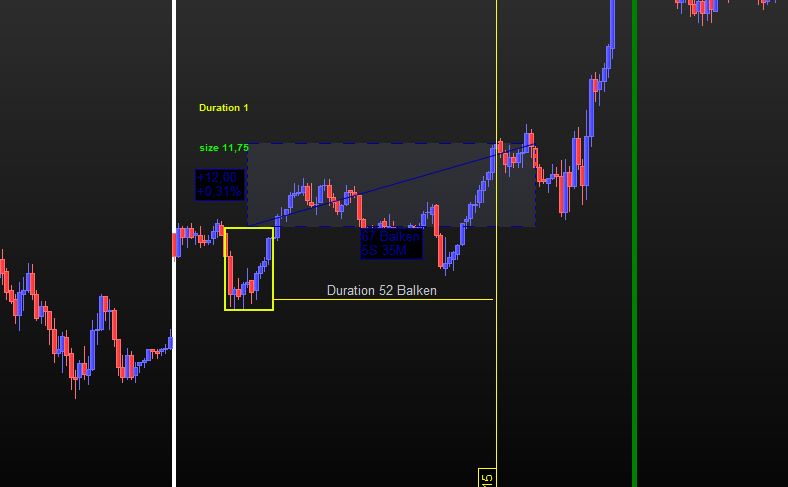
hier ist ein Indikator der mir die Range zwischen zwei bestimmten Zeiten anzeigt.
- Ist es möglich das über oder bei der Range auch die Range Größe angezeigt wird?
- Ist es möglich die Dauer anzeigen zu lassen, wann die Range nach 10 Uhr zum ersten mal durchbrochen wurde. Breakout Time
- Kann man irgendwie den Tag der Range grün markieren, wenn der Ausbruch erfolgt ist und der Trade um 17 Uhr im Gewinn lag.
Vielen Dank
Zu Punkt 2 wird die Dauer in Balken ab endbar berechnet (nicht getestet).
starttime = 090500
endtime = 100000

if intradaybarindex=0 then
hh = 0
ll = 0
duration = 0
alreadydrawn = 0
HHbreak = 0
LLbreak = 0
BACKGROUNDCOLOR(“White”)
endif

if time=starttime then
startbar=barindex
endif

if time=endtime then
endbar=barindex
endif

if time>=starttime and time<=endtime then
if high>hh then
hh = high
endif
if low<ll or ll=0 then
ll = low
endif
endif
if time>endtime and alreadydrawn=0 then
drawrectangle(startbar,hh,endbar,ll) COLOURED(224,252,0)style(line,3)
Gap = hh - ll
DRAWTEXT("size #Gap#", Startbar, hh + Gap, standard , bold, 10) COLOURED(224,252,0)
alreadydrawn=1
endif
if time>endtime and duration=0 then
If close > hh or close < ll then
Duration = barindex - endbar
DRAWTEXT("Duration #Duration#", Startbar, hh + Gap*1.5, standard , bold, 10) COLOURED(224,252,0)
If close > hh then
HHbreak = close
Elsif close < ll then
LLbreak = close
Endif
Endif
endif
If time = 170000 and (HHbreak + LLbreak) > 0 then
If HHbreak then
If close > HHbreak then
BACKGROUNDCOLOR(“Green”)
Endif
Elsif LLbreak then
If close < LLbreak then
BACKGROUNDCOLOR(“Green”)
Endif
Endif
RETURN
Danke, leider wird bei mir in Zeile 33, 39 und 57 ein fehler angezeigt??? ich habe es versucht aber bekomme es nicht weg…
Danke..
Ich werde es in den nächsten 10-12 Tagen nicht testen können. Ich hoffe jemand anderes kann helfen.
Danke für die Info, ich werde dann gern warten…….
Ich habe viel versucht, jedoch bekomme ich immer wieder fehlermeldungen bei diesem Code oben.
Scheinbar stimmt mit den Zeilen Backgroundcolor etwas nicht?
GRUß
Dieser meldet keine Fehler:
starttime = 090500
endtime = 100000

if intradaybarindex=0 then
hh = 0
ll = 0
duration = 0
alreadydrawn = 0
HHbreak = 0
LLbreak = 0
BACKGROUNDCOLOR("White")
endif

if time=starttime then
startbar=barindex
endif

if time=endtime then
endbar=barindex
endif

if time>=starttime and time<=endtime then
if high>hh then
hh = high
endif
if low<ll or ll=0 then
ll = low
endif
endif
if time>endtime and alreadydrawn=0 then
drawrectangle(startbar,hh,endbar,ll) COLOURED(224,252,0)style(line,3)
Gap = hh - ll
DRAWTEXT("size #Gap#", Startbar, hh + Gap, dialog, bold, 10) COLOURED(224,252,0)
alreadydrawn=1
endif
if time>endtime and duration=0 then
If close > hh or close < ll then
Duration = barindex - endbar
DRAWTEXT("Duration #Duration#", Startbar, hh + Gap*1.5, dialog , bold, 10) COLOURED(224,252,0)
If close > hh then
HHbreak = close
Elsif close < ll then
LLbreak = close
Endif
Endif
endif
If time = 170000 and (HHbreak + LLbreak) > 0 then
If HHbreak then
If close > HHbreak then
BACKGROUNDCOLOR("Green",30)
Endif
Elsif LLbreak then
If close < LLbreak then
BACKGROUNDCOLOR("Green",30)
Endif
Endif
Endif
RETURN
Hallo und vielen Dank,
könnte ich noch um eine veränderung bitten?!
Können sie dem code erweitern, sodass es eine gelbe linie gibt an der stelle wo der Breakout in den gewinn gelaufen ist. Der gewinn ist ja 1 x die Range!!
Im Bild ist zu sehen, das Duration hier ich glaube 52 Balken stehen müsste.
Entschuldigung, ich habe vergessen zu schreiben das der gewinn 1 : 1 sein soll 1 mal die Range nach oben
Vielen Dank
Ich habe bisher nur Farben behandelt, ich bin mir nicht ganz sicher, was Ihr Indikator tut. Wie wird der Ausbruch gemeldet?
Ausbruch aus der Range von 08 – 09 Uhr Meinten Sie das?
Los geht’s (Entschuldigung für die Verzögerung):
starttime = 090500
endtime = 100000

if intradaybarindex=0 then
hh = 0
ll = 0
duration = 0
alreadydrawn = 0
HHbreak = 0
LLbreak = 0
BACKGROUNDCOLOR("White")
endif
IF Time >= starttime AND Time <= endtime THEN
TPbar    = 0
BObar    = 0
BreakOut = 0
if time=starttime then
startbar=barindex
endif

if time=endtime then
endbar=barindex
endif

if time>=starttime and time<=endtime then
if high>hh then
hh = high
endif
if low<ll or ll=0 then
ll = low
endif
endif
endif
if time>endtime and alreadydrawn=0 then
drawrectangle(startbar,hh,endbar,ll) COLOURED(224,252,0)style(line,3)
Gap = hh - ll
DRAWTEXT("size #Gap#", Startbar, hh + Gap/2, dialog , bold, 10) coloured("Fuchsia")//COLOURED(224,252,0)
alreadydrawn=1
endif
if time>endtime and duration=0 then
If close > hh or close < ll then
Duration = barindex - endbar
//DRAWTEXT("Duration #Duration#", Startbar, hh + Gap*1.5, dialog , bold, 10) COLOURED(224,252,0)
If close > hh then
HHbreak = close
Elsif close < ll then
LLbreak = close
Endif
Endif
endif
If time = 170000 and (HHbreak + LLbreak) > 0 then
If HHbreak then
If close > HHbreak then
BACKGROUNDCOLOR("Green")
Endif
Elsif LLbreak then
If close < LLbreak then
BACKGROUNDCOLOR("Green")
Endif
Endif
ENDIF
IF ((Time > endtime) OR (Time < starttime)) AND (BreakOut = 0) THEN
IF close > HH then
BreakOut = 1
BObar    = BarIndex
TP       = HH + Gap
BO       = HH
ELSIF close < LL THEN
BreakOut = -1
BObar    = BarIndex
TP       = LL - Gap
BO       = LL
ENDIF
ENDIF
IF BObar <> 0 THEN
IF BreakOut = 1 THEN
IF high >= TP THEN
TPbar = BarIndex
ENDIF
ELSIF BreakOut = -1 THEN
IF low <= TP THEN
TPbar = BarIndex
ENDIF
ENDIF
IF TPbar THEN
TimeLapse = (TPbar - BObar) + 1
DrawSegment(BObar,BO,TPbar,TP) style(line,4) coloured("Blue")
DRAWTEXT("Duration #TimeLapse#", Startbar, hh + Gap/3, dialog , bold, 10) coloured("Fuchsia")//COLOURED(224,252,0)
BObar = 0
ENDIF
ENDIF
RETURN //HH AS "HH",LL AS "LL",TP AS "TP"
Vielen Dank und bitte keine Entschuldigung 🙂 alles gut….