Hi,
I would like to share an automatization system of backtest I write in autohotkey.
Here is the repository of the program and installation explanations: https://github.com/adegard/PRT_AUTOHOTKEY
Typicaly it is a script which automatize (and fastered) backesting of prorealtime strategies with a list of indicators and various types of trailing stops in different combinations. The idea is to create a lot of different strategies and make automatic backtesting like “genetic creation”.
The results are “reading” on the screen with OCR functionality and the results are stored in one file.
You can change strategy as you want in “.txt” files.
Fill free to ask question and help me to improve it and solve some “bugs” or add with optimization functions (based on period or other things…)
Thanks
Thank you very much Arnaud for us to benefit from your knowledge and your very interesting ideas that go far beyond what we could do with the platform.
I think the idea is great, I will test this tomorrow because it is a little late for the moment, and will not fail to come back to share my feelings.
strings.ahk file is missing, seems necessary because of its include in your main script. I cannot find it anywhere.
Hi Nicolas,
I think it is not use in the script so put it in comment with “;”
anyway you could found some bugs. I will post new releases. I woud like to complete gui windows with more options like money managment with different kind of scripts to include (i.e. trailing stop script found on the prorealcode platform…) etc
one issues for users could be the X,Y mouse coordinate and use of OCR external program… I trying to include a new library for text recognition to speed up result analysis
Do all the X,Y coordinates need to be edited in the .ahk file? or is there any possibility to automatically adjust them for a computer screen? Sorry, but I’m trying to find out how to make it more user friendly 🙂 and I don’t know any knowledge in auto hotkey script 😐
Hi Nicolas,
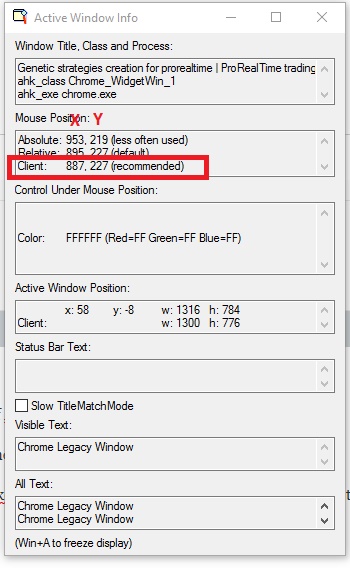
The X,Y coordinates of mouse clicks are adjusted for my computer using the “windows spy” of Autohotkey :
To access to the “Windows spy” tool: simply rightclick on H icon in notification icons bar of windows when script is running. Then point your PRT Report windows or what coordinate you need to capture. (see picture attached)
For OCR: you need to drag mouse as rectangle to read the values in the report (Gain/loss, number of trades…) so there si XY for left up and right down corners
For button click: only 1 click is needed for changing pages
For the moment I don’t know how to “automatically adjust positions”, but there is some autohotkey features to find images on the screen I will try those days…
Looking forward to seeing this working. We had a guy where I worked who did some amazing Window GUI operations using AutoIt which is a very similar tool to AutoHotKey.
ok, fine…! could you share also your script in Autoit?
I have no knowledge of AutoIt myself and those I saw at my previous place of work were not related to the markets, they were replacing a lot of manual tasks and running automated test scripts etc. I was just commenting on how powerful they can be.
I put a new release of the program, with “text finder function” so it will not be necessary to adjust any coordinate, the program find the button itself.
Please try it to see on your computers if you have some difficulties…
Download PRT_strategy_tester v1.10.ahk and FindText_function.ahk in the same folder from
https://github.com/adegard/PRT_AUTOHOTKEY
Run PRT_strategy_tester v1.10.ahk
Go to a new chart, it will be show option windows. Press OK to start (in the 3rd tab).
Thanks for your help 😉
Hello!
A basic question, I am running the PRT_strategy_tester v1.10.ahk on the screen I got “Wait PRT graph….” What is the next step?
When I go to PRT and New chart bottom no option window show up.
Thanks
/Berra
Hi Berra, thanks for your answer. Probably the program didn’t recognize the same picture on the screen… it could come frome your theme selection or picture size different from mine… I will have a look. But could you please send me a screenshot of some graph windows of yours? Thanks. Arnaud