FVG(Fair Value Gap) indicator – convert to Trading Code

Viewing 15 posts - 1 through 15 (of 16 total)
  • Author
    Posts
  • #249481 quote
    Andre Vorster
    Participant
    Senior

    Hello.

    Can someone please help me modify this indicator so that it can be used in AutoTrader to open and close trades?
    The indicator works, but I need it to open buy/sell positions when it displays an indication on the screen.
    Also needed only run between certain times of the day as well as position Qty and TS options.

    Thank you.


    // FVG (Fair Value Gap) indicator

    DEFPARAM DrawOnLastBarOnly = true
    DEBUG = 0

    // Start of code, don’t change anything below

    IF IsLastBarUpdate THEN
    $RangeHigh[0] = 0
    $RangeLow[0] = 0
    $RangeIndex[0] = 0
    RangeIdx = 0
    BI = 0
    B = 0
    RI = 0
    TotalBars = BarIndex[0]

    IF DEBUG = 1 THEN
    DRAWTEXT(“Total bars: #TotalBars#”, BarIndex[0], High[0])
    ENDIF

    // List all imbalance
    FOR RI = 1 TO TotalBars – 2 DO
    BI = BarIndex[RI]
    //drawtext(“#BI#”, BI, High[RI])
    IF High[BI – 1] < Low[BI + 1] THEN
    RangeIdx = RangeIdx + 1
    $RangeHigh[RangeIdx] = Low[BI + 1]
    $RangeLow[RangeIdx] = High[BI – 1]
    $RangeIndex[RangeIdx] = RI
    ENDIF
    IF High[BI + 1] < Low[BI – 1] THEN
    RangeIdx = RangeIdx + 1
    $RangeHigh[RangeIdx] = Low[BI – 1]
    $RangeLow[RangeIdx] = High[BI + 1]
    $RangeIndex[RangeIdx] = RI
    ENDIF
    NEXT

    IF DEBUG = 1 THEN
    DRAWTEXT(“Imbalance found: #RangeIdx#”, BarIndex[0], Low[0])
    ENDIF

    // Remove mitigated imbalance
    FOR RI = 1 TO RangeIdx DO
    IF DEBUG = 1 THEN
    DRAWRECTANGLE($RangeIndex[RI] – 1, $RangeHigh[RI], $RangeIndex[RI] + 1, $RangeLow[RI]) COLOURED(0,0,200)
    //DRAWRECTANGLE($RangeIndex[RI] – 1, $RangeHigh[RI], $RangeIndex[RI] + 1, $RangeLow[RI]) COLOURED(0,0,200)
    ENDIF

    Valid = 1
    FOR B = $RangeIndex[RI] + 2 TO TotalBars DO
    LB = Low[BarIndex[B]]
    HB = High[BarIndex[B]]
    // Candle is above or below our zone, ignore it
    IF LB >= $RangeHigh[RI] OR HB <= $RangeLow[RI] THEN
    IF DEBUG = 1 THEN
    DRAWTEXT(“Out”, B, High[BarIndex[B]])
    ENDIF
    CONTINUE
    ENDIF

    IF LB <= $RangeLow[RI] THEN
    // Candle engulfs our zone, so imbalance is mitigated
    IF HB >= $RangeHigh[RI] THEN
    IF DEBUG = 1 THEN
    DRAWTEXT(“Mitigated”, B, High[BarIndex[B]])
    ENDIF
    Valid = 0
    BREAK
    ENDIF
    IF DEBUG = 1 THEN
    DRAWTEXT(“High”, B, High[BarIndex[B]])
    ENDIF
    $RangeLow[RI] = HB
    ELSE
    // In this case, Low is within the zone
    IF DEBUG = 1 THEN
    DRAWTEXT(“Low”, B, High[BarIndex[B]])
    ENDIF
    $RangeHigh[RI] = LB
    ENDIF
    NEXT
    IF Valid = 1 THEN
    DRAWRECTANGLE($RangeIndex[RI], $RangeHigh[RI], TotalBars+2000, $RangeLow[RI]) COLOURED(0,0,0,0) FILLCOLOR(173,194,201)
    //COLOURED(0,0,0,0) FILLCOLOR(173,194,201)
    //(0,0,0,30) 201,40,51
    ENDIF

    NEXT

    ENDIF

    RETURN

    #249482 quote
    robertogozzi
    Moderator
    Master

    I deleted the other post in the French forum.

    #249483 quote
    Andre Vorster
    Participant
    Senior

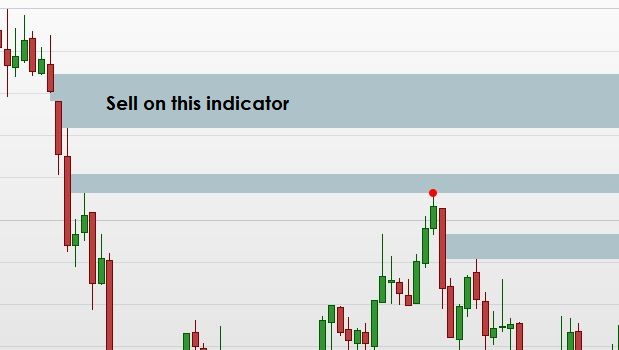
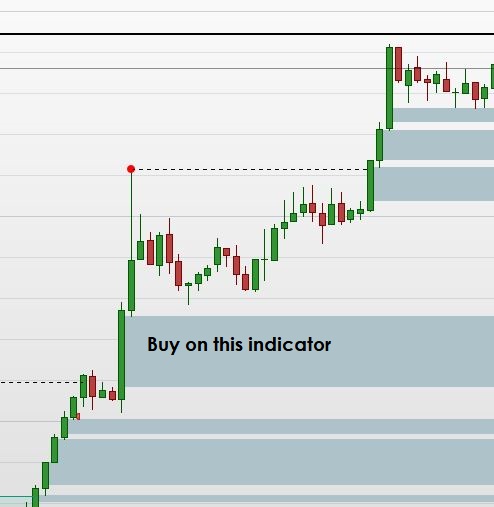
    See the images for more clarity when to Buy or Sell.

    Sell.jpg Sell.jpg Buy.jpg Buy.jpg
    #249502 quote
    robertogozzi
    Moderator
    Master

    Post your topic in the correct forum:
    _ ProRealTime Platform Support: only platform related issues.
    _ ProOrder: only strategy topics.
    _ ProBuilder: only indicator topics.
    _ ProScreener: only screener topics
    _ General Discussion: any other topics.
    _ Welcome New Members: for new forum members to introduce themselves.

    I moved it from the ProScreener support.

    There you go:

    // FVG (Fair Value Gap) indicator
    //DEFPARAM DrawOnLastBarOnly = true
    //DEBUG = 0
    // Start of code, don’t change anything below
    
    //IF IsLastBarUpdate THEN
    $RangeHigh[0] = 0
    $RangeLow[0] = 0
    $RangeIndex[0] = 0
    //RangeIdx = 0
    //BI = 0
    //B = 0
    //RI = 0
    //TotalBars = BarIndex[0]
    //IF DEBUG = 1 THEN
    //DRAWTEXT("Total bars: #TotalBars#", BarIndex[0], High[0])
    //ENDIF
    // List all imbalance
    //FOR RI = 1 TO TotalBars - 2 DO
    RI = 1
    BI = RI//BarIndex[RI]
    //drawtext("#BI#", BI, High[RI])
    IF High[BI - 1] < Low[BI + 1] THEN
    //RangeIdx = RangeIdx + 1
    //$RangeHigh[RangeIdx] = Low[BI + 1]
    //$RangeLow[RangeIdx]  = High[BI - 1]
    //$RangeIndex[RangeIdx] = RI
    IF Not OnMarket THEN // or   IF Not ShortOnMarket THEN
    SELLSHORT 1 CONTRACT AT MARKET
    ENDIF
    ENDIF
    IF High[BI + 1] < Low[BI - 1] THEN
    RangeIdx = RangeIdx + 1
    //$RangeHigh[RangeIdx] = Low[BI - 1]
    //$RangeLow[RangeIdx] = High[BI + 1]
    //$RangeIndex[RangeIdx] = RI
    IF Not OnMarket THEN // or   IF Not LongOnMarket THEN
    BUY 1 CONTRACT AT MARKET
    ENDIF
    ENDIF
    SET STOP   pLOSS   100
    SET TARGET pPROFIT 300
    //NEXT
    //IF DEBUG = 1 THEN
    //DRAWTEXT("Imbalance found: #RangeIdx#", BarIndex[0], Low[0])
    //ENDIF
    //// Remove mitigated imbalance
    //FOR RI = 1 TO RangeIdx DO
    //IF DEBUG = 1 THEN
    //DRAWRECTANGLE($RangeIndex[RI] - 1, $RangeHigh[RI], $RangeIndex[RI] + 1, $RangeLow[RI]) COLOURED(0,0,200)
    ////DRAWRECTANGLE($RangeIndex[RI] - 1, $RangeHigh[RI], $RangeIndex[RI] + 1, $RangeLow[RI]) COLOURED(0,0,200)
    //ENDIF
    //Valid = 1
    //FOR B = $RangeIndex[RI] + 2 TO TotalBars DO
    //LB = Low[BarIndex[B]]
    //HB = High[BarIndex[B]]
    //// Candle is above or below our zone, ignore it
    //IF LB >= $RangeHigh[RI] OR HB <= $RangeLow[RI] THEN
    //IF DEBUG = 1 THEN
    //DRAWTEXT("Out", B, High[BarIndex[B]])
    //ENDIF
    //CONTINUE
    //ENDIF
    //IF LB <= $RangeLow[RI] THEN
    //// Candle engulfs our zone, so imbalance is mitigated
    //IF HB >= $RangeHigh[RI] THEN
    //IF DEBUG = 1 THEN
    //DRAWTEXT("Mitigated", B, High[BarIndex[B]])
    //ENDIF
    //Valid = 0
    //BREAK
    //ENDIF
    //IF DEBUG = 1 THEN
    //DRAWTEXT("High", B, High[BarIndex[B]])
    //ENDIF
    //$RangeLow[RI] = HB
    //ELSE
    //// In this case, Low is within the zone
    //IF DEBUG = 1 THEN
    //DRAWTEXT("Low", B, High[BarIndex[B]])
    //ENDIF
    //$RangeHigh[RI] = LB
    //ENDIF
    //NEXT
    //IF Valid = 1 THEN
    //IF (close[RI-1] > open[RI-1]) THEN
    //DRAWRECTANGLE($RangeIndex[RI], $RangeHigh[RI], TotalBars+20, $RangeLow[RI]) COLOURED(0,0,0,0) FILLCOLOR("Green")//(173,194,201)
    //ELSE
    //DRAWRECTANGLE($RangeIndex[RI], $RangeHigh[RI], TotalBars+20, $RangeLow[RI]) COLOURED(0,0,0,0) FILLCOLOR("Red")//(173,194,201)
    //ENDIF
    ////COLOURED(0,0,0,0) FILLCOLOR(173,194,201)
    ////(0,0,0,30) 201,40,51
    //ENDIF
    //NEXT
    //ENDIF
    #249503 quote
    Andre Vorster
    Participant
    Senior

    Thank you for moving the post.
    Plus Thank you for the script !

    robertogozzi thanked this post
    #249510 quote
    Andre Vorster
    Participant
    Senior

    The script is working – does open/close trades.
    Will it be possible for the script to only open positions when the indicator(grey) is activated. When the indicator draws on the screen and not trade at any other time.
    The earlier attached images shows what I try to say in words when to open positions.

    #249526 quote
    robertogozzi
    Moderator
    Master

    It uses the same code, so it can only enter when the indicator detects a FVG.ù

    If it doesn’t, please post the name of the instrument traded, timeframe used, date and time of one or more incorrect enrtries.

    #249582 quote
    MaoRai54
    Participant
    Master

    @ ROBERTO

    Sorry, but I feel that with all the //  that you’ve placed, this script is only selecting these lines:

    IF High[BI – 1] < Low[BI + 1] THEN              or

    IF High[BI + 1] < Low[BI – 1] THEN

    where, however, B1 is always = 1.      Therefore the lines become:

    IF High[0] < Low[2] THEN       or

    IF High[2] < Low[0] THEN

    Is it right or maybe there should be less //  to filter more variables?

    robertogozzi thanked this post
    #249583 quote
    Andre Vorster
    Participant
    Senior

    Thank you.
    I’ll test it in the next 2 days. I want to run it asap 🙂

    #249616 quote
    robertogozzi
    Moderator
    Master

    @ ROBERTO

    Sorry, but I feel that with all the // that you’ve placed, this script is only selecting these lines:

    IF High[BI – 1] < Low[BI + 1] THEN or

    IF High[BI + 1] < Low[BI – 1] THEN

    where, however, B1 is always = 1. Therefore the lines become:

    IF High[0] < Low[2] THEN or

    IF High[2] < Low[0] THEN

    Is it right or maybe there should be less // to filter more variables?

    Yes, those are the only lines that matter in an automated strategy, as he requested to enter whenever a FVG is detected.

    MaoRai54 thanked this post
    #249671 quote
    Andre Vorster
    Participant
    Senior

    Thank you.

    Somewhere I’m missing something becuse I can’t get yoru suggestion to work.
    My knowledge of any programming code is limited.

    I’m using this on CAC, DAX, DJ, NASDAQ, JAPAN.
    Timeframe – Prefferable 1-5 min
    I’ve seen the existing code runs on any time frame.

    I know it might not be possible to AutoTrade code form this indicator but if this indicator can trigger another acceptable indicator that can trigger auto trade.

    #249928 quote
    robertogozzi
    Moderator
    Master

    Sorry for the delay.

    Can you please recap when you want to enter either LONG or SHORT based on the code you first posted?

    #249937 quote
    Andre Vorster
    Participant
    Senior

    The script gives indicator on the candle when to Buy/Sell.
    Not a separate script for Long/Short.

    I’ve even asked Ai to write code to give an alarm that will start auto trade.
    Ai wrote two other indicator scripts based on the original script that it will trigger an alert and auto trade to start when the alert is triggered.
    I could not get it to work 100%. Will test it further over the next few days to be sure why it does not work before replying to Ai to modify the scripts.
    I’m sure you will understand the code/scripts better. I struggle to read/understand code -not a strong point of mine.

    FVG_Zones_TradeSignal.itf FVG-Status.itf FVG-00.itf
    #250166 quote
    robertogozzi
    Moderator
    Master

    What’s the purpose of each one of them?

    #250171 quote
    geroniman
    Participant
    Average

    Thank you Roberto for the FVG itf. Is it possible to add a line at 50% of the FVG that will disappear when it is reached. Thanks

Viewing 15 posts - 1 through 15 (of 16 total)
  • You must be logged in to reply to this topic.

FVG(Fair Value Gap) indicator – convert to Trading Code


ProOrder: Automated Strategies & Backtesting

New Reply
Author
Summary

This topic contains 15 replies,
has 4 voices, and was last updated by Andre Vorster
5 months, 3 weeks ago.

Topic Details
Forum: ProOrder: Automated Strategies & Backtesting
Language: English
Started: 08/07/2025
Status: Active
Attachments: 7 files
Logo Logo
Loading...