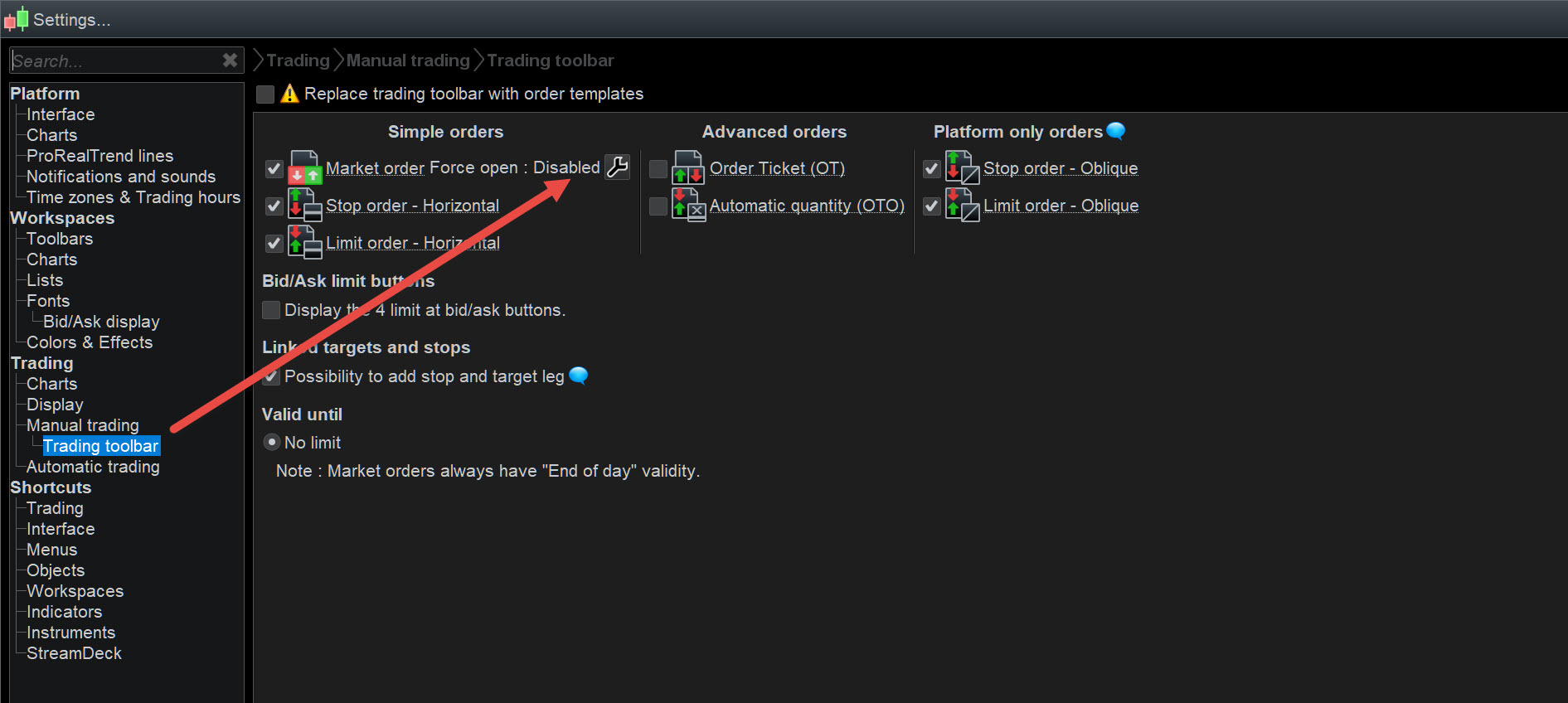
Hi can someone explain the ‘Force Open’ setting.
I have enable and disabled it from the ‘spanner’ in th eorder window but it just opens an order in the opposite direction?
Eg………….if long say at one contract and I then want to go short one contract – I would short two contracts so that I end up with one contract short -yes?
Irrespective if I disable or enable the function, it leaves me with a two positions……………long and short.
I must be missing something.
oh and this is manual trading.
many thanks if someone could clarify what I’m doing wrong or what i haven’t set correctly!!
With Force Open enabled … if we open a new Long, an existing Short would not be closed.
With Force Open disabled … if we open a new Long, an existing Short would be closed.
I wonder …
Attached you see my setting. With AutoTrading (if related at all) it behaves like that / as expected.
With Manual Trading, the last time I tried, it does not behave as set; instead it will always open a new position (which is quite unworkable for manual trading).
Something like 8 months ago I made the same remark, including that somewhere longer ago this worked as intended for Manual Trading (too).
Anyway, although I did not try it today for Manual Trading, I think @bearbull experiences the same as I did.
GraHal, does this really work for you ? (with the Net Off setting)
Where is the ‘Net Off’ setting?
Try Force Open on manul trading … using no Limit or Stop Orders set at the point of open a trade … Force Open should work as I stated above.
I will also try (above) later on my Demo Account.
Where is the ‘Net Off’ setting?
In my screenshot ? 🙂
(attachment in previous post)
Yeah I saw the screenshot, but my Force Open setting does not mention Net Off etc … see attached.
Aha. Yes, I have that set like that too. That’s in PRT.
I (mis)understood that bearbull was doing that in the IG settings. So I showed it from there.
Still, with me (jn Live) this did not work any more with thus both shut off (but I did not try it lately).
Edit : But wait … it says Bestens (Market) order in the PRT settings. I don’t recall I ever tried *that*. I do Limits or Stops – and that settings seems not to deal with that … So maybe it is a misunderstanding.
I still have a problem with this, I enable and disable but it just opens two opposite trades. I want to be able to open a trade – say long one contract and then open a short trade later with two contracts, so in effect the long trade cancels and I end up with a short trade but now only with one contract?
say long one contract and then open a short trade later with two contracts, so in effect the long trade cancels and I end up with a short trade but now only with one contract?
All I can help further, is that with IG you have theoretically two options (notice that neither does what you want) :
- You have 1 Long and go 3 Short and end up with 1 Long and 3 Short (two opposite positions);
- You have 1 Long and go 3 Short and end up with 3 (!!) Short (the going Short first eliminates the Long and then executes the Short).
Ad 1.: This seems to happen with me the last time I tried manually.
Ad 2. : This happens with me with Autotrading.
I never change my settings regarding this (for those settings, see my previous post(s).
Hopefully others can help out. Or call IG support ?
it just opens two opposite trades
Try it on Demo with no Limits or Stops associated with the trades.
I just passed over this Topic so thought I’d do a trial in Demo with no associated Stops or Limits.
With Force Open enabled …
Click Buy and a Long opened
Click Sell and a Short opened
With Force Open disabled …
Click Buy and 1 of my AutoSystem closed
Click Sell and (another) 1 of my AutoSystems closed
With Force Open on Auto
Click Buy and a Long opened
Click Sell and a Short opened
Can force open be used through PRT in auto trading with IG? If yes how is this activated or coded?
My previous post shows the Settings and what they do.
It be easier if you say what problem you experience that prompted your question?
Apologies if I am not clear. In your post you state
With Force Open on Auto
Click Buy and a Long opened
Click Sell and a Short opened
My understanding from this is that Force Open can be used in a auto trade strategy to open a long and short position at the same time. If so how is Force Open activated for auto trading. In manual mode I know how to do it in the deal ticket or in PRT under settings for Platform/Trading/Manual Trading/Trading Toolbar.
Under PRT Platform/Trading/Automatic Trading however there is no function to enable Force Trade?
If in a auto strategy I have a short position and I open a long position the short position is closed. To allow for a hedging position strategy to be used I would like at times to open both a long and short position at the same time.
FORCE OPEN means that DIFFERENT strategies can go their own direction as they don’t affect one another.
Every single strategy CANNOT, no matter what Force Open setting is, open two trades in opposite directions; anytime you enter a trade, any open trade in the opposite direction is closed first! (Stop & Reverse).