


For with IF statement bugged as far as I can see

Viewing 3 posts - 1 through 3 (of 3 total)

  • Author
    Posts
  • #211748 quote
    webb1_1
    Participant
    New

    Hi All,

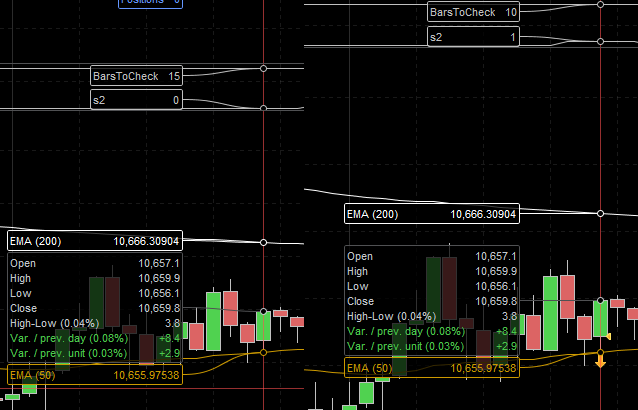
    I have come across this a few times on different occasions  but couldnt work out why code was failing, this time around I “graph” the variables so I could check them on each candle. So what I am seeing is that when “BarsToCheck” is set to 10 the IF statement is found to be true and the code goes on to set s2 to TRUE, however if I then set BarsToCheck to 15 to include more candles it finds the IF statement to be false and not run the rest of the code?

    If the condition exists in 10 candles it has to exist in 15 right? I have included a screen grab hovering over the same candle so that you can see that the IF statement fails(s2 is not set to TRUE/1) if it has to check more candles(even though the selection is bigger and the result should be the same in my eyes)..

    // Changable variables
    BarsToCheck = 15
    
    // Short conditions
    
    // EMA 50 is below 200 for a downtrend
    s1 = (ema50 < ema200)
    
    // Price has closed above the 50 EMA in the last N candles
    For i = 1 to BarsToCheck
    If (close[i] > ema50) then
    s2 = 1
    CheckForOvrSold = i
    else
    s2 = 0
    endif
    next
    BarsToCheck.png BarsToCheck.png
    #211750 quote
    webb1_1
    Participant
    New

    FYI I just figured this out, and now I feel silly but I will leave it up for anyone ELSE (excuse the pun) who runs in to this.

    It was because I was using an ELSE clause in my code block. As in if it finds the condition to be true in on the Nth candle it then overwrites that with the remaining for loops. I have set the s2 variable to false to begin with outside the loop and now there isnt an issue as it doesnt get overwritten:

    s2 = 0 // placed the false setting here and now it works :-)
    For i = 1 to BarsToCheck
    If (close[i] > ema50) then
    s2 = 1
    CheckForOvrSold = i
    endif
    next
    GraHal thanked this post
    #211764 quote
    Nicolas
    Keymaster
    Master

    Yes of course, the loop will go the end as long as you don’t BREAK it, so your s2 variable could be set to 0 even if you have set it to 1 previously in the loop.

    Your first version could be modified with a BREAK at first iteration that found that your Close[i]>ema50 is found:

    // Changable variables
    BarsToCheck = 15
    
    // Short conditions
    
    // EMA 50 is below 200 for a downtrend
    s1 = (ema50 < ema200)
    
    // Price has closed above the 50 EMA in the last N candles
    For i = 1 to BarsToCheck
     If (close[i] > ema50) then
      s2 = 1
      CheckForOvrSold = i
      BREAKT // EXIT THE LOOP!!
     else
      s2 = 0
     endif
    next
Viewing 3 posts - 1 through 3 (of 3 total)
  • You must be logged in to reply to this topic.

For with IF statement bugged as far as I can see


ProOrder: Automated Strategies & Backtesting

New Reply
Author
author-avatar
webb1_1 @webb1_1 Participant
Summary

This topic contains 2 replies,
has 2 voices, and was last updated by Nicolas

2 years, 11 months ago.

Topic Details
Forum: ProOrder: Automated Strategies & Backtesting
Language: English
Started: 03/19/2023
Status: Active
Attachments: 1 files
Logo Logo
Loading...

