


Extraction data vers un tableur

Viewing 4 posts - 1 through 4 (of 4 total)

  • Author
    Posts
  • #230385 quote
    paulPRTpaulPRT
    Participant
    Junior

    Bonjour à tous,


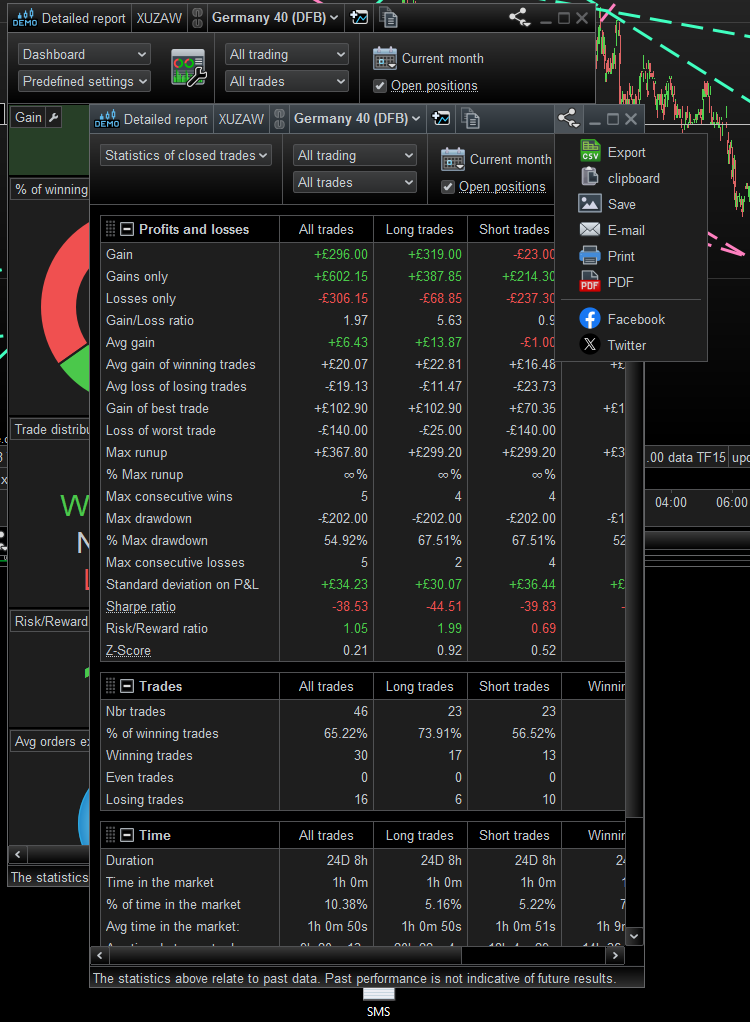
    Je cherche à extraire des data obtenues lors du backtest de ma stratégie (RR ratio, max drawdown,…) pour les exporter sur un tableur.

    Savez vous si c’est possible ?

    Si oui, avez vous une idée de comment faire ?


    En vous souhaitant une très bonne journée.

    Paul

    #230390 quote
    drubydruby
    Participant
    New

    Salut..
    Pour autant que je sache, lorsque vous effectuez un back-test, un « rapport détaillé » apparaît en mode « Tableau de bord ». Remplacez-le par « Statistiques des transactions clôturées » et à partir de l’icône, voir image, vous pouvez choisir « Exporter ». Ce fichier d’exportation peut être importé dans votre tableur.

    salutations Druby

    paulPRT thanked this post
    export-detailed-report.png export-detailed-report.png
    #230395 quote
    Iván GonzálezIván González
    Moderator
    Legend

    Exactement, merci

    #230527 quote
    paulPRTpaulPRT
    Participant
    Junior

    Merci bien !

Viewing 4 posts - 1 through 4 (of 4 total)
  • You must be logged in to reply to this topic.

ProRealAI ProRealAI New

Stuck on this ProBuilder code?

Describe what this topic is trying to build, in plain English, and ProRealAI writes the ProRealTime™ indicator, screener or system for you.

Available in 7 languages
Try ProRealAI

Extraction data vers un tableur


ProBuilder : Indicateurs & Outils Personnalisés

New Reply
Author
author-avatar
paulPRT @paulprt Participant
Summary

This topic contains 3 replies,
has 3 voices, and was last updated by paulPRTpaulPRT

2 years, 5 months ago.

Topic Details
Forum: ProBuilder : Indicateurs & Outils Personnalisés
Language: French
Started: 03/25/2024
Status: Active
Attachments: 1 files
ProRealCode ProRealCode
Loading...


