


Export to CSV

Viewing 5 posts - 1 through 5 (of 5 total)

  • Author
    Posts
  • #15517 quote
    Philippo
    Participant
    Average

    Hi, I would like to export to csv the following for analysis:

    a) backtesting results

    b) prices

    c) indicators

    how can this be achieved?


    Thanks

    #15526 quote
    Cosmic1
    Participant
    Senior

    Hi,

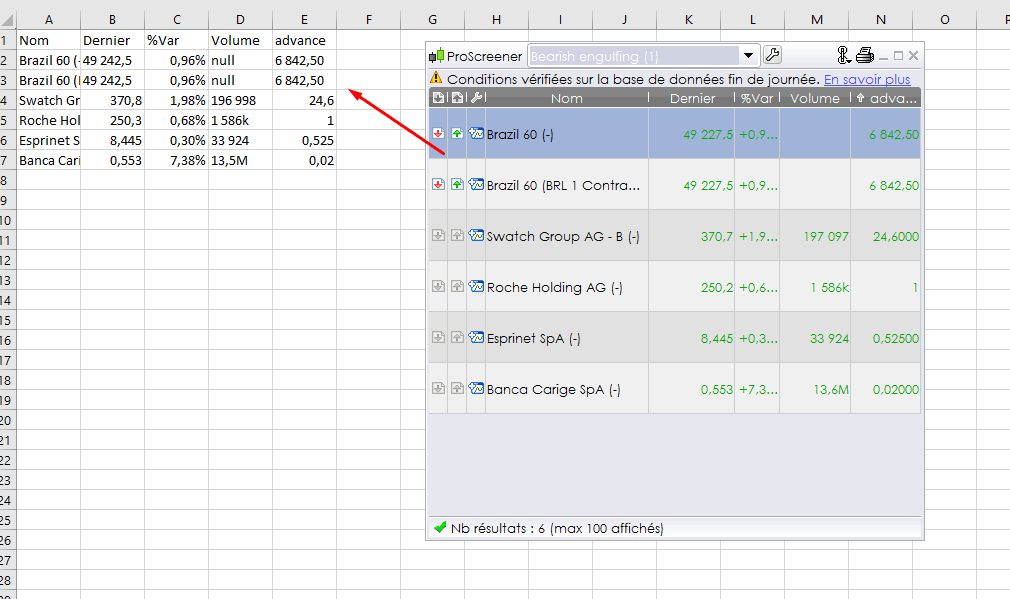
    You can drag and drop any Prorealtime result window to Excel, look at the picture attached with an example of ProScreener result. It can be also draged to any other text format software for csv export for example.

    screener-data-to-excel.png screener-data-to-excel.png
    #15541 quote
    Philippo
    Participant
    Average

    I tried as suggested and indeed the proscreener results transfer to XL.


    I wish to download OHLC prices and indicator values to XL. Is this possible?

    Thanks

    #15542 quote
    Nicolas
    Keymaster
    Master

    No it’s not possible, I don’t know any solution to export OHLC values, I’m sorry.

    You can get them at Yahoo/Google Finance.

    #15557 quote
    Philippo
    Participant
    Average

    its ok, maybe a good thing for the development queue. After all, if it can be done for the screener results…it can be done for the rest! Thanks, will do another way.

Viewing 5 posts - 1 through 5 (of 5 total)
  • You must be logged in to reply to this topic.

Export to CSV


ProOrder: Automated Strategies & Backtesting

New Reply
Author
author-avatar
Philippo @philipd Participant
Summary

This topic contains 4 replies,
has 3 voices, and was last updated by Philippo

9 years, 3 months ago.

Topic Details
Forum: ProOrder: Automated Strategies & Backtesting
Language: English
Started: 10/26/2016
Status: Active
Attachments: No files
Logo Logo
Loading...

