Hello everyone – I would like your help if you would be so kind…
I’d like to understand why there is a difference between the time of exit using “stop” as opposed to “limit”. I obviously understand the fundamental differences between stops and limits in real life, but I can’t explain why the differences are sometimes so pronounced in Pro Order.
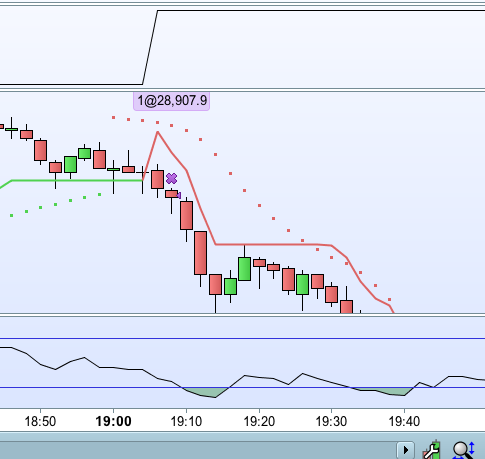
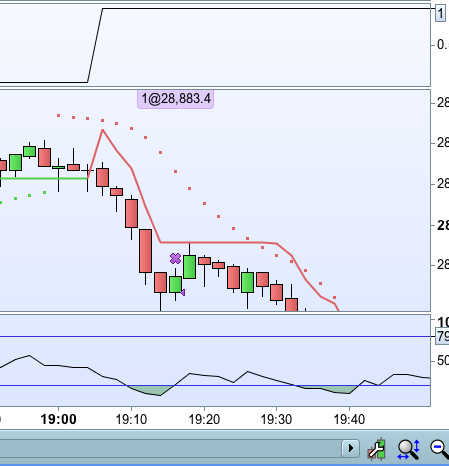
As you can see from the screengrabs, if I use “sell at close STOP” then the trade exits the bar after the graphed entry condition, which is what I would expect. But if I were to change that code to “sell at close LIMIT”, the trade exits three bars later. Throughout most of my dataset, using Limit exits the trade in the same bar and it seems to improve my results by about one point per trade, but in this case it is quite a large difference that goes against me.
Why should be this be?
DEFPARAM CumulateOrders = False


longentry1= close crosses over SuperTrend[1.5,34]
shortentry1= close crosses under SuperTrend[1.5,34]
longexit1= close < SuperTrend[1.5,34]
shortexit1= close > SuperTrend[1.5,34]


fri1start=005200
fri1end=012200
fri2start=012400
fri2end=023400
fri3start=044200
fri3end=055200
fri4start=074600
fri4end=085600
fri5start=125200
fri5end=140200
fri6start=143600
fri6end=154600
fri7start=163200
fri7end=174200
fri8start=0
fri8end=0

if intradaybarindex=0 then
entryflag=0
endif


if time =fri1start and opendayofweek=5 then
entryflag=1
endif

if time =fri1end and opendayofweek=5 then
entryflag=0


endif

if time =fri2start and opendayofweek=5 then
entryflag=1
endif

if time =fri2end and opendayofweek=5 then
entryflag=0


endif

if time =fri3start and opendayofweek=5 then
entryflag=1
endif

if time =fri3end and opendayofweek=5 then
entryflag=0


endif

if time =fri4start and opendayofweek=5 then
entryflag=1
endif

if time =fri4end and opendayofweek=5 then
entryflag=0


endif

if time =fri5start and opendayofweek=5 then
entryflag=1
endif

if time =fri5end and opendayofweek=5 then
entryflag=0


endif

if time =fri6start and opendayofweek=5 then
entryflag=1
endif

if time =fri6end and opendayofweek=5 then
entryflag=0


endif

if time =fri7start and opendayofweek=5 then
entryflag=1
endif

if time =fri7end and opendayofweek=5 then
entryflag=0


endif

if time =fri8start and opendayofweek=5 then
entryflag=1
endif

if time =fri8end and opendayofweek=5 then
entryflag=0


endif

if not onmarket and entryflag=1 and lowest[4] <= lowest[30] and longentry1 then
BUY 1 PERPOINT AT MARKET
entryflag=0

endif
if not onmarket and entryflag=1 and highest[4] >= highest[30] and shortentry1 then
Sellshort 1 perpoint at market
entryflag=0
endif


if longonmarket and longexit1 then
sell at close stop
endif

if shortonmarket and shortexit1 then
exitshort at close stop
endif

graph longexit1
A pending order is an order that was not yet executed, thus not yet becoming a trade. It can, for example, be an order that states that you do not want to buy before the price of a financial instrument reaches a certain point.
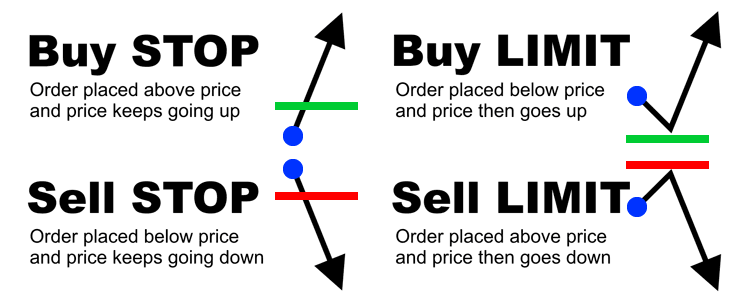
If you want to close a long order with a sell limit, the price must touch the desired level from below and this is what it seemed to happen on your second picture.
Thanks for the response. That all sounds logical, but on my second picture the trade touches the trendline from below the bar after it closes. How could that trade have closed at that time? The bar when it closes is nowhere near to the trendline.
What trend line please? You mean the Supertrend indicator?
If you want to directly exit the order, do not use pending order, but market ones:
SELL AT MARKET
or
EXITSHORT AT MARKET
Are you certain that your Supertrend settings on the chart are identical to those in the strategy? Use GRAPHONPRICE to check.
Thank you Nicolas – that is the solution.
I guess there’s one other thing that has occurred to me that might be an improvement on my entry. Currently my exit rule derives from “if close is > X”… but is there a way of the trade exiting in real time at the moment it breaches the trendline, rather than waiting for the close?
Yes of course – but you have to consider that all orders are created at the close of a candle and at this time we only know what the supertrend level was for that candle that has just closed. The only way to close on the live supertrend value is to use MTF and trade in a faster timeframe while calculating the supertrend in a slower timeframe. Then just use STOP orders in the fast timeframe.
Oh I didn’t realise Multi Time Frame was available. This is good to know!
Thank you. 🙂
The downside of using MTF is that by operating our strategy on a higher time frame we get less data to work with and back test on. The faster we want our strategy to respond the lower the amount of meaningful data we have to play with.